
July 30, 2024
Question

export custom data into excel file

  • July 30, 2024
  • 20 replies
  • 1 view

Hi there,

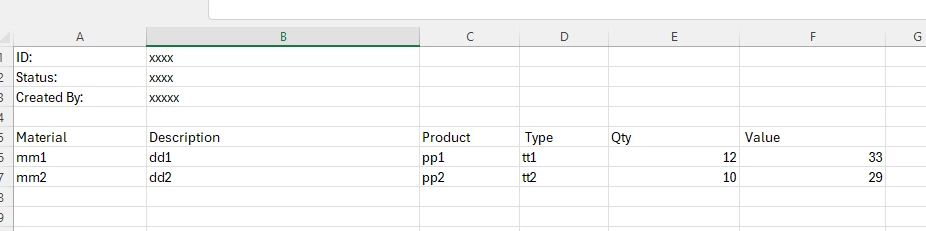
I need to export data to an excel file shown below. I know it's easy to use "Export Data Store Entity to Excel" smart service to export the material list at the bottom, but could anyone know how to combine the upper and bottom parts together to export to an excel file?

regards,

L
20 replies

July 30, 2024

Unfortunately, the "Export Data Store Entity to Excel" smart service does not support customizing the structure of the Excel output file directly. It primarily exports the data as-is from the data store entity.

However, By modifying the underlying view or table to include all the necessary data, you can ensure that the exported Excel file contains the combined information you need.

linp0001Author
July 30, 2024

thanks for the information. you mean changing it like this?

July 30, 2024

Yes..

mikes0011
Brainy
July 30, 2024

CDT to Excel found in the Excel Tools plug-in can do this (it's marked as deprecated but still works just fine AFAIK)

linp0001Author
July 30, 2024

sorry, dont know what plug-in you mentioned here.

mikes0011
Brainy
July 30, 2024
the Excel Tools plug-in

the one I named...

linp0001Author
July 30, 2024

btw, if use CDT to excel, how to create the "Excel-base_template"? what it looks like?

mikes0011
Brainy
July 30, 2024
how to create the "Excel-base_template"?

The benefit with this is you can make it whatever you want.  Add some formatting (other than in the cells data will be inserted into, sadly), like column widths, formatted column headers, and add your A1 / A2 / A3 cell contents (the hardcoded values, where the values in B1/B2/B3 will be filled in by your process).  Upload this excel to your system then reference it as the "base template", and you're set. 

(This is something they left out when creating the "export DSE to Excel" smart service for some reason, and they have never fixed that issue, despite the fact that it makes the node nearly unusable to me since I *always* want to provide a base template.)

linp0001Author
August 14, 2024

thank you for the information

July 31, 2024

You can use Custom Cell Positions and Custom Cell Values parameters for the upper part (Id, Status, Created By, etc) in the sheet.

Then, define the cell (for the bottom part) from where the service will start writing data using the 'Starting Cell' parameter.

linp0001Author
August 14, 2024

thank you.