

salmak1788
August 19, 2024
Question

Export pivoted data in excel

  • August 19, 2024
  • 4 replies
  • 0 views

Hi All,

I would need an help in understanding is there any way i can PIVOT the table data and export it to excel.

Currently my table has data
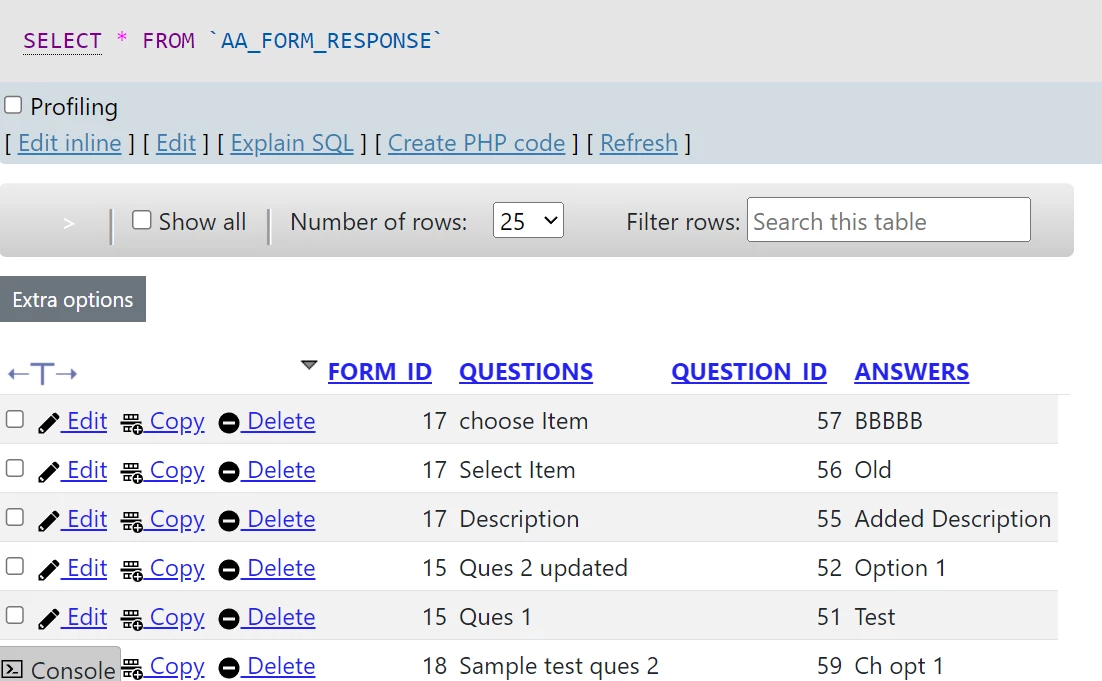
I would need the response in excel as 
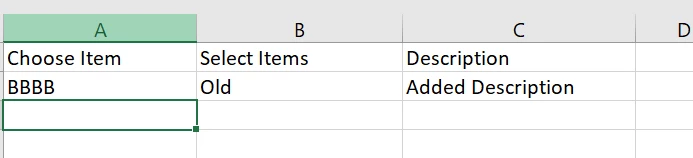
Basically "Questions" column as row header in excel and Answers as row response.

Help is appreciated.

Thanks in advance

    4 replies

    kumara0180
    August 19, 2024

    /* Create a webapi object and place the below code */
    
    a!localVariables(
      /*call your table to fetch two columns and all the rows*/
      local!data,
      local!questionRow: concat(
        a!forEach(
          items: local!data,
          expression: { fv!item.questions, "," }
        )
      ),
      local!answerRow: concat(
        a!forEach(
          items: local!data,
          expression: { fv!item.answers, "," }
        )
      ),
      a!httpResponse(
        /*
        * Set an HTTP header that tells the client that the body of the response
        * will be a CSV attachment.
        */
        headers: {
          a!httpHeader(
            name: "Content-Disposition",
            value: "attachment; filename=" & char(34) & "Test.csv" & char(34)
          )
        },
        /*
        * Create a CSV value of 'local!questions', 'local!anwers'  and place it in the response body.
        */
        body: {
          local!questionRow & char(10) & local!answerRow
        }
      )
    )

    salmak1788
    August 20, 2024

    Thanks for the reply,  I did try this ,but all answers are coming in one row

    After responded by ,data should have flown to third row, something i might be missing here?

    kumara0180
    August 20, 2024

    you would need to modify the logic in local!answerRow so that for every row you need to insert char(10) at the end and then start concat again (something like that)