
April 24, 2024
Question

Facing issue in expression while querying the data

  • April 24, 2024
  • 11 replies
  • 0 views

Hi Team,

While querying the data from database I am Geeting error msg like 
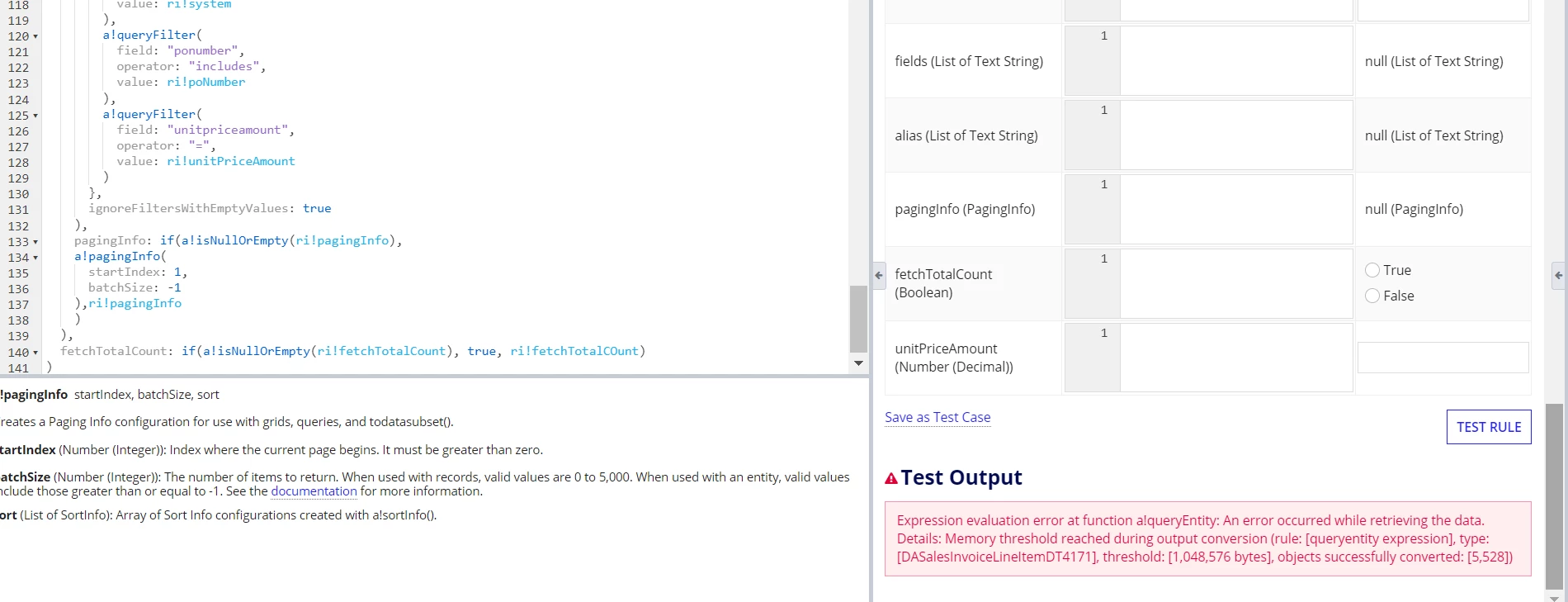


I have given batch size 1, -1y, I want to retrieve all data from database view table(6500 rows)

Can you please help me on this.

Thanks,

Nag  

11 replies

venkatrea696188
April 24, 2024

It seems you are pulling large data (More than 1 MB) ,there is a support case related to this error , go through it. 

https://community.appian.com/support/w/kb/686/kb-1411-memory-threshold-reached-during-output-conversion

rohitm7223
April 24, 2024

[mention:52de0ce478ae4a25be2fbff46609a4fb:e9ed411860ed4f2ba0265705b8793d05] :

You are attempting to retrieve all data from a view in a single QE hit, which is not considered best practice and should generally be avoided. I am not fully aware of the specifics of your use case, but it is necessary to revise your approach, especially as the data in the view will continue to grow and you are using a batch size of -1.

Consider the following alternative approaches:

1. Retrieve only a specific number of rows.
2. Use aggregation to decrease the number of rows.
3. Limit the number of columns in the QE.
4. Execute a stored procedure (SP) and limit the data retrieved.
5. Alternatively, you can transfer the data from the view into a table and perform the QE on that table.

Please provide more details about your use case so that we can suggest a more tailored approach.

stefanhelzle0001
Brainy
April 24, 2024

For what purpose do you try to load the whole table into memory?

April 24, 2024

I Need to show all the data into Grid in UI

konduruc733182
April 24, 2024

I would say show few columns in the grid by minimizing the amount of data that you query and try to have a summary where you can display the whole data of that particular selection. That would be a better option. If you have too many columns your grid would look clumsy anyway. So I would consider few points from Rohit's suggestion.

karumurua531442
April 24, 2024

hi [mention:52de0ce478ae4a25be2fbff46609a4fb:e9ed411860ed4f2ba0265705b8793d05]  May I Know the requirement for querying the whole data. filter the columns you need from the data set and display, Calling whole data at once may lead to memory and timeout issues, Also may i know is it a table or view you are using to retrieve the data. Add indexes to the required columns and retrieve the columns you need.

harshk1671
April 24, 2024

Use Appian record to create the grid and Appian will automatically solve the batch size issue for you.

Alternatively, if you are pulling data in a local variable first and use that to render the grid then make sure the query of local variable and paging grid shares the same paging info. This way you will only pull the rows needs to display in one page of grid and limits the batch size.