
May 6, 2026
Question

Fetching Data from external source (Oracle SQL Developer software)

  • May 6, 2026
  • 5 replies
  • 0 views

Hi,

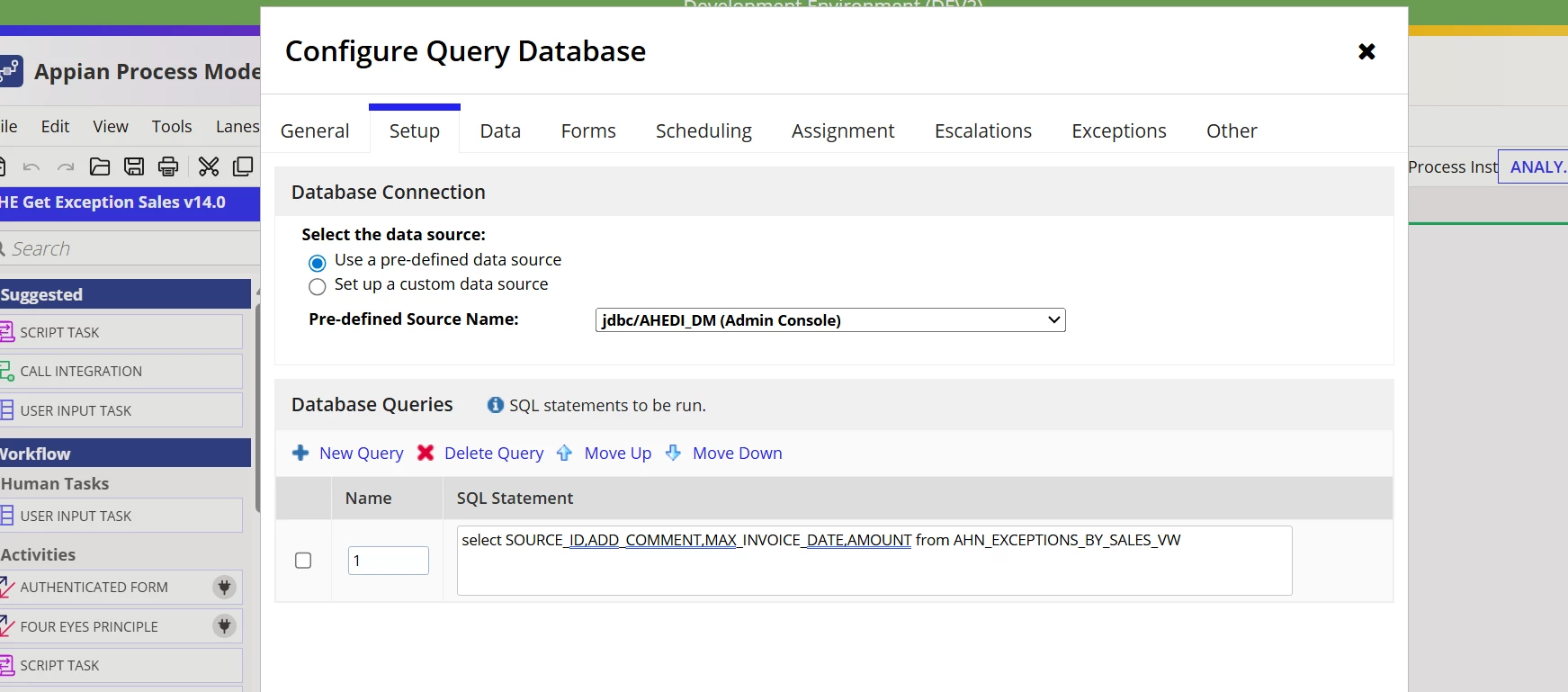
I am using Query database smart service in the Process model to get the data from the external data source which is in DataMart. Due to some access restriction, we were not able access external database. So, we have added the source in the admin console, and we are using it in smart service. I am getting 1000 rows of data, and I am storing it in a Process variable which is of CDT type. I want to fetch all the rows like I have more than 4000 rows of data. But I am able to fetch only 1000 rows. Is there any way to fetch all the rows. This is my current configuration. We need to display the data in an interface grid which will be viewed in Site
    5 replies

    harshas2775
    May 6, 2026

    Did you try setting up a record type to work with external data source? What challenges did you face

    Editing because I cant reply to this thread any longer, and am getting a warning. [mention:8471be98489a457180e488ffb8d3bb1d:e9ed411860ed4f2ba0265705b8793d05]  Please see below my latest reply

    As per documentation, the default limit is 1000 rows for a select query when Query Database smart service is used but it can be updated. Check this documentation to get the limit updated as per need  

    May 6, 2026

    We have some grant restrictions to access the table. We are unable to create a record. We have configured the data source in the admin console and pulling the data through Query database smart service. But it doesn't support select * query in the setup configuration. We need all the data to be queried. Is there any other method ?

    harshas2775
    May 6, 2026

    As per documentation, the default limit is 1000 rows for a select query when Query Database smart service is used but it can be updated. Check this documentation to get the limit updated as per need  

    shubhama926776
    May 6, 2026

    Query Database smart service has a 1000-row hard limit. Use a loop in your process model with LIMIT 1000 OFFSET ac!offsetValue, starting at 0 and incrementing by 1000 each iteration. Stop the loop when returned rows < 1000 and append each batch to your CDT list PV.
    Pass ac!offsetValue as an input node in the Data tab of the smart service, starting at 0 and dynamically passing the updated offset after each iteration.

    SELECT SOURCE_ID, ADD_COMMENT, MAX_INVOICE_DATE, AMOUNT
    FROM AHN_EXCEPTIONS_BY_SALES_VW
    ORDER BY SOURCE_ID
    OFFSET ac!offsetValue ROWS FETCH NEXT 1000 ROWS ONLY

    varuntejg243705
    May 7, 2026

    Hi [mention:8471be98489a457180e488ffb8d3bb1d:e9ed411860ed4f2ba0265705b8793d05]  ,

    The Query Database Smart Service is not designed to load huge datasets into process variables for UI consumption.


    By default:

    • It fetches limited rows (commonly 1000 depending on config/query)
    • Storing 4000+ rows in PV is a bad design ( upto 1000 is maximum).
    • If you absolutely must use Query Database Smart Service. Then implement:
      • batching
      • pagination loop

    Question: Why are you not using the Integration call to get the data into Appian?