

allenp0001
Known Participant
March 4, 2021
Solved

Hide read-only column hidden when cell value is null

  • March 4, 2021
  • 12 replies
  • 0 views

So I have an interface where in a read-only grid the user can select a specific "event" which then shows another read only grid with that particular events information.  I would like a way to hid a column in the break down when the value is null but show when there is a number in the value.

For example, in the picture, hide "Energy", "Air Gas", etc
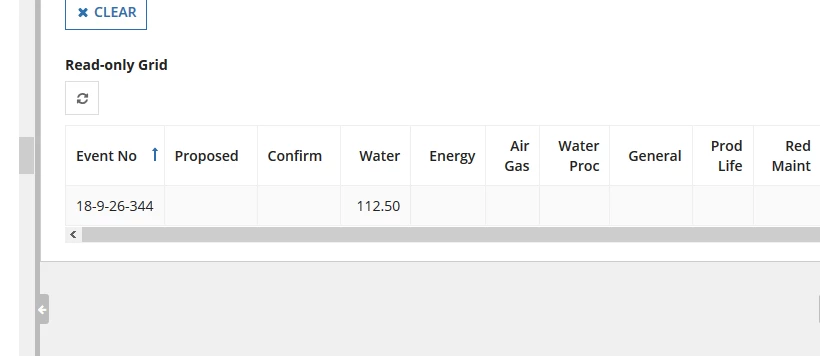
Thank you

    Best answer by mikes0011

    The reason I didn't suggest that is it looks as if they're checking specifically against a single space character (" ") versus blank.  I suppose the view they're referencing for this record type could be set up so that it intentionally populates a single space instead of blank or null under specific conditions, though I guess maybe I should've asked about that assumption.

    12 replies

    mikes0011
    Brainy
    March 4, 2021

    Was there supposed to be a picture attachment with this?  If so, I don't see anything -- just in case you want to re-try that.

    The Expression Guru
    allenp0001
    Known Participant
    March 4, 2021

    Yes, there was. Thank you

    mikes0011
    Brainy
    March 4, 2021

    So is this grid intended to only ever have one row?  I guess I'm unclear why even use a grid at all, though i guess with that many columns it might offer you better "compactness"...

    The Expression Guru
    pratiks0003
    April 13, 2021

    hi Allenp,

    you can use show when condition . in that you can use showwhen: not(isnull(ri!data)) . try this onces when you have data then it will be show . apply this on which coloumn to hide