
June 12, 2023
Solved

How do I access the result data in the Custom Output of the Query Database Smart Service?

  • June 12, 2023
  • 10 replies
  • 0 views

I want to access sql result data in Custom Output of Query Database Smart Service, but I get an error.

I would like to access the ResultSets, like in the Execute Stored Procedure Smart Service if possible, can I achieve the same operation in the Query Database?

Best answer by sanchitg0002

Just out of curiosity, any specific reason for using Query Database node instead of a!queryentity() ? this is very rarely used and other options should be considered first.

Still, if you want to index the result sets, you need to store them in a pv! and index those pv! in a script task next to this node.

10 replies

stefanhelzle0001
Brainy
June 12, 2023

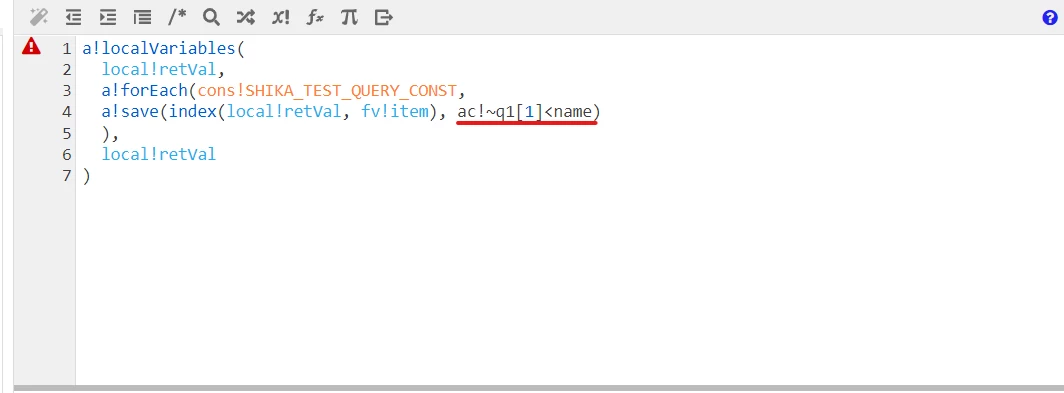
Is your code snippet just a non-working example or your final code?

Appian describes in the documentation how to do that: https://docs.appian.com/suite/help/23.2/Query_Database_Smart_Service.html#data-tab

tomoo7550Author
June 12, 2023

This code is under consideration and does not work.

What I would like to achieve is a map to the CDT structure with custom output.

The best practice might be to store each item of the result in a process variable, but we are considering whether it is possible to implement this in a way that it can be used around QueryDatabase.

harshitb6843
June 12, 2023

Your description and screenshot are miles apart. And I am not clear what are you trying to achieve with that code in your screenshot. 

tomoo7550Author
June 12, 2023

This code is under consideration and does not work.

What I would like to achieve is a map to the CDT structure with custom output.

The best practice might be to store each item of the result in a process variable, but we are considering whether it is possible to implement this in a way that it can be used around QueryDatabase.

June 12, 2023

Just out of curiosity, any specific reason for using Query Database node instead of a!queryentity() ? this is very rarely used and other options should be considered first.

Still, if you want to index the result sets, you need to store them in a pv! and index those pv! in a script task next to this node.