
January 11, 2024
Question

how to connect SQL server Data Source with Appian
  • January 11, 2024
  • 22 replies
  • 0 views


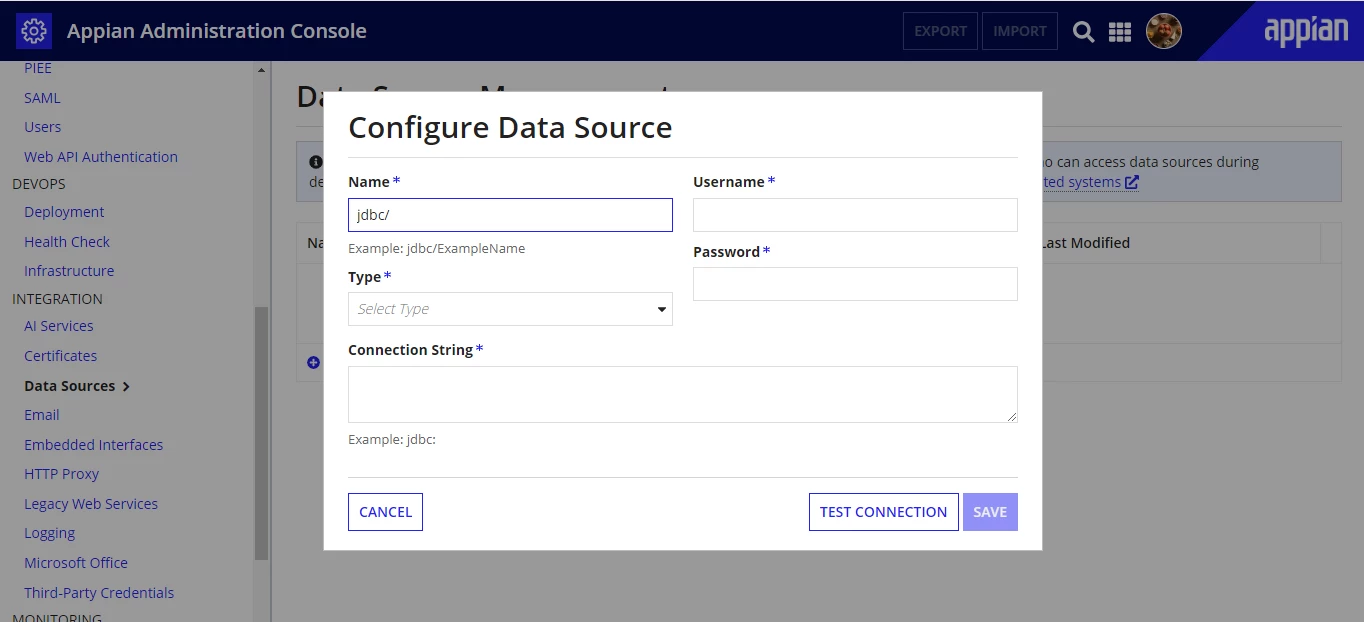
It is very difficult to figure out what should be the inputs of the mentioned fields on this page.
Can someone please explain what input should be given in each of these fields and especially on the "Connection String"?

P.S: Don't give links to documentations.

Your help will be highly appreciated.

Thanks

    22 replies

    harshitb6843
    January 11, 2024

    If you select the "Type" then a sample connection string will appear. You can copy that, make necessary changes to it, and paste it there. 
    I will advise to go for creating a connected system instead of configuring a Data source in Admin Console

    harshitb6843
    January 11, 2024
    January 11, 2024

    i have already gone through that and selected SQL server in the type category but nowhere does it mentions the format and sequence of the other inputs. Also it doesn't give clear instructions for creating a connected system.

    please explain this further:
    Example: jdbc:sqlserver://yourserver.example.com:1433;databaseName=your_db_name


    mathieud0001
    Brainy
    January 11, 2024

    https://docs.appian.com/suite/help/23.4/Configuring_Relational_Databases.html#sql-server

    jdbc:sqlserver://such_as_sqlServer.example.com:1433;databaseName=such_as_MS-SQL_for_appian

    stefanhelzle0001
    Brainy
    January 11, 2024

    Nowadays we prefer to configure a data source using a connected system instead of the admin console.

    January 15, 2024

    in connection URL the hidden part is my <hostname:portnumber>
    and username is what SQL server uses with Windows authentication and password is same as what i use for system.
    what am i doing wrong here.

    thanks for participating in my discussion. [emoticon:c4563cd7d5574777a71c318021cbbcc8]

    mathieud0001
    Brainy
    January 15, 2024

    Are you sure you have access to this database from the Appian instance? Are you trying to access an on-prem database from the cloud by any chance?