Question
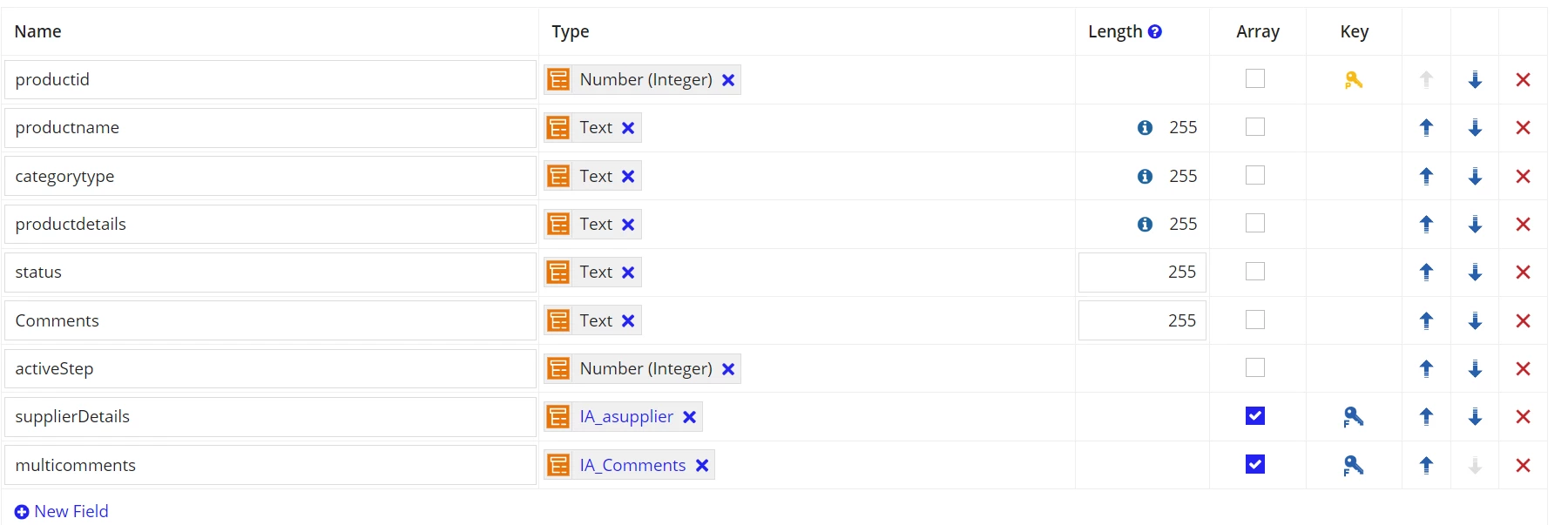
how to store the child CDT field in parent CDT using Ruleinput in the interface.?(one to many-flat relation)
Hi All,
I have inserted the interface code, comment field line :152, here how can we pass the ruleinput to value and saveinto parameter.?
thanks in advance.
a!localVariables(
  local!griddata: 'type!{urn:com:appian:types:IA}IA_asupplier'(),
  local!selection: ri!addProduct.status,
  local!comments,

  a!formLayout(
    label: if(
      ri!Manager = true,
      "Approval for Product",
      "Add Product Details"
    ),
    contents: {
      a!sectionLayout(
        label: "",
        contents: {
          a!columnsLayout(
            columns: {
              a!columnLayout(
                contents: {
                  a!dropdownField(
                    label: "Product Name",
                    labelPosition: "ABOVE",
                    placeholder: "---  Select a Value ---",
                    choiceLabels: cons!IA_ProductName,
                    choiceValues: cons!IA_ProductName,
                    value: ri!addProduct.productname,
                    saveInto: ri!addProduct.productname,
                    searchDisplay: "AUTO",
                    required: true,
                    disabled: ri!Manager = true(),
                    validations: {}
                  ),
                  a!dropdownField(
                    label: "Category Type",
                    labelPosition: "ABOVE",
                    placeholder: "--- Select a Value ---",
                    choiceLabels: cons!IA_CategoryType,
                    choiceValues: cons!IA_CategoryType,
                    value: ri!addProduct.categoryType,
                    saveInto: { ri!addProduct.categoryType },
                    searchDisplay: "AUTO",
                    required: true,
                    disabled: ri!Manager = true(),
                    validations: {}
                  ),
                  a!paragraphField(
                    label: "Product details",
                    value: ri!addProduct.productdetails,
                    saveInto: { ri!addProduct.productdetails },
                    required: true,
                    disabled: ri!Manager = true()
                  )
                }
              ),
              a!columnLayout(contents: {})
            }
          )
        }
      ),
      a!gridLayout(
        label: "Supplier Details",
        labelPosition: "ABOVE",
        headerCells: {
          a!gridLayoutHeaderCell(label: "Name of Supplier"),
          a!gridLayoutHeaderCell(label: "Quantity"),
          a!gridLayoutHeaderCell(label: "Location"),
          a!gridLayoutHeaderCell(label: "PhoneNumber"),
          a!gridLayoutHeaderCell(label: "")
        },
        columnConfigs: {
          a!gridLayoutColumnConfig(width: "DISTRIBUTE"),
          a!gridLayoutColumnConfig(width: "ICON"),
          a!gridLayoutColumnConfig(width: "DISTRIBUTE"),
          a!gridLayoutColumnConfig(width: "DISTRIBUTE"),
          a!gridLayoutColumnConfig(width: "ICON")
        },
        rows: {
          a!forEach(
            items: ri!addProduct.supplierDetails,
            expression: a!gridRowLayout(
              contents: {
                a!pickerFieldUsers(
                  maxSelections: 1,
                  groupFilter: cons!IA_SupplierGroup,
                  value: fv!item.suppliername,
                  saveInto: fv!item.suppliername,
                  required: true,
                  readOnly: ri!Manager = true
                ),
                a!integerField(
                  value: fv!item.quantity,
                  saveInto: fv!item.quantity,
                  required: true,
                  validations: if(
                    tointeger(fv!item.quantity) <= 0,
                    "Please enter greater than 0",
                    {}
                  )
                ),
                a!textField(
                  value: fv!item.location,
                  saveInto: fv!item.location,
                  readOnly: ri!Manager = true
                ),
                a!textField(
                  value: fv!item.phoneNumber,
                  saveInto: fv!item.phoneNumber,
                  readOnly: ri!Manager = true
                ),
                a!richTextDisplayField(
                  value: a!richTextIcon(
                    icon: "times",
                    link: a!dynamicLink(
                      saveInto: a!save(
                        target: ri!addProduct.supplierDetails,
                        value: remove(ri!addProduct.supplierDetails, fv!index)
                      )
                    ),
                    showWhen: ri!Manager = false,
                    color: "NEGATIVE"
                  )
                )
              }
            )
          )
        },
        addRowLink: a!dynamicLink(
          label: "Add Suppplier",
          saveInto: a!save(
            target: ri!addProduct.supplierDetails,
            append(
              ri!addProduct.supplierDetails,
              local!griddata
            )
          ),
          showWhen: ri!Manager = false()
        ),
        validations: {},
        shadeAlternateRows: true
      ),
      a!radioButtonField(
        label: "Status",
        labelPosition: "ABOVE",
        choiceLabels: cons!IA_StatusARR,
        choiceValues: cons!IA_StatusARR,
        value: ri!addProduct.status,
        saveInto: ri!addProduct.status,
        showWhen: ri!Manager = true(),
        choiceLayout: "STACKED",
        validations: {}
      ),
      a!paragraphField(
        label: "Reason/Comments",
        labelPosition: "ABOVE",
        value:local!comments,
        saveInto:ri!addProduct.multicomments.comments,
        refreshAfter: "UNFOCUS",
        height: "MEDIUM",
        showWhen: or(
          local!selection = "Reject",
          local!selection = "Return"
        ),
        required: true,
        readOnly: if(
          'recordType!{fb9fc1c0-b1ff-43a2-aea6-c4a11b2d7bbe}IA AddProduct.fields.{ed9bcd81-5050-4eaa-90b9-f18c43a669ee}status' = "Return",
          true,
          false
        )
      )
    },
    buttons: a!buttonLayout(
      primaryButtons: {
        a!buttonWidget(
          label: "Submit",
          saveInto: ri!addProduct.activeStep,
          value: if(ri!addProduct.status = "Approve", 3, 2),
          submit: true,
          style: "PRIMARY"
        )
      },
      secondaryButtons: {
        a!buttonWidget(
          label: if(ri!Manager = true, "Submit", "Cancel"),
          value: true,
          saveInto: ri!cancel,
          submit: true,
          style: "NORMAL",
          showWhen: ri!Manager = false(),
          validate: false
        )
      }
    )
  )
)
child cdt

parent cdt