
December 5, 2025
Question

Indexing Fails When Configuring Smart Search

  • December 5, 2025
  • 7 replies
  • 0 views

I am trying to enable smart search on a particular record type, but I keep getting "Indexing failed" errors. I'm new to this feature, so I'm not really sure where a good place to start troubleshooting is, but I've listed what I've done/noticed below and attached a screenshot of the error.

  • I have successfully set up smart search on 2 other record types in the same environment
  • A difference between the 2 records successfully using smart search and the one that is failing, is the primary key of the failing record is type text and can contain some symbols (periods and hyphens mostly) while the other 2 are type integer. Not sure if that's relevant or not.
  • When performing a full sync on the record, the "total record type rows" shows that it has 2 more rows than the "total source rows", but when viewing the record list the row count is correct.
  • I've tried changing the fields that smart search uses with no effect
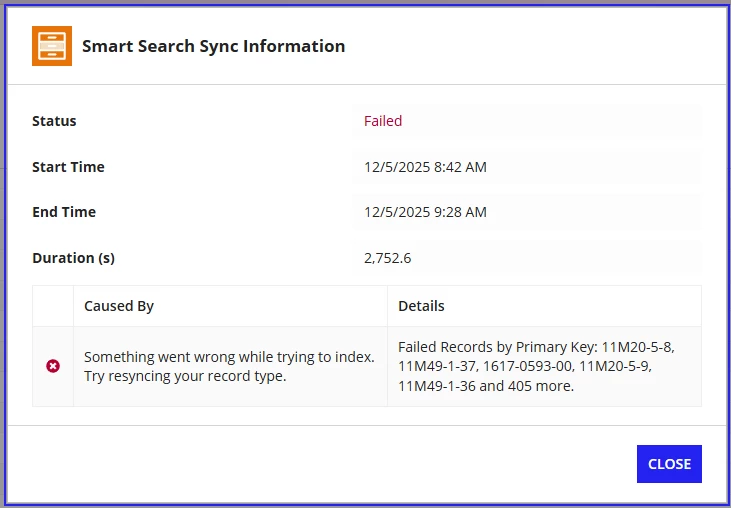
If anyone has some other ideas of what might be causing this, what I can try, or could point me to the log where I could get some more details, that would be greatly appreciated!

Thanks,

Jack

7 replies

stefanhelzle0001
December 7, 2025
When performing a full sync on the record, the "total record type rows" shows that it has 2 more rows than the "total source rows", but when viewing the record list the row count is correct.

This sounds suspicious. But, I suggest to open a support case and report this behaviour.

shubhama926776
December 8, 2025

Failed records likely have invalid/missing primary keys or data that can't be indexed. Check if those specific Ids exist in your source and ensure your source query filters match your sync filters.

jackf0001Author
December 9, 2025

Shubham,

Could you elaborate on what kind of data can't be indexed?

The record syncs fine and there are no sync filters, which would indicate that there are no missing/invalid primary keys, just keys or data that can't be indexed.

shubhama926776
December 11, 2025

Check if the failing records have nulls or unusual data in your smart search fields.

December 8, 2025
[deleted]
jackf0001Author
December 9, 2025
Have you tried looking at the sync logs (usually in the admin console)

I'm not aware of any logs that live in the admin console. Could you tell me the name of this log and where I might find it?

issue caused by unexpected characters in the data

What kind of characters caused this issue? The primary keys listed in the error message all had "-" in them, but there are more than 410 primary keys with that symbol in the record, and I can't see the rest of the failed primary keys to confirm if that pattern holds.

mikes0011
Brainy
February 26, 2026

FYI