

vigneshkumarr0001
April 30, 2023
Question

Issue in fn!union() to return unique values. Is there any other function available?

  • April 30, 2023
  • 9 replies
  • 1 view

Hi Team,

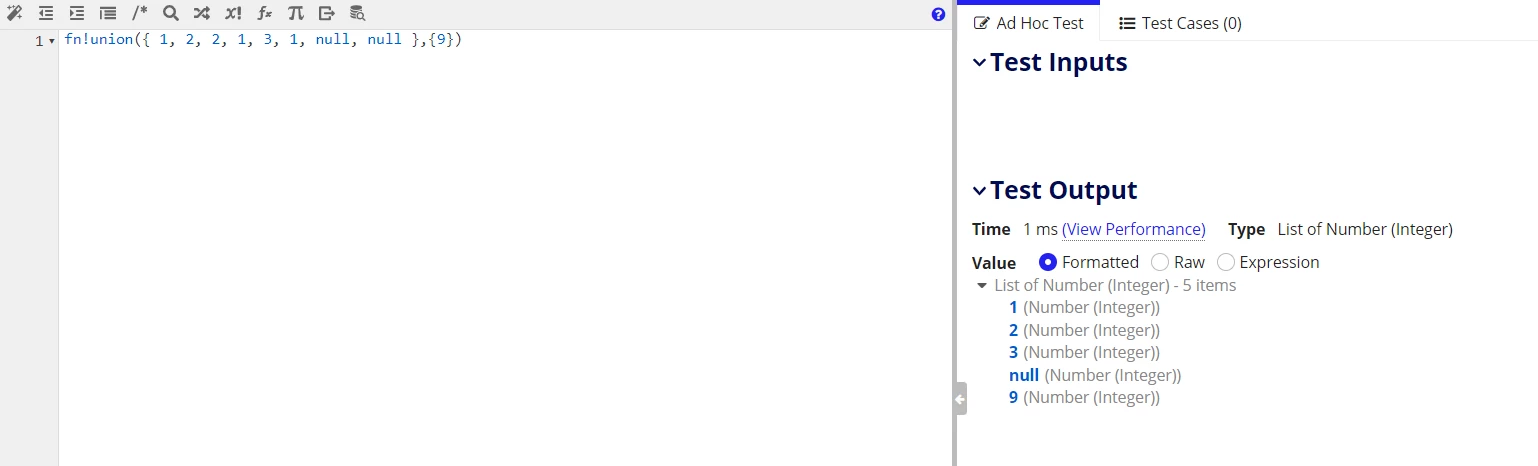
Got confused while doing some calculations in Appain Expression rule. Added input and output below. i have tried fn!union() function but it was failing sine input was only one array.

Code: fn!union({ 1, 2, 2, 1, 3, 1, null, null }, {})

Sample i/p -> { 1, 2, 2, 1, 3, 1, null, null}

Expected o/p -> { 1, 2, 3} 

Current Appian Design:
Thanks and Regards,

Vigneshkumar Radhakrishnan

9 replies

April 30, 2023

if I understood your query correctly, you want to fetch distinct values from a list and remove null values.

In that case, you can use union using same list twice and pass the output in reject().

Something like:-

a!localVariables(
local!a : {1, 2, 2, 1, 3, 1, null, null },
reject(fn!isnull,union(local!a,local!a))
)

gopalk2865
Participating Frequently
May 1, 2023

HI, If you want to use union() then you are expected to pass two arrays, from your requirement, your code should look something like below,

a!localVariables(
  local!input:{ 1, 2, 2, 1, 3, 1, null, null},
union(local!input, local!input),


)

vigneshkumarr0001
May 1, 2023

Yes, Agree but normally its look Appain was failed in sometimes of execution right. Assume if user are passing same data twice but Appian needs to handle this also right it union() passed one parameter then it return outputs instead of error as invalid parameter

@appian

May 1, 2023

What does union mean? set of all unique elements from multiple sets. So, there should be more than one array to perform a union right? it is mentioned in the documentation on the Expression rule designer as well that atleast two arrays are required for union to work as expected although it can take n number of arrays. Consider this as sum of numbers which always require more than one number to execute.

Now, you can try what other contributors suggested (passing the same array as second parameter) or you can fool Appian by passing an empty list as a second parameter which would also yield the same result.

union({ 1, 2, 2, 1, 3, 1, null, null }, tointeger({}))

rajkumary3857
May 1, 2023

Hi,

you want to use union() then you need to pass two parameter. and also you want to remove null values form output, then code should look like below

a!localVariables(
  local!input1: { 1, 2, 2, 1, 3, 1, null, null},
  local!input2: { 1, 2, 2, 1, 3, 1, null, null},
  reject(a!isNullOrEmpty(_), union(local!input1, local!input2))
)

davel001150
May 1, 2023

This works perfectly.  You pass in an array with three 1's, two 2's, a 3, and 2 nulls, and pass in another array with a 9 in it.  Union does exactly what it says on the tin.  It joins the arrays and removes the duplicates.  You only have 1 null in the result set.  If you don't want it, reject(a!isNullOrEmpty(_), local!list).

Union doesn't say it does anything or doesn't do anything to nulls.  It says it removes duplicates, and it did.

May 2, 2023

The UNIQUE function in Excel returns a list of unique values from a range or array. It works with any data type: text, numbers, dates, times, etc.

The function is categorized under Dynamic Arrays functions. The result is a dynamic array that automatically spills into the neighboring cells vertically or horizontally.

The syntax of the Excel UNIQUE function is as follows:

UNIQUE(array, [by_col], [exactly_once])

Where:

Array (required) - the range or array from which to return unique values.

By_col (optional) - a logical value indicating how to compare data:

TRUE - compares data across columns.
FALSE or omitted (default) - compares data across rows.

Exactly_once (optional) - a logical value that defines what values are considered unique:

TRUE - returns values that occur only once, which is the database notion of unique.
FALSE or omitted (default) - returns all distinct (different) values in the range or array.

stefanhelzle0001
Brainy
May 2, 2023

How does your post help the TO in Appian?