chriss4489
July 11, 2023
Solved

Need to be able to calculate the total of column data in order to be used in reporting metrics

  • July 11, 2023
  • 22 replies
  • 0 views

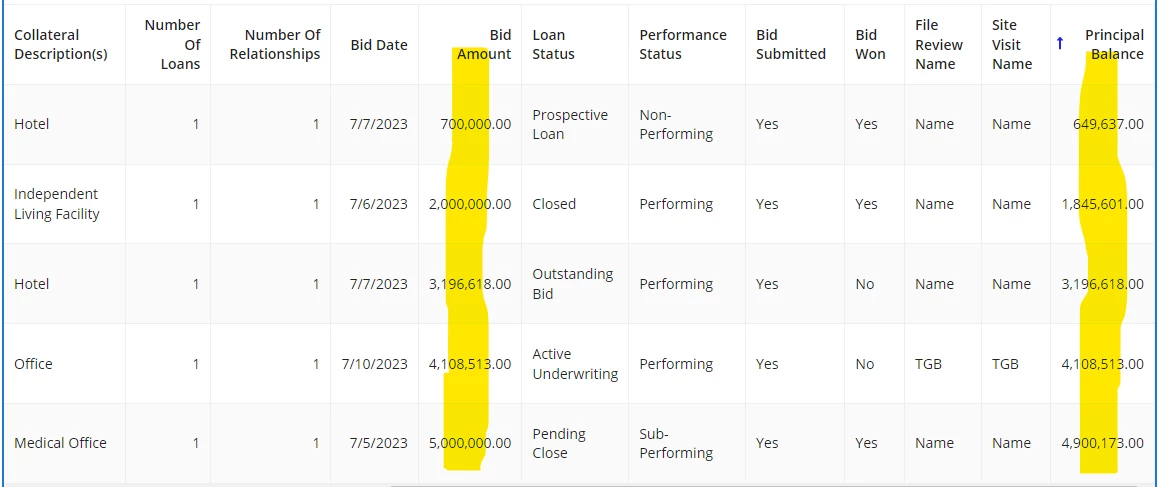
For the following table of records, I need to be able to calculate the total of the highlighted columns, (Bid Amount & Principle Balance) so that I can utilize that information to create a list of metrics listed below the Picture.
  • Balance Underwritten
    • Sum of Principle Balance
  • Balance Bid
    • Sum of Principal Balance (Where Bid Submitted? = Yes)
  • Balance Won
    • Sum of Principal Balance (where Bid Won? = Yes)
  • Bid to Underwritten %
    • Balance Bid divided by Balance Underwritten
  • Win to Bid %
    • Balance Won divided by Balance Bid
  • Win to Underwritten %
    • Balance Won divided by Balance Underwritten

    Best answer by mikes0011
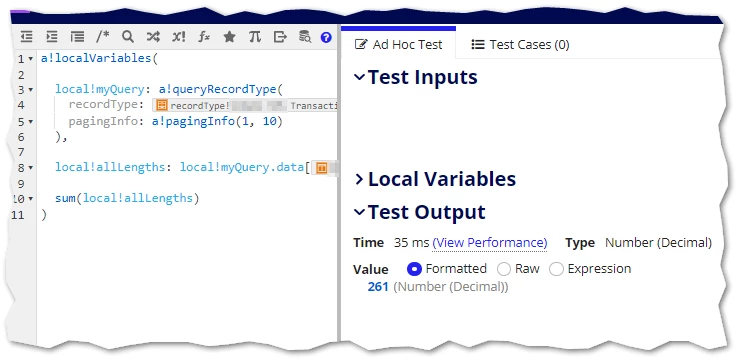
    this following query which that kind of gives me the result I want

    1) store the result of that query in a local variable

    2) call sum() on that result (or the relevant field)

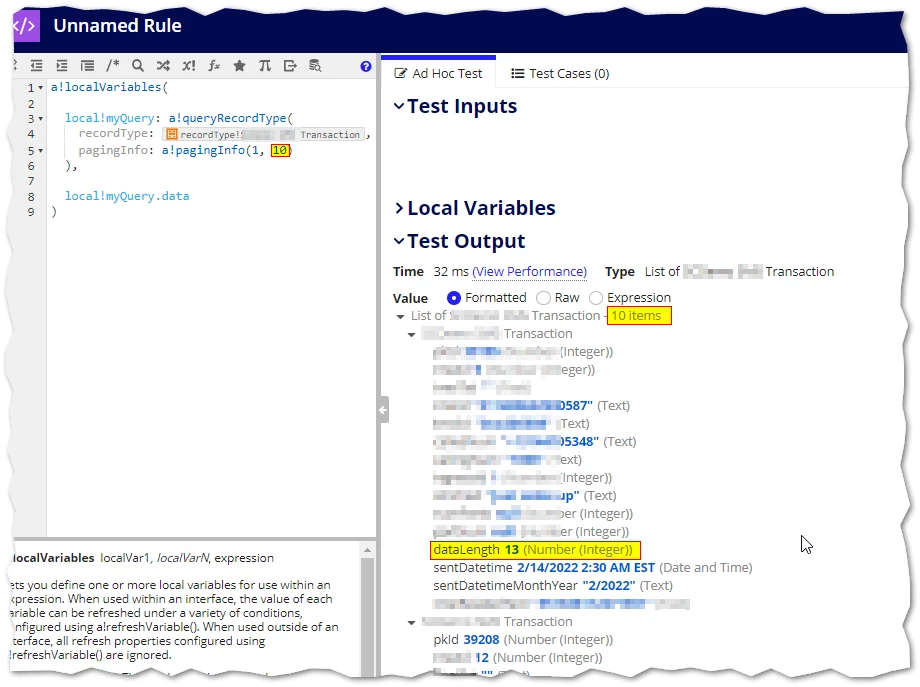
    First you need to know how to access the field in RecordType data post querying.  Kinda-stupidly, this requires referencing the entire recordtype and then the relevant fieldname.  For the recordtype here in my example I have a field name called "dataLength". (Querying just a page of 10 only for simplicity's sake).

    So let's display the full value first:

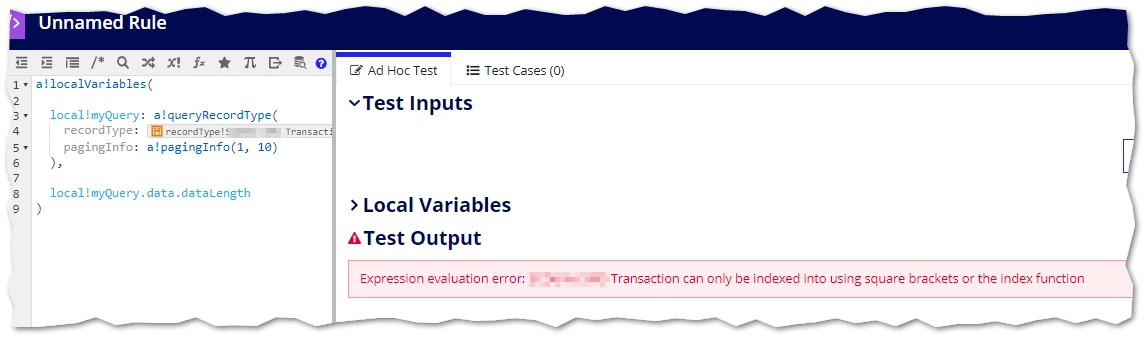
    Traditional queries would let us just add ".dataLength" after that to get the property alone as a list.  Let's try:

    (Womp, womp...)

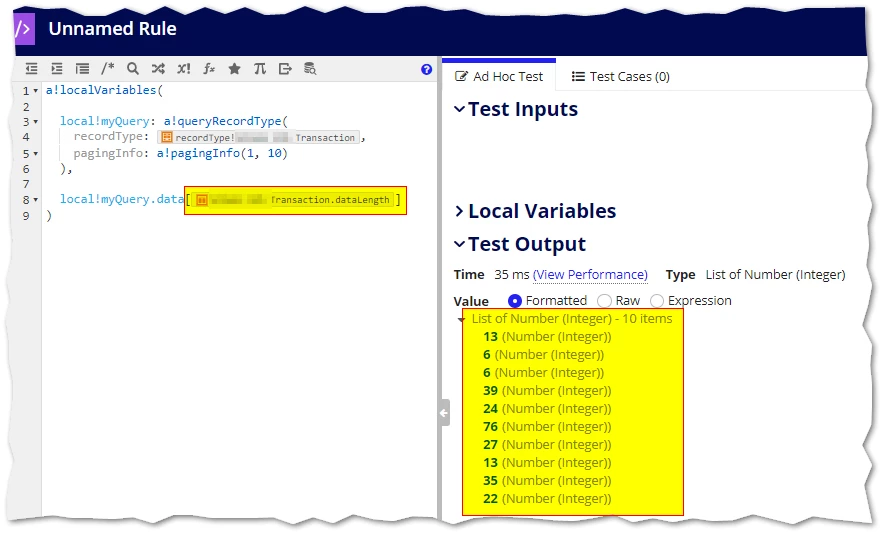
    So how do we access it?  Following the error message, we add the record type property reference in square brackets:

    Voila!

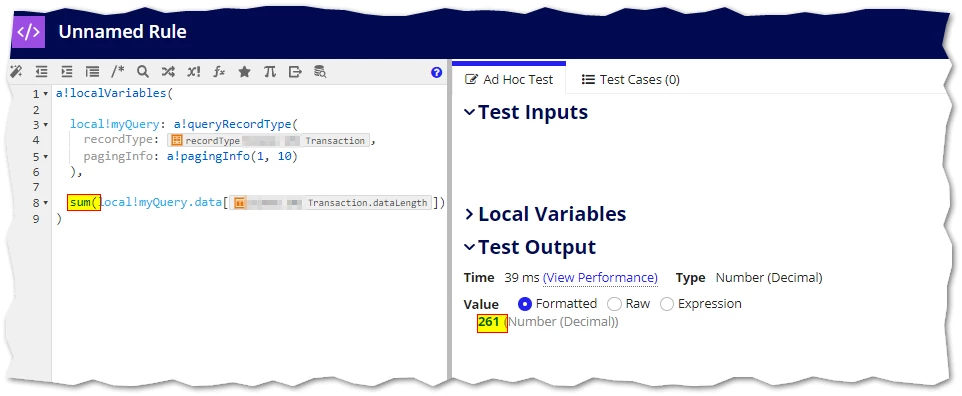
    Then for the cherry on top, since now we just have an array of integers, we can pass that quite cleanly into sum().

    Though I often prefer to abstract the individual steps into their own local variables, which adds a bit more flexibility...

    And as with most things, when crafting expressions it's best to start with something small and working, and then iterate it step-by-step.

    22 replies

    stefanhelzle0001
    July 11, 2023

    Well, the sum() function can do that for you.

    chriss4489
    July 11, 2023

    Can you explain how though because I tried that and it didn't work. It's not as simple as entering =sum(recordtype!dcloans.fields.principlebalance) somewhere? Or even if it is, where would you use that formula?

    stefanhelzle0001
    July 11, 2023

    Well. You need to use the actual values, not just a reference to some field in a record.

    =sum(local!YOUR_DATA[recordtype!dcloans.fields.principlebalance])

    mathieud0001
    July 12, 2023

    a!localVariables(
      local!pagingInfo: a!pagingInfo(startIndex: 1, batchSize: 20),
      local!balanceSum: a!refreshVariable(
        value: a!queryRecordType(
          recordType: 'recordType!{c98782ad-3fca-46e0-bba4-c6a8e2c71a2c}T Loan',
          fields: a!aggregationFields(
            groupings: a!grouping(
              field: 'recordType!{c98782ad-3fca-46e0-bba4-c6a8e2c71a2c}T Loan.fields.{776544e7-09aa-4079-b038-f3e274675ab5}id',
              alias: "id"
            ),
            measures: a!measure(
              field: 'recordType!{c98782ad-3fca-46e0-bba4-c6a8e2c71a2c}T Loan.fields.{02381417-037d-4868-bb86-0d812cc564f8}principalBalance',
              alias: "principalBalanceSum",
              function: "SUM"
            )
          ),
          pagingInfo: a!pagingInfo(
            startIndex: local!pagingInfo.startIndex,
            batchSize: local!pagingInfo.batchSize
          )
        ).data,
        refreshOnVarChange: local!pagingInfo
      ),
      {
        a!gridField(
          data:  a!recordData(
            recordType: 'recordType!{c98782ad-3fca-46e0-bba4-c6a8e2c71a2c}T Loan'
          ),
          columns: {
            a!gridColumn(
              label: "Loan",
              value: fv!row['recordType!{c98782ad-3fca-46e0-bba4-c6a8e2c71a2c}T Loan.fields.{1a71e16c-85b9-4882-8ab0-4af845f27271}loanName']
            ),
            a!gridColumn(
              label: "Balance",
              value: fv!row['recordType!{c98782ad-3fca-46e0-bba4-c6a8e2c71a2c}T Loan.fields.{02381417-037d-4868-bb86-0d812cc564f8}principalBalance']
            )
          },
          pageSize: 20,
          pagingSaveInto: { a!save(local!pagingInfo, fv!pagingInfo) },
          showSearchBox: false,
          showRefreshButton: false
        ),
        a!richTextDisplayField(
          value: {
            a!richTextItem(text: "Total Balance: ", style: "STRONG"),
            a!richTextItem(
              text: {
                a!currency(
                  value: sum(local!balanceSum.principalBalanceSum),
                  isoCode: "USD"
                )
              }
            )
          },
          align: "RIGHT"
        )
      }
    )

    Not sure if this is what you are trying to do. This example works with paging but doesn't support searching/sorting etc but it gives you an idea.

    If you wanted filters and such, you'll have to build them out yourself, you can't use the ones provided by recordData if you want sums and totals.

    mikes0011
    Brainy
    July 12, 2023

    I dunno, it sounded to me a bit more like a matter of wanting to be able to take a sum of a column but not being able to figure out how to access the data property in the returned RecordType query, like I walked him through here.  But the detail provided was a little unclear, so who knows.