

pascalek9567
October 10, 2022
Question

Search and filter the Record List

  • October 10, 2022
  • 8 replies
  • 0 views

Hi Everyone

I want to create a Search box to search for Issue IDs in my Record Type. I found all the Info's on how to do it here: Search and Filter the Record List - Appian 22.3
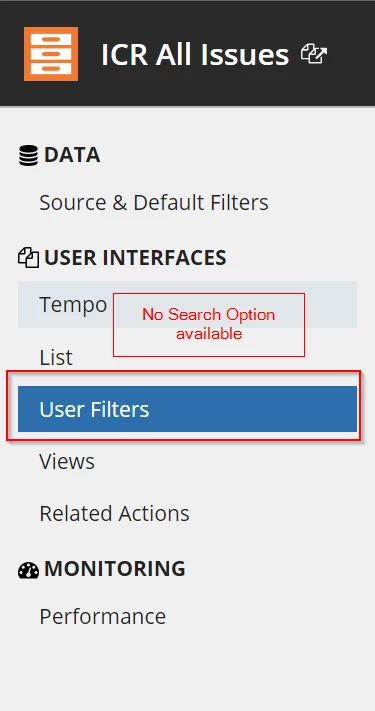
But my problem is, that I just can create User Filters, but don't have the option to create search boxes. When I'm on my Record Type, I just see User Filters. Which is not ideal to filter for Issue IDs, because there are a lot. And, if you believe the manual (Search and Filter the Record List - Appian 22.3) , Search Boxes would be better, because they don't load the data directly, but you can search for it after loading the site. 

Does this relate to maybe an old Appian Version that I am note able to see Search and User Filter but just User Filters? Or do I have to "activate" the Search option on Record Types somewhere else? 

Thanks in advance for your help and kind regards, 

Pascale 

8 replies

stefanhelzle0001
Brainy
October 10, 2022

A record based grid has a search box by default. Did you try that?

pascalek9567
October 10, 2022

Yes, i have that in the Interface. But it searches over all Columns i have in the Record Type and i didnt see the possibility to add a new Search box just for a single column. Is that even possible?

October 10, 2022

By Default, Record will provide Search box as well, but it is not specific to one column, if you want to you can customize that search box and Limit the Search to ID only highlighter in below screenshot and you can give custom place holder also.

pascalek9567
October 10, 2022

I am not able to create a Search, because for me, it just calls User Filter and not as in your picture "Search and User Filter". I only can creates User Filters. Do i use a "wrong" record type? Did i configure something wrong? 

October 10, 2022

Is your Record getting data from Webservices...?, I think this search option is not available for Service Backed Records.