
November 14, 2023
Solved

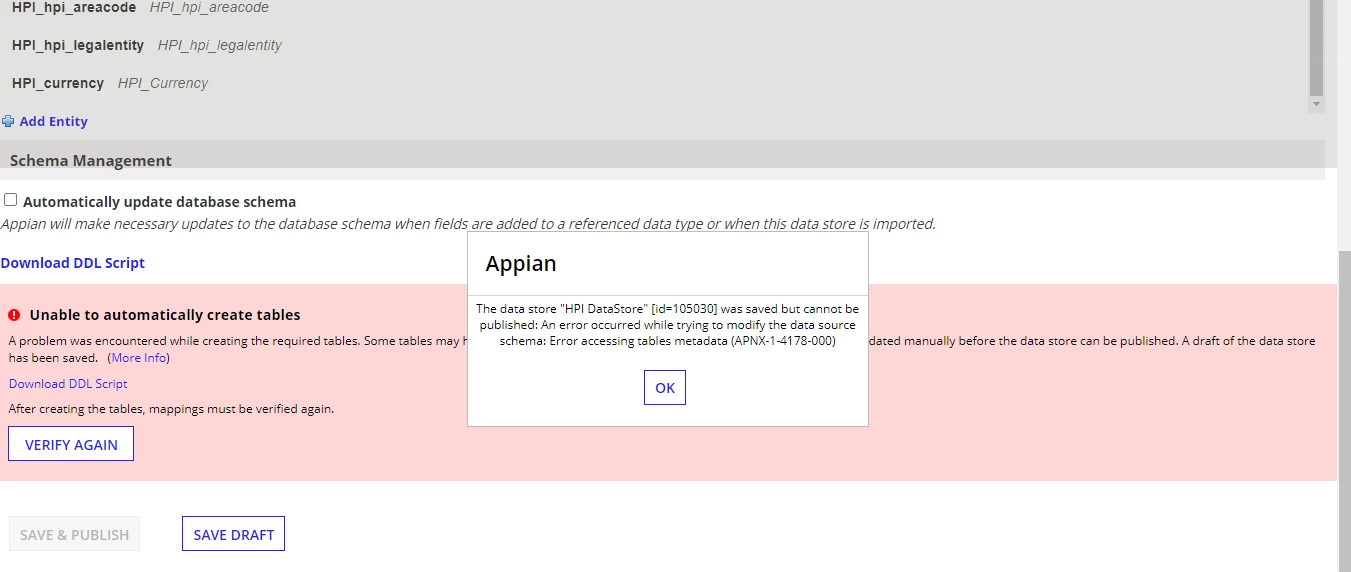
The data store "HPI DataStore" [id=105030] was saved but cannot be published: An error occurred while trying to modify the data source schema: Error accessing tables metadata (APNX-1-4178-000)

  • November 14, 2023
  • 4 replies
  • 0 views

Hi EveryOne,

when I'm Publish the Data Store Entity I am getting the following error: can you please help with this.
Thanks...

    Best answer by mathieud0001

    Yes. So definitely an issue with permissions on the  at the DB level.

    4 replies

    mathieud0001
    Brainy
    November 14, 2023

    I would assume something maybe wrong with the permissions of the user you are using to connect to the databas.

    karumurua531442
    November 16, 2023

    Hi [mention:87da69473b6545cfb642d019ee709eeb:e9ed411860ed4f2ba0265705b8793d05] The error mentions an issue with accessing table metadata. Confirm that the user account used by Appian to connect to the database has the necessary permissions to retrieve metadata information. Ensure that the user account is not locked or expired.

    mathieud0001
    Brainy
    November 16, 2023

    Yes. So definitely an issue with permissions on the  at the DB level.

    January 29, 2024

    We encountered this error last Fall in our dev environment, but were able to work around it until today. We thought it had something to do with our MySQL 5.8 upgrade (internal RDS) and the change to utf8mb4 defaults. Yet it was something different from that, and the timing was coincidental.

    The stdout log didn't show an error when I clicked 'verify'. However, I accidentally discovered that clicking "Download DDL Script", generates the actual permissions error in our stdout log file.  In our case, it was related to a sandbox / experimental view that was created with improper SQL SECURITY definitions on an unrelated data store. After we fixed that error with that view in the database, our data stores verify ok.