
April 28, 2025
Question

Update Record field Value in expression

  • April 28, 2025
  • 17 replies
  • 0 views
  • I have an interface where collecting the information & storing in record type. 
  • Then sending this record type rule input to process model to store in db using write records 
  • However before that write records node, I need to update a few of the fields of the record type. 

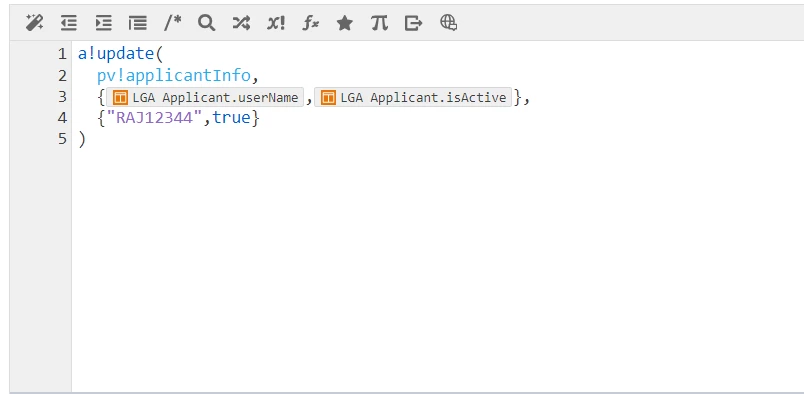
I have tried to update the fields using the following expression, however the data which got from interface is becoming null and record type is updating only with the expression values. Can any one pick it up and shoot it?
17 replies

amaans4178
April 28, 2025

Is the data becoming null within the process model, or is it already null when received from the interface? We need more information about when exactly the data becomes null — is it after the update action or before?

April 28, 2025

It gets null after the update action in the script task. 

amaans4178
April 29, 2025

please share the script task node's configuration (input and output)

harshas2775
April 30, 2025

Hi Shukur

Instead of a!update, create two custom outputs and save in respective fields. E.g. 1st output variable expression will be "RAJ12344" and  saveinto will be your recordtype!recordname.fields.username. Similarly 2nd output variable will have true() in expression and save into isActive field of your record. This will leave all other fields of your record as it came from interface. 

a!update() is making all other fields as null and doing operation on just the fields you mention in 'index'. So either do the above or mention all the fields in the index and corresponding values in 'value' of a!update.

a!update(
pv!applicantInfo,
{recordtype!record.userName, recordtype!record.isActive, recordtype!record.createdBy, recordtype!record.createdOn},
{"RAJ12344",true(),recordtype!record.createdBy, recordtype!record.createdOn})

April 30, 2025

Hi Harsha,

Thank you so much for your reply. Yep I knew that however I was looking for a easy approach that should save in one go instead of creating multiple custom outputs for each field. 

stefanhelzle0001
April 30, 2025

Our best practice is to add a bunch of a!save(), one for each field, to the saveInto of the submit button to populate fields not entered by the user.

January 20, 2026

Interesting answer [mention:a11f77a729fb4db2af76b09948583328:e9ed411860ed4f2ba0265705b8793d05] , because I would have thought just the opposite. Putting a bunch of a!save() into the UI just doesn't feel right to me. Is this still Appian's best practice strategy? I was hoping the end of this thread was going to say NOT to add a bunch of save's into the UI button event. 

January 30, 2026

the documentation even explicitly states that "You can pass just the record's identifier and the new <field>, and only the changed field will be updated in the source."

https://docs.appian.com/suite/help/25.4/Write_Records_Smart_Service.html#update-existing-records

It seems like poor design to have to rely on a bunch of save's just to preserve existing values. it's difficult to maintain if you add new fields because now you have to go back to every object to update that. 

Appian's functionality should handle this but it seems enough people have issues with it that I wonder if there's a way to prevent this issue from happening on the developer side. 

 [mention:a11f77a729fb4db2af76b09948583328:e9ed411860ed4f2ba0265705b8793d05]  

arunkumara411233
February 9, 2026

It looks like the issue is happening because the record variable is being overwritten instead of just updating a few fields.

When using a!update(), make sure you are updating the existing record data and not replacing it completely.


February 10, 2026

a!update inherently updates the existing record variable. we can see their code in the script task and i don't see anything to indicate they are overwriting the whole variable

arunkumara411233
February 12, 2026

I agree a!update() doesn’t overwrite the whole record. I was thinking the issue might be with the data being passed into it — maybe the record isn’t fully populated before the update.

It might help to check the record values right before the update step.