
Question
Why Appian process report has data, but when I query it from expression rule using queryProcessAnalytics it returned no data
Hi everyone,
I'm having this issue and trying to find some help/ recommendation.
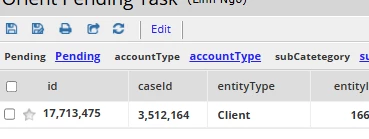
I'm having this process report that contain 1 row of data. But when I run the expression rule to query it with 2 different user account, I get different results, even though the 2 accounts are in same All Users group and that group has Viewer level security in my report.
With my main user account, when I run the query I get that 1 row of data back as output - expected
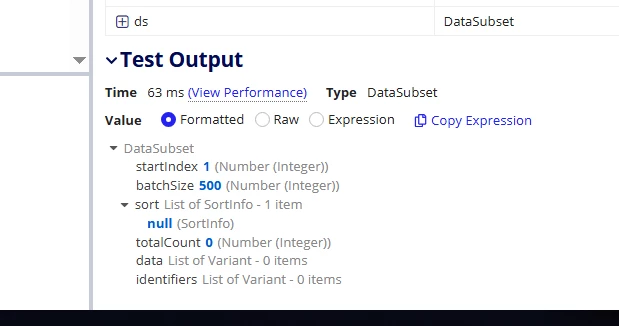
With my test account, I get null value as output - Even though when I open the report I can still see data displayed.
Is there any other areas apart from security level that I should look at?
This is my code snippet, I just input in the context process model and report
if(
  ri!isMissingMinimumInputs,
  if(
    ri!doReturnData,
    {},
    a!dataSubset()
  ),
  a!localVariables(
    local!columnConfigs: if(
      not(rule!GBL_isEmpty(ri!columnConfigs)),
      ri!columnConfigs,
      a!queryProcessAnalytics(
        report: ri!report,
        contextGroups: ri!contextGroups,
        contextProcessIds: ri!contextProcessIds,
        contextProcessModels: ri!contextProcessModels,
        contextUsers: ri!contextUsers,
        query: a!query(
          pagingInfo: a!pagingInfo(1,0)
        )
      ).columnConfigs
    ),
    local!filter: if(
      rule!GBL_isEmpty(ri!filter.field),
      null,
      updatedictionary(
        ri!filter,
        {
          field: displayValue(
            ri!filter.field,
            local!columnConfigs.label,
            local!columnConfigs.field,
            ri!filter.field
          )
        }
      )
    ),
    local!pagingInfo: if(
      rule!GBL_isEmpty(ri!pagingInfo),
      a!pagingInfo(
        startIndex: 1,
        batchSize: cons!GBL_VAL_DEFAULT_QUERY_BATCH_SIZE
      ),
      a!pagingInfo(
        startIndex: ri!pagingInfo.startIndex,
        batchSize: ri!pagingInfo.batchSize,
        sort: if(
          rule!GBL_isEmpty(ri!pagingInfo.sort),
          ri!pagingInfo.sort,
          a!sortInfo(
            /* Hijack pagingInfo sort field from the user-facing label ("label")
            to the code recognized by the process report ("field") */
            field: rule!GBL_indexWhere(
              value: ri!pagingInfo.sort.field,
              initialArray: local!columnConfigs.label,
              finalArray: local!columnConfigs.field
            ),
            ascending: ri!pagingInfo.sort.ascending
          )
        )
      )
    ),
    local!portalDs: a!refreshVariable(
      value: a!queryProcessAnalytics(
        report: ri!report,
        contextGroups: ri!contextGroups,
        contextProcessIds: ri!contextProcessIds,
        contextProcessModels: ri!contextProcessModels,
        contextUsers: ri!contextUsers,
        query: a!query(
          logicalExpression: ri!logicalExpression,
          filter: local!filter,
          pagingInfo: local!pagingInfo
        )
      ),
      refreshAlways: true
    ),
    local!ds: a!dataSubset(
      startIndex: local!portalDs.startIndex,
      batchSize: local!portalDs.batchSize,
      sort: ri!pagingInfo.sort,
      totalCount: local!portalDs.totalCount,
      identifiers: local!portalDs.identifiers,
      data: a!forEach(
        local!portalDs.data,
        a!localVariables(
          local!thisRow: fv!item,
          createdictionary(
            keys: local!columnConfigs.label,
            values: a!forEach(
              local!columnConfigs,
              index(local!thisRow, fv!item.field, {})
            )
          )
        )
      )
    ),
    if(
      ri!doReturnData,
      index(local!ds,"data",{}),
      local!ds
    )
    /*local!ds*/
    /*local!portalDs*/
    /*local!columnConfigs*/
    /*local!filters*/
  )
)