

Expression evaluation error: Syntax error. Details: Expression evaluation error at function a!localVariables parameter 2 [line 11]: Keyword and non-keyword arguments must not be mixed. Used in: queryProcessAnalytics.
a!localVariables(
local!statusFilter: null,
/* docs.appian.com/.../Task_Report_Tutorial.html */
/* Basic steps to follow: */
/* 1. Create a Process Report object */
/* 2. Duplicate an existing process report, e.g. active_tasks */
/* 3. Create a Document constant for the report, e.g. TASKS_REPORT */
/* 4. Replace the value parameter of the refresh variable */
/* local!taskReportData with a process analytics query e.g. */
local!taskReportData: a!queryProcessAnalytics(
cons!WSAACTIVE_TASKS_POINTER,
query: a!query(
pagingInfo: a!pagingInfo(
startIndex: 1,
batchSize: -1,
sort: a!sortInfo(
field: "c2",
ascending: false
)
),
filter: a!queryFilter(
field: "c5",
operator: "in",
value: local!statusFilter,
applyWhen: a!isNotNullOrEmpty(local!statusFilter)
)
)
),
There is still code left, which is not effecting the above. The error as of now at : " local!taskReportData: a!queryProcessAnalytics ".
In order to highlight the error , I have used the double codes.
I want to Create an Interface for the Task Report in Reports: Build Basic Charts and Grids
Use the Task Report Pattern found in Appian Documentation.
● Go to docs.appian.com.
● In the search bar, search for Task Report Pattern.
● Scroll down to the Pattern expression section.
● Copy and paste this pattern expression into the interface expression.
When I followed the step in the document as below:
6. In line 11, before a!queryProcessAnalytics, enter local!taskReportData:.
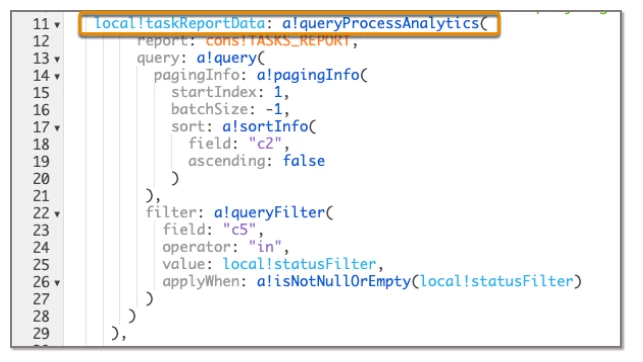
I am facing this issue.