yazhinim0001
July 8, 2021
Solved

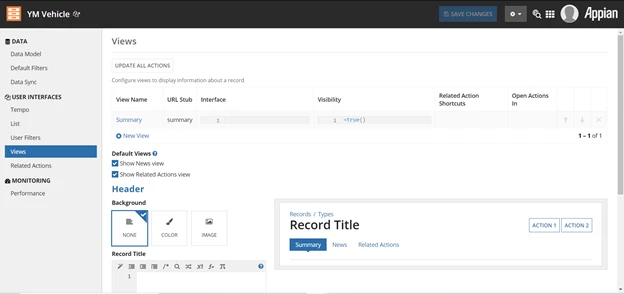
I don't see an option to generate interface button in view option under record type? How to fix this?

  • July 8, 2021
  • 4 replies
  • 0 views

Best answer by selvakumark

Hi [mention:b8e6fe648d2546fa9c804db777ec80c8:e9ed411860ed4f2ba0265705b8793d05],

I hope you're in the 21.2 version of Appian. If yes, then you have to configure the record source first and it should be synced in Appian. Only if the source is configured and synced, the generate interface option will be shown.

docs.appian.com/.../Appian_Release_Notes.html

4 replies

selvakumark
July 8, 2021

Hi [mention:b8e6fe648d2546fa9c804db777ec80c8:e9ed411860ed4f2ba0265705b8793d05],

I hope you're in the 21.2 version of Appian. If yes, then you have to configure the record source first and it should be synced in Appian. Only if the source is configured and synced, the generate interface option will be shown.
docs.appian.com/.../Appian_Release_Notes.html

yazhinim0001
July 8, 2021

Hi Selvakumar Kumarasamy, Thanks for the quick reply. I checked my version it is in 21.1, can u help me to update my version?

selvakumark
July 8, 2021

If your Appian instance is self-managed(on-premise) then refer to the below link for upgrade:
https://docs.appian.com/suite/help/21.2/Upgrade_Guide.html

If you're on a cloud instance, then contact the Appian support team via your system administrator.