
December 20, 2021
Question

Implement Aggregation inside QueryProcess Analytics, while querying task report

  • December 20, 2021
  • 3 replies
  • 0 views

I have a requirement to send consolidated escalation emails. One user can have multiple tasks assigned to him. But requirement is we cannot send individual escalation emails to users as its increasing their mail box volume. So Instead of default task escalation email,  I need to create a consolidated email which will show all the tasks assigned to a particular user in a single mail if task isn't completed within 2 days.

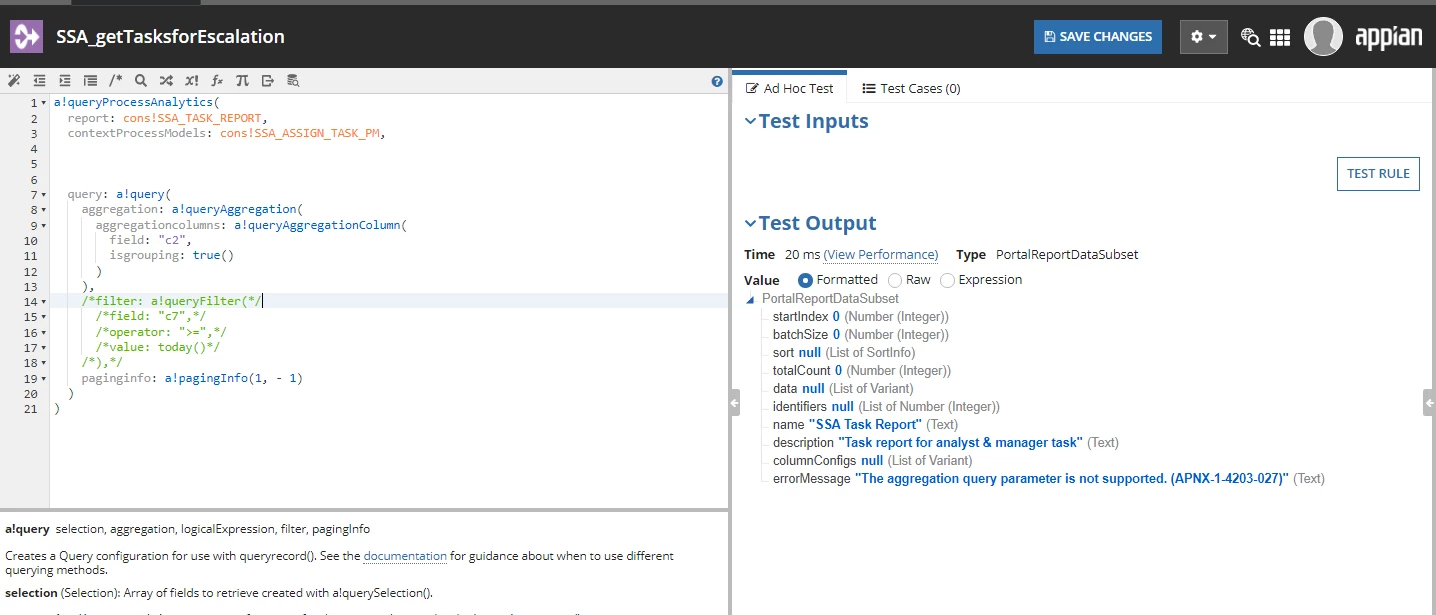
I have created a  task report &  I tried using grouping by task owner field  inside queryProcess analytics, but it isn't working , attached code image.
I am getting the below error message 
errorMessage"The aggregation query parameter is not supported. (APNX-1-4203-027)"

Please Help Me its Urgent.. TIA
3 replies

stefanhelzle0001
December 20, 2021

You can configure the aggregation inside the process report configuration.

December 20, 2021

Make sure to move the column you want to group by as the first column in the Task report and check the "Group By" option

peter.lewis
Employee
December 20, 2021

Personally I wouldn't use an aggregation at all in your query - I'm assuming you still need to return all the task IDs so you can provide links to them, right? In that case it might be easiest to (1) query all the active tasks (2) use an expression to identify the unique users (you can use the union() function to return a unique list of items) and (3) use a!forEach() to iterate over the unique list and associate each user with their tasks.

Just to verify - how many users / tasks are you expecting to view here?