
May 8, 2025
Solved

Multiple values in Process Report column

  • May 8, 2025
  • 19 replies
  • 0 views

Hello everyone,

I am having issues with querying process report which has multiple (different) values in one column. The column is filled with data from a list of CDTs, for example:
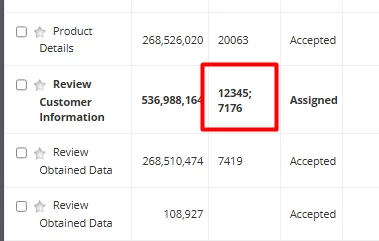
I've tried setting it as a list of integers and strings, but either way, when trying to query all rows which have a value "12345" in that column (by using a!queryProcessAnalytics), I get no results.

 a!queryFilter(
    field: "c4",
    operator: "includes",
    value: tostring("12345")
)

I also tried all different combinatios (in, includes, strings, integers....).

Thanks in advance!

Best answer by mikes0011

I fear you're not quite understanding the full capability of the solution I've detailed here.  Sorry if my description thus far has been misleadingly vague or something.

The array is concatenated such that the value ends up like "[123][1234][234][456]" (etc).  See my previous configuration screenshot for the expression code used to generate this string.

When querying, you use "includes", and the value you pass into the filter is done thus:

operator: "includes",
value: "[" & ri!myValue & "]"

This will find exact matches, as I previously said.

19 replies

harshas2775
May 8, 2025

Did you try using "in" operator instead of includes when using list of integer or string

anak3061Author
May 8, 2025

Yes, it just returns an empty dataset.

harshas2775
May 8, 2025

In your process report what is the data type for that column

shubhama926776
May 8, 2025

Is the column a string or a list of strings?

anak3061Author
May 8, 2025

Currently, it's a list of strings. But I tried with a non-array string as well.

dimitriss5700
May 8, 2025

In the process report make the C4 field as string with tostring() function and use includes the same way you have posted in the code. 

anak3061Author
May 8, 2025

Thanks for the idea, but it does not work in scenarios when there are similar IDs in that column, for example, I would get two results in case I have "12345" and "123456" in different rows.

dimitriss5700
May 8, 2025

What you could do more is to build a logic and additionally filter the result set of the initial queryProcessAnalytics.

You could try this one:

a!localVariables(
  local!resultData: a!queryProcessAnalytics(
    report: cons!DS_TASK_ASSIGMENT_PBPM,
    contextProcessModels: cons!DS_PM_TASK_ASSIGNMENT,
    query: a!query(
      filter: a!queryFilter(
        field: "c3",
        operator: "includes",
        value: ri!text
      ),
      pagingInfo: a!pagingInfo(1, 10)
    )
  ).data.c3,
  local!splitText: a!forEach(
    items: local!resultData,
    expression: fn!split(fv!item, ";")
  ),
  local!searchIndexes: wherecontains(
    ri!text,
    touniformstring(local!splitText)
  ),
  index(
    local!resultData,
    local!searchIndexes,
    null()
  )
)

This is the result 

nurudinl2355
May 8, 2025

[mention:b8bc6b28f38f4df4983b8b1b200d55ec:e9ed411860ed4f2ba0265705b8793d05] you will have to convert the value in column from array into one value, for example tostring("12345; 7166").

a!queryFilter expects in the field to have only one value per row, and not an array.

In your case value in the field c4 is an array {12345; 7176}, but it should be one value. If you concatenate them, or cast them to string, it will be considered as one value.

After that filter will work.

Beware that, if you use tostring, it will include all rows which have that value in that column.

You will need to check which one you really need from the returned rows, or add additional filter(s) based on the business logic.

I hope it helps you in this endeavor.

mikes0011
Brainy
May 8, 2025

The way I've handled this sort of thing before is to force the column's data into a flattened string (though usually i'll create a brand new column for this, even if it seems redundant), because once it's a flattened string (instead of list), the query should work on it.

edit: see the example I posted in another comment of mine in this post, here.