
October 1, 2024
Question

To remove zero values from mouse hovers in charts

  • October 1, 2024
  • 4 replies
  • 0 views

Hi Everyone, We have a requirement to remove the unwanted data i.e., the data without value or zero value from the mouse hover as highlighted below from the chart. Can anyone please help us and let us know how this can be achieved?
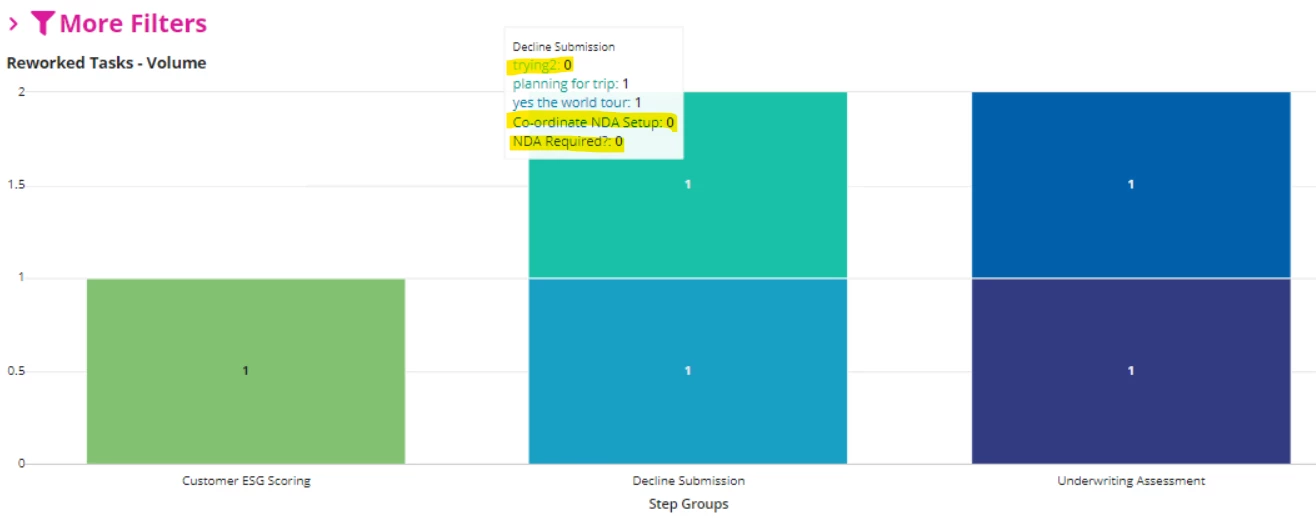
The highlighted values from the above screenshot shouldn't be visible to the user.

Note: Record data is being used to populate this chart


4 replies

kumara0180
October 1, 2024

You would need to filter them before preparing the char. Basically your decline submission has 5 groups and 3 of them are having no value. So filter them out before preparing your chart

October 2, 2024

Hi [mention:d71dc0922a44411db41369c6058e69ad:e9ed411860ed4f2ba0265705b8793d05] , The other 3 groups are from Customer ESG Scoring and Underwriting Assessment. If I hover over those then the respective groups are getting populated with value and others are getting marked with 0 as we have used a!measure and "COUNT" as function in it.

October 1, 2024

To avoid loading more data than is needed, I recommend on the query rule to add a filter to only select the values that are not null and not equal to zero. 

October 2, 2024

Hi [mention:544ef975f5414ea59a9b6bad8530d285:e9ed411860ed4f2ba0265705b8793d05] , We have added the filters but since we have added secondary grouping it is considering all values to display even if it is not applicable for that particular column(for ex. Decline Submission as shown in above screenshot).