

ponnuchama617877
July 20, 2023
Question

Appian RPA Agent/Robot goes offline

  • July 20, 2023
  • 14 replies
  • 0 views

Hi Everyone,

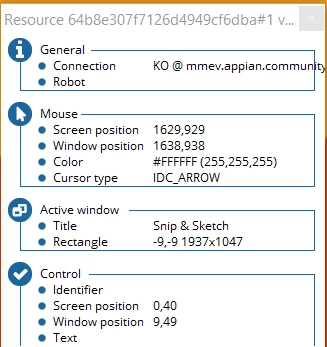
   Good day! The appian RPA agent goes offline frequently in my local machine. I have installed the latest rpa-installer only. How to fix this issue? PFA for your reference. Thanks in advance!
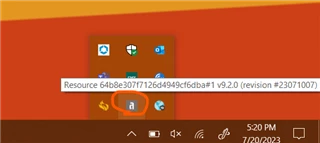
1) Initial Status
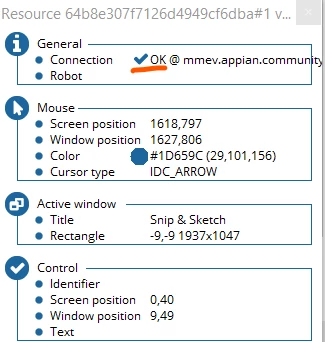
2) Went offline within 1 minute
14 replies

randy.richeson
July 20, 2023

Is there an ERROR message in the jidoka-client.log file? If so, the message may help further troubleshoot the root cause.

ponnuchama617877
July 21, 2023

Hi Randall Richeson,

   Thanks for your reply. As I am new to Appian RPA, May I know how to download "jidoka-client.log file"?

randy.richeson
July 21, 2023

You can find this on the host machine where the agent is installed. Here is an example.

July 21, 2023

Are you re-installing this agent anywhere, or is anyone else trying to download the same robot onto their machines? Re-downloading the installer will invalidate your current agent. 

ponnuchama617877
July 21, 2023

Hi Tien Bui,

      Actually I downloaded the same agent more than two times and installed it in the same local machine (uninstalled the older version before installing the latest rpa-installer). How to fix this issue? Thanks!

July 21, 2023

I would just comb through your machine to make sure all instances of the agent have been uninstalled. Then just start fresh with a new download and installation of that robot. You can also try to just delete the current robot from the RPA Console, create a new one, and try again if you want to start completely from scratch. 

hirushiharant0001
May 10, 2024

Hi [mention:34ba7edb74b347929404ff29bc5ea79c:e9ed411860ed4f2ba0265705b8793d05] ,

I've encountered a similar situation. Whenever there's an error in the RPA task, the bot goes offline for a few seconds (10-20 sec) before coming back online. I recall this being the typical behavior for Appian RPA. Is this the same scenario for you as well?

May 28, 2024

Hi,

When RPA task encounters some error or you abort the RPA task it takes some time to come back online again.

akshayg2355
May 30, 2024

You need to click on the installed application in the local machine, refresh the bot page.. It will come online

arulk0002
May 31, 2024

[mention:34ba7edb74b347929404ff29bc5ea79c:e9ed411860ed4f2ba0265705b8793d05]  If you are new to RPA. These are the basics

1. Run your BOT as administrator
2. Check your operation console
3. If the bot is unable to retrieve the element, it will go offline or disable. You will need to wait for 30 seconds until the bot comes back online or standby. (check RPA configuration log)
4. If the bot is still offline after 30 seconds, you don't need to download it. Instead, go to your folder and run the agent again.