jaideepb0002
September 15, 2022
Solved

Appian RPA update multiple get attributes in RPA Loop

  • September 15, 2022
  • 9 replies
  • 0 views

hi,

I am trying to create a BOT that will read records from Appian DB, hit a website, extract information (get attributes) and update few other columns of the DB.

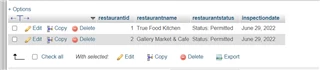
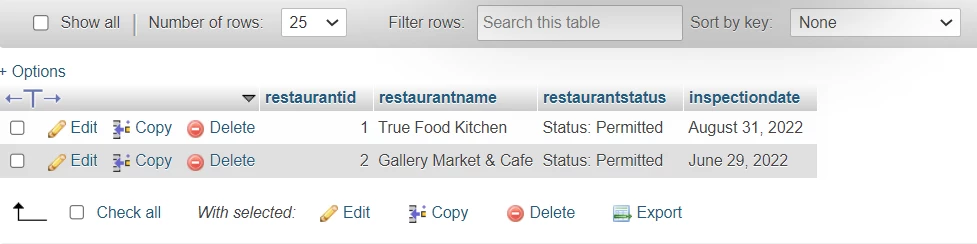
The table is

The BOT reads restaurantname (in a loop), get attributes (status and date) and update the DB back

this is what I have
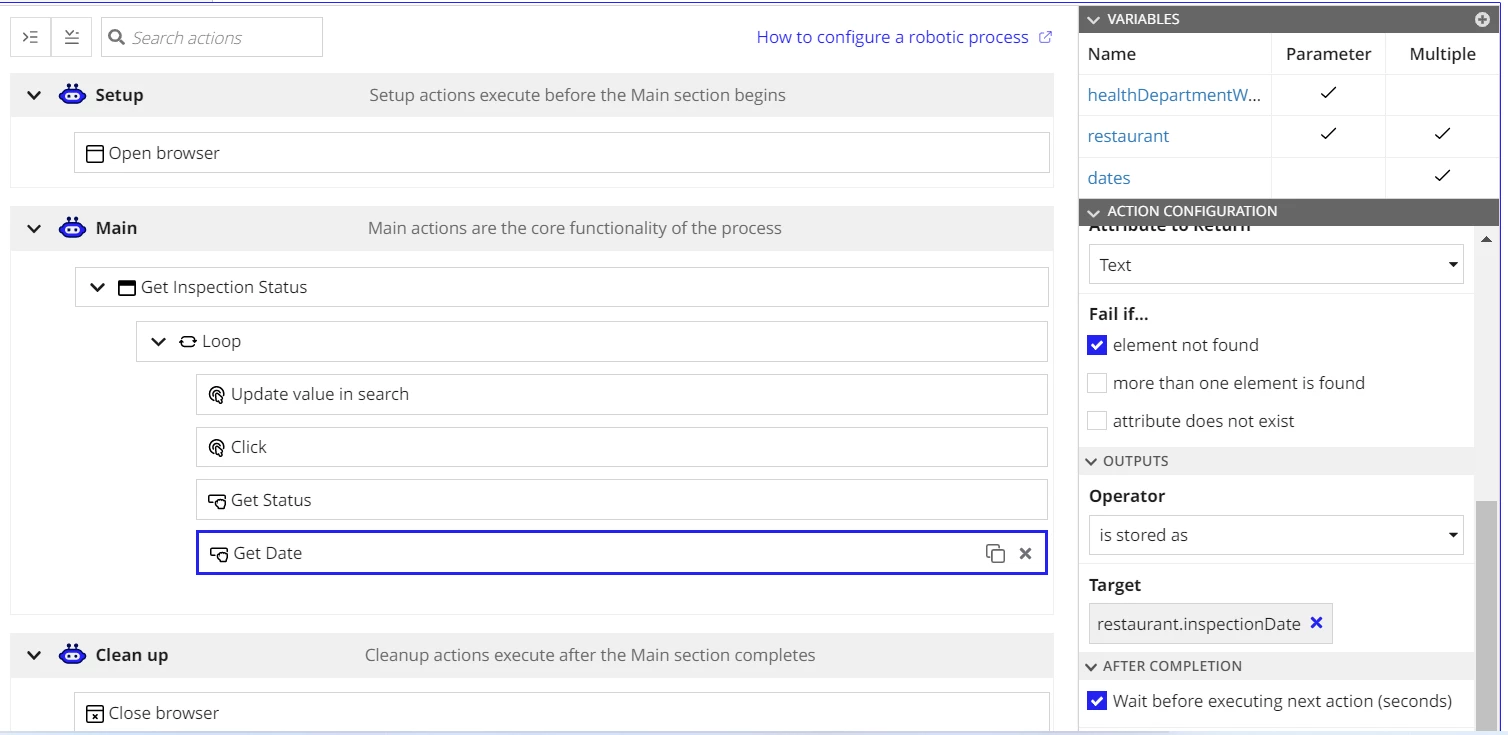
Loop is: foreach pv!restaurant.restaurantName

Update value in search is "interact with element" with value as fv!item

Get Date is 'get attribute' with target as restaurant.inspectionDate where restaurant is a variable of type CDT that has
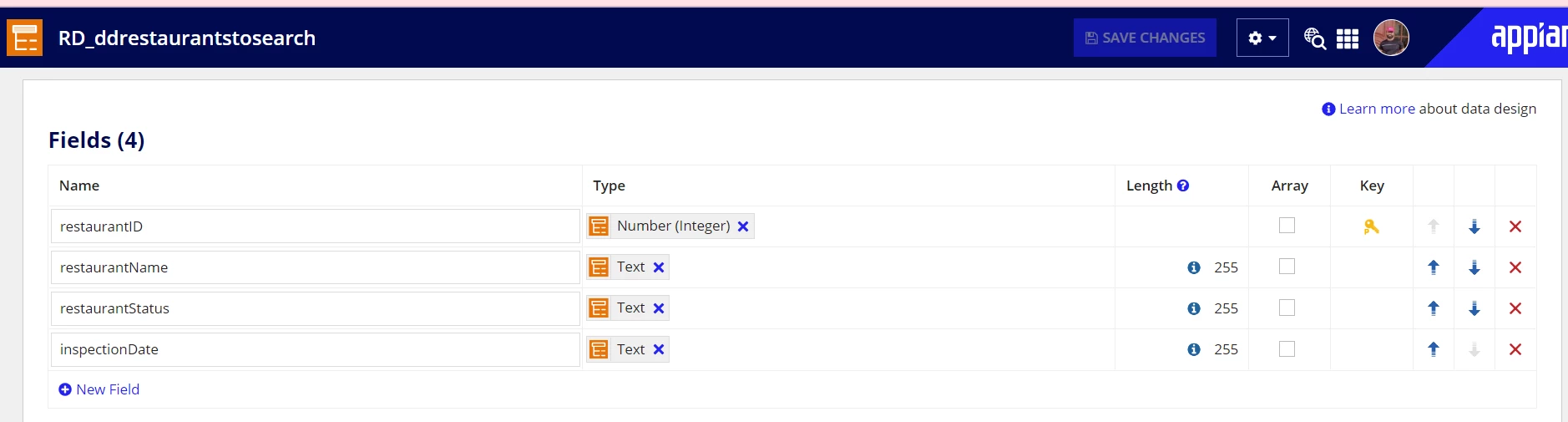
when i run this BOT (through a process model) I see the restaurant names are picked up fine by the loop (one after another),

however the status and date values that gets updated is for the last entry in the table (in this case: Gallery Market & Cafe) 

so when I see the process variable in BOT after it has run it is 

Value
[{"restaurantID":1,"restaurantName":"True Food Kitchen","restaurantStatus":"Status: Permitted","inspectionDate":"June 29, 2022"},
{"restaurantID":2,"restaurantName":"Gallery Market & Cafe","restaurantStatus":"Status: Permitted","inspectionDate":"June 29, 2022"}]
but actually it should be 
Value
[{"restaurantID":1,"restaurantName":"True Food Kitchen","restaurantStatus":"Status: Permitted","inspectionDate":"Aug 31, 2022"},
{"restaurantID":2,"restaurantName":"Gallery Market & Cafe","restaurantStatus":"Status: Permitted","inspectionDate":"June 29, 2022"}]
How do I make my BOT retain the attribute value (Aug 31, 2022) of the first record and not get overridden by the attribute value of the last record ??
any help will be appreciated
my process model works fine.. the problem I see is in the BOT itself. Once the Value is updated correctly the process model will do its job. Let me know if you need more information 
my current output is 
but it should be
thanks
jaideep

Best answer by jaideepb0002

finally was able to get this resolved

Apparently in the Evaluate Expression I had to move the restaurantid as well (which is the primary key) and all other fields..
a!update(
  data: pv!restaurant,
  index: fv!index,
  value: 'type!{urn:com:appian:types:RD}RD_ddrestaurantstosearch'(
    restaurantId: fv!item.restaurantId,
    restaurantName: fv!item.restaurantName,
    restaurantStatus: pv!itemStatus,
    inspectionDate: pv!itemInspectionDate)
  )

and target field as pv!restaurant variable

9 replies

cyrus.saadat
September 15, 2022

Hello,

In your "Get Attribute" actions for "Get Status" and "Get Date", you need to specify the index of the CDT that is within the loop in the target field. For example, save into restaurant[fv!index].inspectionDate. The same issue will occur on the status.

jaideepb0002
September 16, 2022

Hi Cyrus,

I do not have the 'edit as expression' link for the target field. just the dropdowns available

One other option was to create a temporary pv! variable - itemStatus and itemInspectionDate and then use the 'Evaluate Expression' 

Inside the loop

Step 1:use get attribute to move the values to ItemStatus and itemInspectionDate like

Step 2:  Use evaluate expression at the end of the loop ..

a!update(pv!restaurant, fv!index, 'type!{urn:com:appian:types:RD}RD_ddrestaurantstosearch'(restaurantName: fv!item, restaurantStatus: pv!itemStatus, inspectionDate: pv!itemInspectionDate))

but looks like I need to work on the expression. It is not populating anything

Any suggestions ??

thanks

jaideep

cyrus.saadat
September 16, 2022

Hi Jaideep,

With what you have, try appending the constructed CDT into pv!restaurant.

In RPA outputs for the evaluate expression select "Is appended to" the target pv restaurant.

In the expression itself, only have the constructor piece:
'type!{urn:com:appian:types:RD}RD_ddrestaurantstosearch'(restaurantName: fv!item, restaurantStatus: pv!itemStatus, inspectionDate: pv!itemInspectionDate))

September 21, 2022

I have the same problem as well, I'm trying to update the status field of the current item in the loop after processing it, but it doesn't get saved in the variable. I can't use the target since it doesn't have an option to select an index or create an expression to point to the current index of the loop. I want to save the status first in the cdt variable so I can run the process model to update database just once after the loop, but I can't seem to find a workaround. Have you solved this problem?

jaideepb0002
September 21, 2022

I just figured out the solution yesterday..i have posted it now above. Please try to learn it and see if it helps...if not we can discuss more.

thanks

jaideep