harisha7770
August 23, 2023
Question

Chrome Drivers

  • August 23, 2023
  • 11 replies
  • 0 views

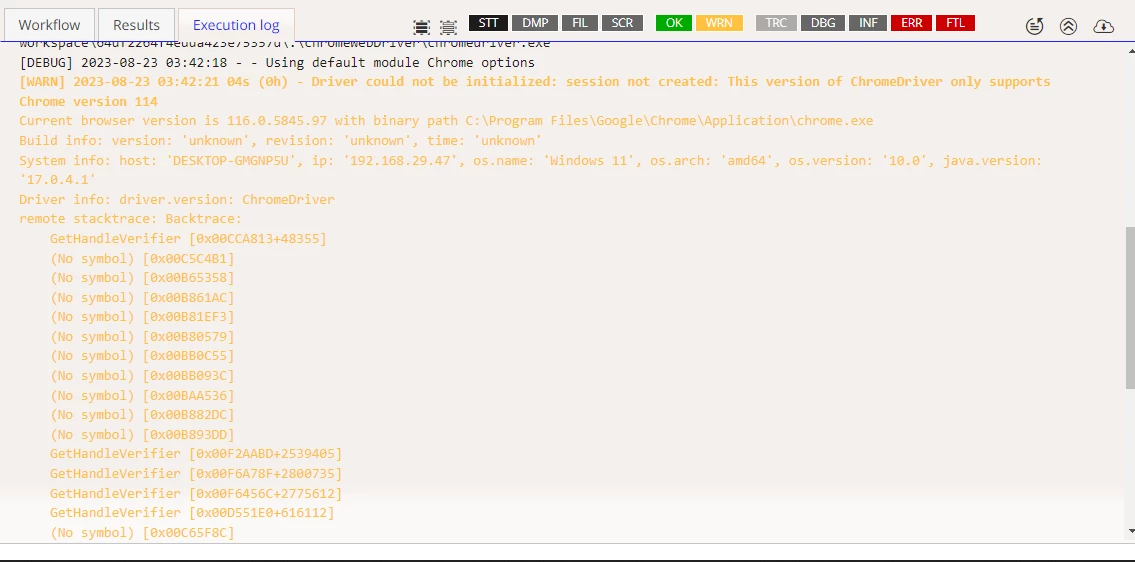
Has anyone else encountered Chrome driver errors while using Appian recently? I'm facing an issue and would appreciate any insights or solutions you might have to resolve this problem.

    11 replies

    mathieud0001
    August 23, 2023

    Is this for RPA pr Automated Testing using Selenium?

    harisha7770
    August 23, 2023

    Yes Mathieu

    mathieud0001
    August 23, 2023

    Yes? RPA?

    mathieud0001
    August 23, 2023

    Looks like Appian may have an issue updating to the latest drivers.

    Did you try unchecking that box and go update that driver manually?

    [View:https://docs.appian.com/suite/help/23.3/rpa-9.3/java-module-browser.html]

    Here is where you can download the latest drivers: [View:https://googlechromelabs.github.io/chrome-for-testing/]

    harisha7770
    August 23, 2023

    I have unchecked the box and did it manually Mathieu

    .

    mathieud0001
    August 23, 2023

    Are you sure you downloaded the proper driver and placed it in the appropriate location?

    [View:https://docs.appian.com/suite/help/23.3/rpa-9.3/configure-advanced-configuration-tab.html#support-files]

    miguelangel.carnero
    August 23, 2023

    The latest Chrome update (115+) prevents Appian to downloading and provide the appropriate driver version for your browser. In the meantime we update our process to retrieve it automatically, you can manually add the updated driver following these steps:

    1) Download the latest stable driver for your Chrome version here: googlechromelabs.github.io/.../

    2) From the zip downloaded we will need only "chromedriver.exe", please unzip that file from the package.

    3) In Appian RPA console go to Robotic Task > Support Files: docs.appian.com/.../configure-advanced-configuration-tab.html

    4) Create a the following folder structure and upload the chromedriver.exe file there.
    - Windows/Mac -> Root > ChromeXXX > chromeWebDriver > chromedriver.exe
    - Linux -> Root > ChromeXXX > ChromeWebDriver > chromedriver.exe
    Please note these path are case sensitive.

    5) Go to your failed Robotic Task > Configuration > General Information and add the following label in "Permission tags" > ChromeXXX

    6) Please note in 4) and 5) ChromeXXX will be the current version of your Chrome (eg Chrome116)

    In order to let Appian auto-resolve the driver again when the fix is ready, you just need to remove the "Permission tags" added to your Robotic Tasks.

    sabrya0001
    December 7, 2024

    Thank you [mention:fcc981e8b4ba4f2ca9666e0fe8df41f0:e9ed411860ed4f2ba0265705b8793d05] I was trying to use Edge with RPA. The updated link to the advanced configuration is: Browser Actions - Appian 24.4

    I was able to manually upload MS Edge drivers. But could not find the checkbox "Allow Appian to Provide Latest Selenium Drivers" checkbox in the latest Community Edition.

    miguelangel.carnero
    August 24, 2023

    This issue has been solved.