
harisha7770
August 23, 2023
Question

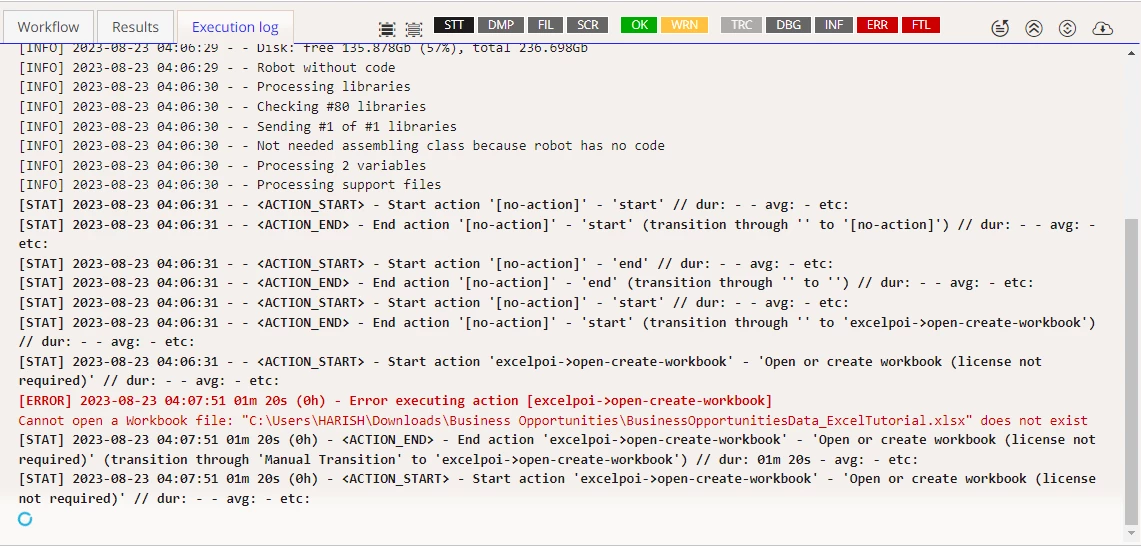
Excel Workbook File Path issue

  • August 23, 2023
  • 9 replies
  • 0 views

"I've been providing the correct file path to the 'Open Excel File' action in Appian for a robotic task, yet I keep receiving an error indicating an incorrect filepath. Has anyone else run into this problem? I'd be grateful for any advice on how to troubleshoot and resolve this error."
    9 replies

    mathieud0001
    August 23, 2023

    Where is your agent installed? Are you sure it has access to this file?

    harisha7770
    August 23, 2023

    C:\Users\HARISH\AppData\Local\Appian RPA  .This is the location where my agent is installed

    mathieud0001
    August 23, 2023

    OK. And you are sure that path to the Excel is OK?

    August 23, 2023

    It seems that your are including the quotes (") in the file path parameter. 

    Even if there are blank spaces in the full path, it is not necessary to put the quotation marks

    harisha7770
    August 24, 2023

    Thank you  David ,Its working fine now

    mathieud0001
    August 24, 2023

    Hi [mention:ea9f5947e7b043e1a34a7292b76c9888:e9ed411860ed4f2ba0265705b8793d05]  - if an answer helps you, please mark it as verified so that others can find it later.