October 12, 2021
Solved

Execute Robotic Process Smart Service input nodes not working

  • October 12, 2021
  • 4 replies
  • 0 views

Hello, 

I have a Execute Robotic Process inside a process per documentation it says for this node: 

-------------------

Data tab

Node inputs

When an integration is selected, the integration's inputs will automatically appear as node inputs. If you change the selected integration or the inputs of the selected integration are updated outside the process modeler, the node inputs will be refreshed the next time you view the Data tab.

-------------------

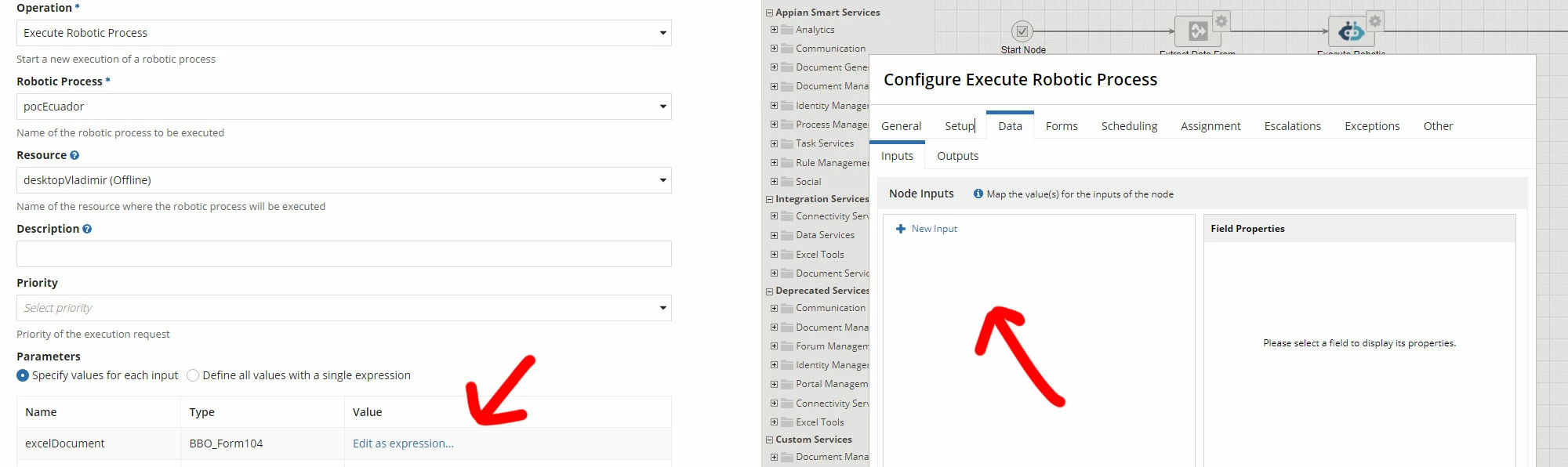
Problem which I am facing is that in the Robot I have 3 variables, they appears inside the Integration view but does not appears inside the pcoess Node in the Input Data Tab.

Any idea why ?
    Best answer by danny.verb

    Similar to other integration objects, you must define rule inputs to pass values into the Integration. You can then use the rule inputs as parameters to the robotic process. 

    4 replies

    danny.verb
    October 12, 2021

    Similar to other integration objects, you must define rule inputs to pass values into the Integration. You can then use the rule inputs as parameters to the robotic process. 

    October 12, 2021

    Where exactly those the rule inputs have to be defined ? inside the integration ? I don't have any options to create rule inputs inside the integration. 

    danny.verb
    October 12, 2021

    On the right side of the integration object there should be an arrow to open the pane. Click it, and you can define rule inputs at the top. docs.appian.com/.../Create_an_Integration.html