
August 2, 2021
Question

How to read each row from excel file

  • August 2, 2021
  • 9 replies
  • 0 views

Hi,

JFI, I am new to Appian and do not have admin access. 

I have excel file as below. I want to read each row and process on it. Please suggest me stepwise process for the same 
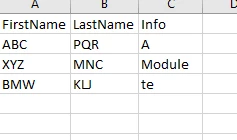
What I have tried so far is,

1. Created process with Excel data provider template, but when executed as it is, I am getting error as below

[ERROR] 2021-08-02 12:30:48 03s (0h) - java.lang.reflect.InvocationTargetException

Caused by: com.novayre.jidoka.client.api.exceptions.JidokaException: Error invoking method 'processItem' ....

Thanks in advance,

Mohini

9 replies

August 2, 2021

Hi Mohini,

You can user readExcelSheet() fn. It will give you a result set.

use forEach to iterate over the resultset and transform it into your own cdt type.

a!localVariables(
  local!excelFile: if(
    isnull(ri!docs),
    {},
    readexcelsheet(
      excelDocument: ri!docs,
      sheetNumber: ri!sheetNumber,
      startRow: ri!startRow
    ).result
  ),
  local!flatten: a!flatten(local!excelFile),
  local!finaldata: {
    a!forEach(
      items: local!flatten.values,
      expression: 'type!{urn:com:appian:types:ABC}ABC_testCDT'(
        date: fv!item[1],
        productName: fv!item[2],
        manufacture: fv!item[3],
        clerance: fv!item[4],
        package: fv!item[5],
        shipped: fv!item[6]
      )
    )
  },
  local!finaldata,
  
)

August 2, 2021

Thanks,

Where should I write this code OR where I can put this file of code.

Also, how the bot will understand which file it needs to read. I have simply uploaded file but did not mention it anywhere

danny.verb
August 2, 2021

The above example is using Appian expressions with Appian Documents. You don't need to use RPA for this task