
August 21, 2023
Solved

Issue with RPA Process Execution - Browser Recognition Error

  • August 21, 2023
  • 4 replies
  • 0 views

Hi All,

Whenever I run the RPA process and encounter issues such as process stuck near any step or failures due to XPath changes, I'm encountering an unexpected error in the execution log.

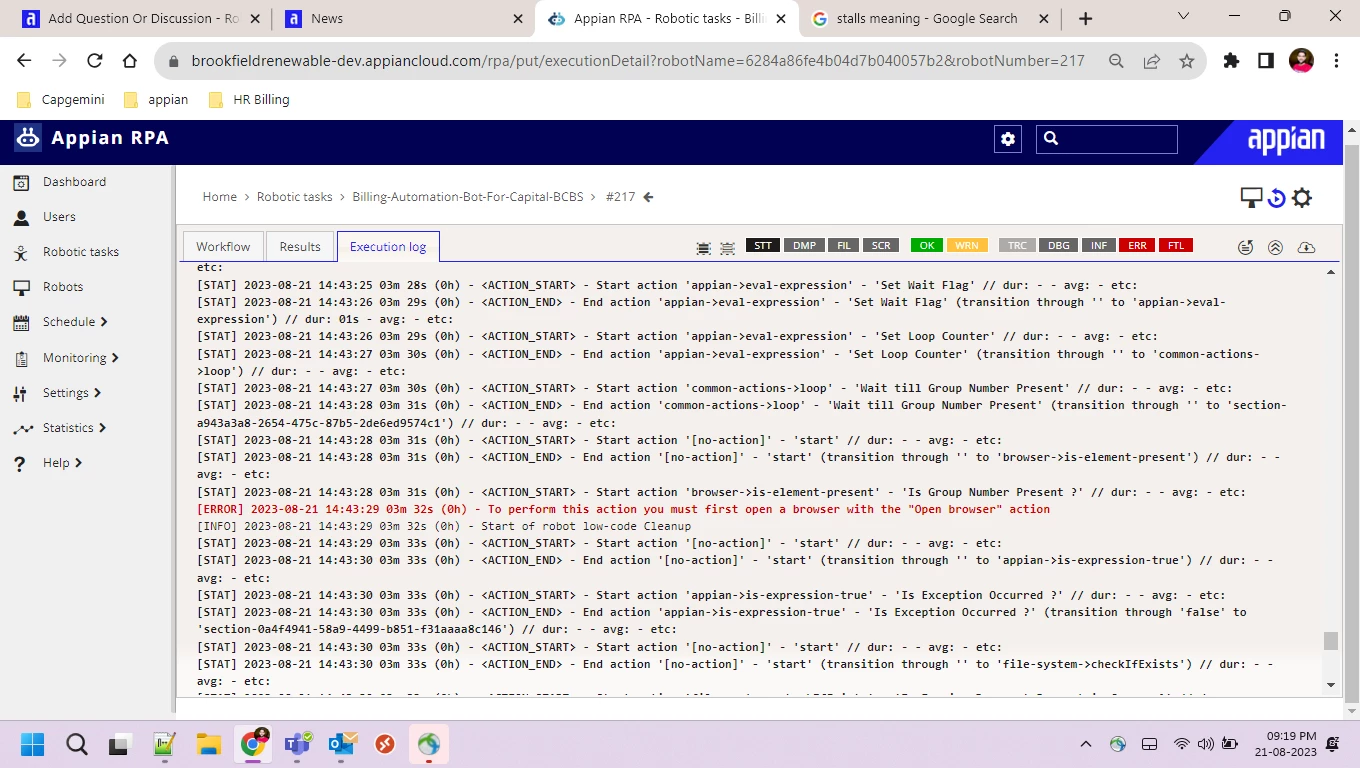
The error message reads: "To perform this action, you must first open a browser with the open browser action." even when a browser is already open and operational. Unfortunately, it appears that the system is not recognizing the open browser despite its presence.When attempting to validate element presence using the "is element present", despite setting up expressions to recheck the element 15 times within a loop, I'm encountering an issue where the loop isn't being entered, and instead, an "open browser" error is being generated. 
Best answer by shashankr0001

Hello 

I found a solution to my earlier question.
At the beginning i use to open browser & open multiple tabs in it when i close one tab  Appian's assumption that I've closed the entire browser

Instead of closing a tab, I'm now switching tabs and completing my process. This prevents Appian from assuming that I've closed the entire browser. But at the end of the process i am using close browser to close entire browser.

4 replies

August 23, 2023

Same here, did you get any way out yet? https://kodi.software/ https://dltutuapp.com/tutuapp-download/ 

August 23, 2023

Hi:

As far as I know, this problem only happens in cases where the browser was not actually opened using the "Open Browser" action. Did you included that action in your Robotic Task? This is an example.

If yes, to try to reproduce the issue, please could you share the steps made by the robotic task before the failure occurred?

August 24, 2023

Hi David,

I'm utilizing the "Open Browser" function in my process as shown below. While I can see the browser to open during execution, I sometimes encounter an "Open Browser" error if the bot is unable to interact midway.

For instance, if the bot opens Chrome browser, navigates to a website, logs in successfully, but then fails to click a specific button, "Open browser" error occurs. The "Open Browser" error can occur at any point in the process if the bot encounters interaction issues and is unable to proceed.

Here you can see the open browser from execution log. 


Here its checking group number present on the website bot failed to identify the group number present and this is the error

its asking to open browser 

When the bot can't interact with a specific button, the execution logs should indicate that the bot was unable to interact with the button. However, currently, the logs display an "Open Browser" error message instead.

shashankr0001AuthorAnswer
September 20, 2023

Hello 

I found a solution to my earlier question.
At the beginning i use to open browser & open multiple tabs in it when i close one tab  Appian's assumption that I've closed the entire browser

Instead of closing a tab, I'm now switching tabs and completing my process. This prevents Appian from assuming that I've closed the entire browser. But at the end of the process i am using close browser to close entire browser.