
April 9, 2021
Question

Jenkins Connectivity With Appian RPA

  • April 9, 2021
  • 2 replies
  • 0 views

Hi All,

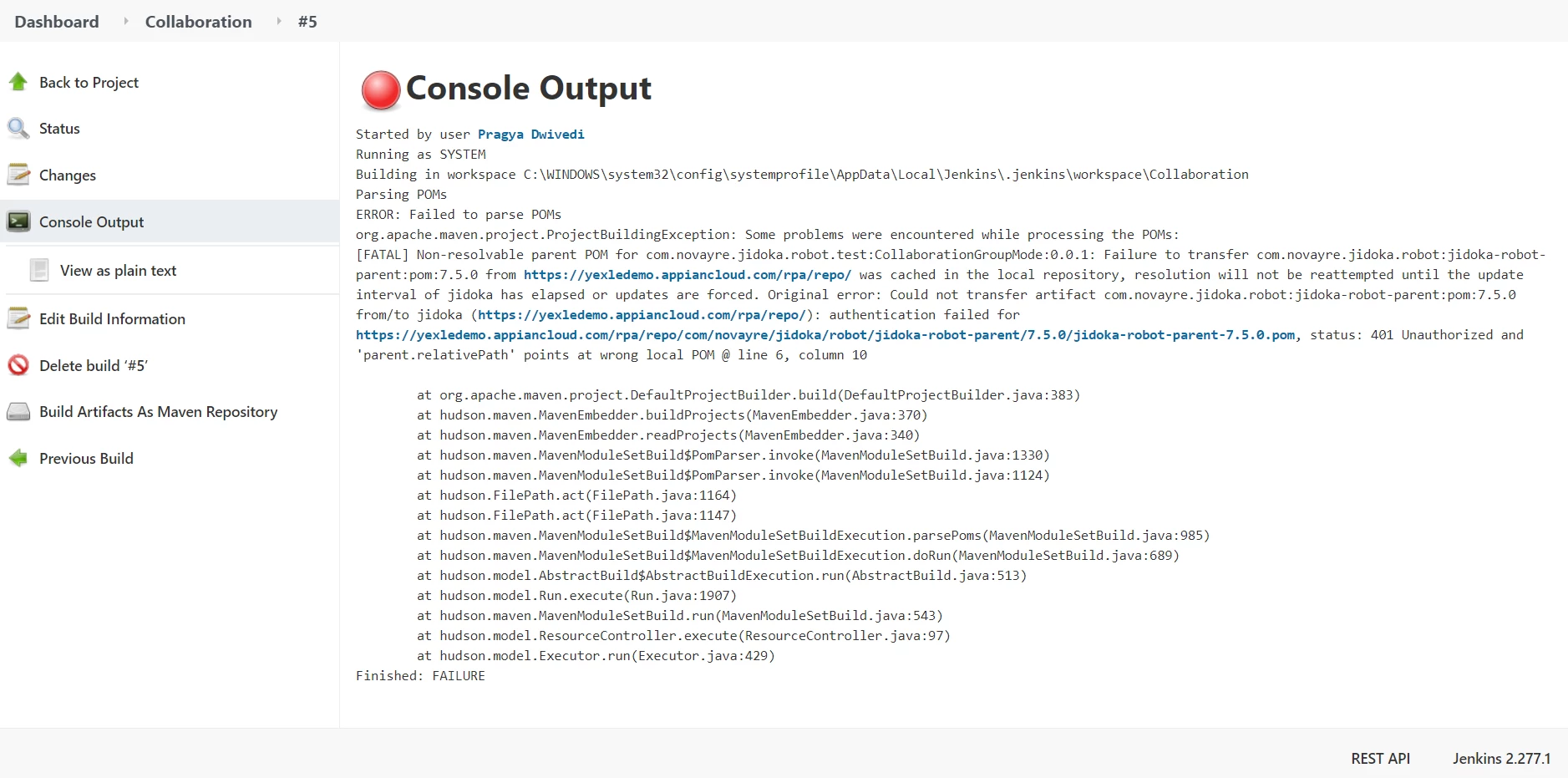
I am trying to connect Jenkins with the Appian RPA, where we have to pass a pom file path, when we create Jenkins job. There is some authentication issue while parsing the pom file. PFA the screenshot for the same. In case anyone has faced similar issues please share a work around.

Thanks in advance!

Thanks and Regards,
2 replies

samrat.jha
April 9, 2021

The error seems to indicate that you are either trying to build or deploy the robot in a Jenkins agent. But maven cannot authenticate to your RPA site yexledemo@appiancloud.com/rpa/repo

This is likely because the machine running the job doesn't have a settings.xml file in it's ~/.m2 directory with the appropriate credentials to pull from that site. You will want to follow: https://docs.appian.com/suite/help/21.1/rpa-7.5/setup/maven-setup.html#example-settings.xml-file to create a similar settings.xml file and put that on the Jenkins agent 

April 14, 2021

Hi Samrat,

Thanks for the update, Now I can successfully execute the Appian RPA process on Jenkins.