
April 24, 2024
Question

Not able to bring robot online

  • April 24, 2024
  • 2 replies
  • 0 views

Hi Team,

I have just started exploring appian RPA. Following the instructions in the documents, i downloaded the JRE ver 8 and then installed the agent. I received the message that installation is successful but the agent is not running. The agent icon in the taskbar is grey.

Also, when i checked the connection details, it shows - 
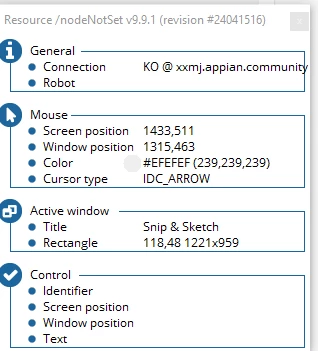
my bot remains offline in the operations console-

Can anyone please assist me with the correct way to troubleshoot and understand the root cause so that the bot is online.

    2 replies

    srmm0001
    April 25, 2024

    Hi,

    1. Check JRE Version: Confirm that Java Runtime Environment (JRE) version 8 is correctly installed and configured on your system.

    2. Verify Agent Configuration: Ensure that the agent is configured with the correct credentials and URL to connect to your Appian RPA instance.

    3. Examine Agent Logs: Look for error messages or warnings in the agent logs that might indicate what's preventing it from coming online.

    4. Restart Agent: Try restarting the agent and/or your computer to see if this resolves the connectivity issue.

      or download again and install it
    May 6, 2024

    Try installing the latest version of the agent again and then refresh the operations console.