
May 18, 2023
Question

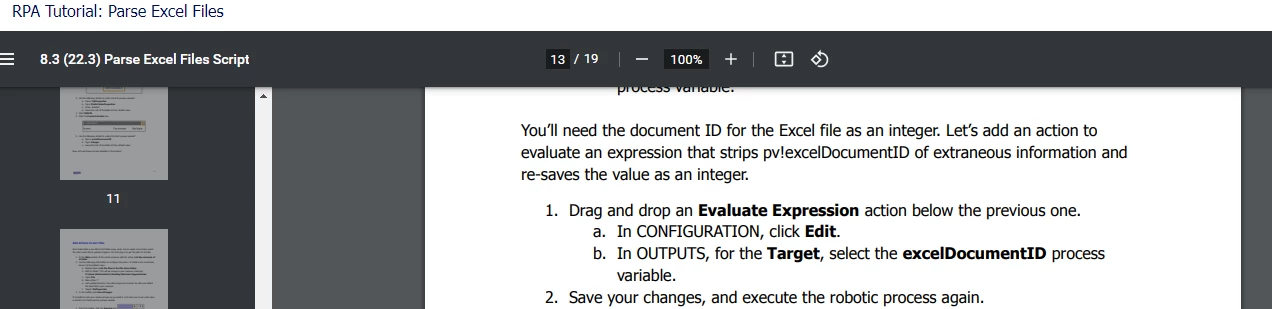
RPA Evaluate Expression action below the previous one. a. In CONFIGURATION

  • May 18, 2023
  • 2 replies
  • 0 views

I watched RPA Tutorial: Parse Excel Files

Please guide me what kind of code on 

Evaluate Expression

Drag and drop an Evaluate Expression action below the previous one. a. In CONFIGURATION, click Edit.
Facing issue in RPA

Any one have solution 
2 replies

randy.richeson
May 18, 2023

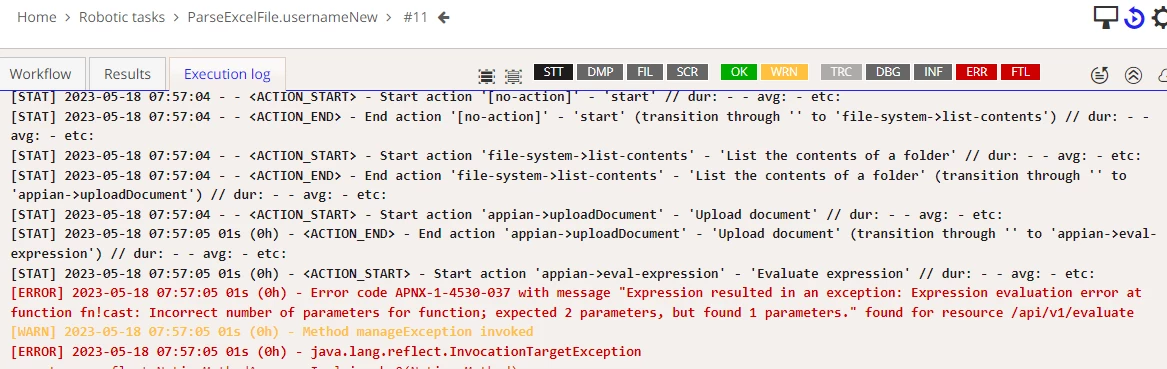
Looks like only 1 parameter was provided for the cast() function, when it needs 2.

As an alternative approach, have you tried replacing your current expression for the 'Evaluate expression' action to something like the following where the excelDocumentID is an integer type: 

tointeger(pv!excelDocumentID)

May 19, 2023

Thanks [mention:13e6402c5dc14637ac17d66d78f6da00:e9ed411860ed4f2ba0265705b8793d05]