
December 7, 2023
Solved

RPA Test Connection

  • December 7, 2023
  • 3 replies
  • 0 views

Hi team!

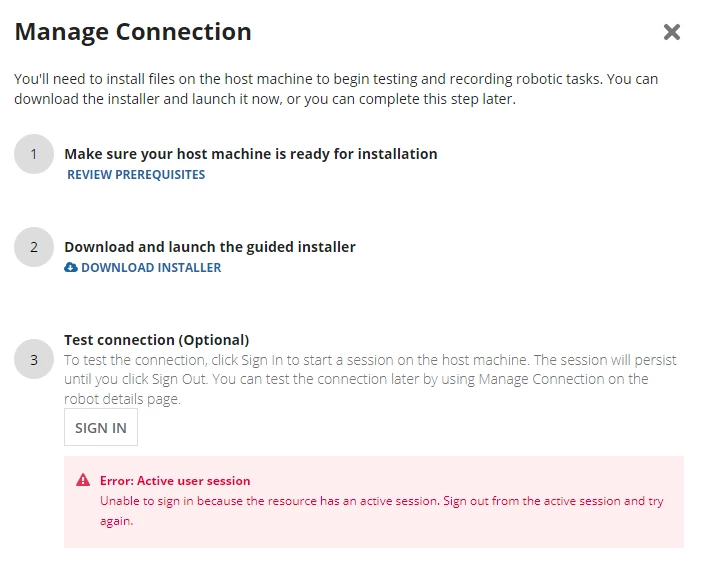
I have created a Robotic Task for automatic input in RPA, and it works fine when I test the Robotic Task, and when I run the process with Execute Robotic Task in the Process Model, the Robotic Task works fine as well. However, when I go to the Operation Console and click on Test Connection in the Manage Connection of the robot running the Robotic Task, the following error occurs: Error: Active user session
Unable to sign in because the resource has an active session. Sign out from the active session and try again. Troubleshooting does not tell me how to sign out from the active session exactly. My understanding is that if I can sign in with this, the robotic task will start automatically. Can anyone help me with a solution?

    Best answer by tien.bui

    Here are some troubleshooting scenarios: https://docs.appian.com/suite/help/23.4/rpa-9.3/manage-robots.html#troubleshooting

    Active session means you're still signed into the location where your agent is installed (e.g. if you installed it on your local machine and your laptop is still open). If it's on a VM, make sure to sign out of your VM.

    3 replies

    sriramk5349
    December 7, 2023

    Hi [mention:15998842abd847959f973ed620ea4b5f:e9ed411860ed4f2ba0265705b8793d05] ,

    Test connection is to check the sign in credentials are working or not. It is saying that the session in host machine is active. Thats the reason it is saying the resource has active session. 

    tien.buiAnswer
    December 7, 2023

    Here are some troubleshooting scenarios: https://docs.appian.com/suite/help/23.4/rpa-9.3/manage-robots.html#troubleshooting

    Active session means you're still signed into the location where your agent is installed (e.g. if you installed it on your local machine and your laptop is still open). If it's on a VM, make sure to sign out of your VM.

    December 8, 2023

    It worked perfectly! Thank you!