

christianm400190
November 7, 2024
Question

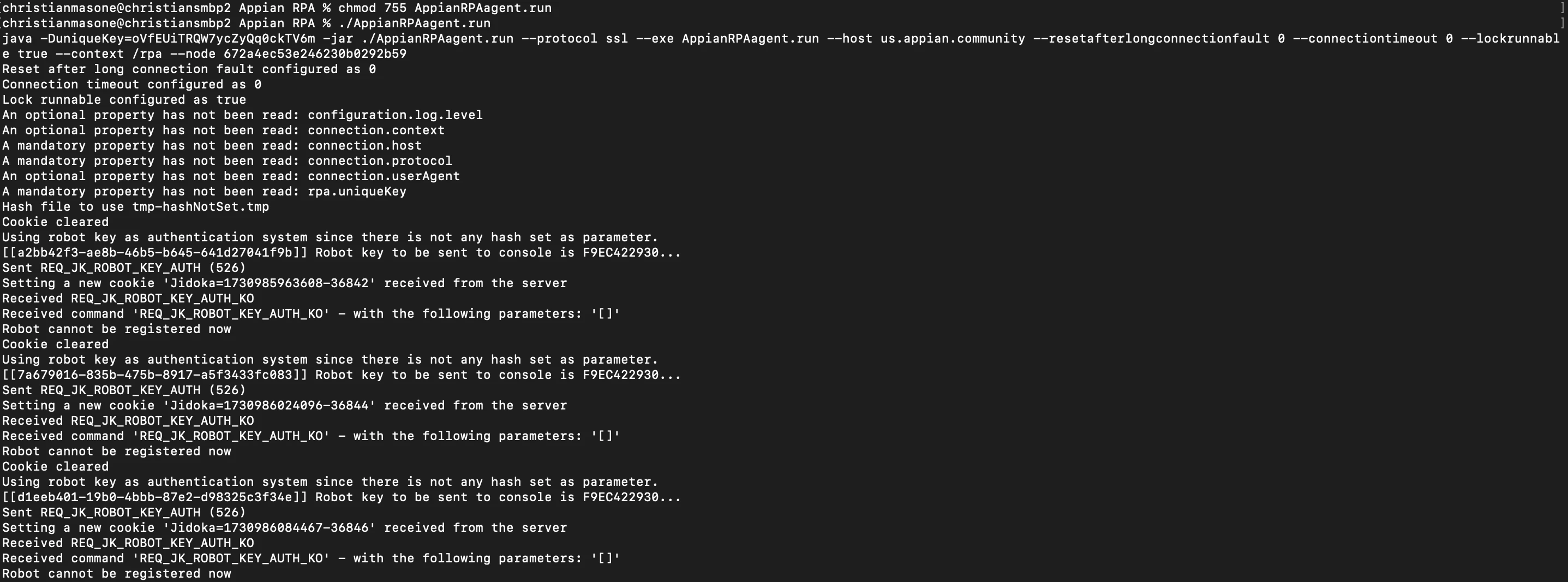
Running RPA files on Mac error "Robot cannot be registered right now"

  • November 7, 2024
  • 2 replies
  • 0 views

Hello,

I am trying to download the RPA files on my mac to use them. I have downloaded Java 17 from Oracle and followed the steps from Appian to run RPA, but I am getting the error message  "Robot cannot be registered right now" in the terminal. I have attached pictures below. Thank you!
2 replies

miguelangel.carnero
November 29, 2024

Hi [mention:6e94c681625744538bf822c0833afa9a:e9ed411860ed4f2ba0265705b8793d05] this can be caused to a rotation of the Robot Key. If you have switched off your RPA console, and you have set automatic Robot Key Rotation (default and recommended configuration), the Robot Key has changed. Here is the related documentation: https://docs.appian.com/suite/help/24.4/rpa-9.13/manage-robots-installation-config.html#robot-keys

In the folder where the agent is installed, you can find a jidoka.log file with more information. Please let us know if this helps.

joshuaa0001
November 27, 2025

It's kinda late reply now but sharing this for people who are still looking for answers

Appian version 25.4

1. I enabled manual robot key rotation on the RPA Console>settings>configuration

2. In the folder created for the RPA files, I created a file named getRobotKey.sh with the content below

echo "YOUR KEY HERE"


3. follow the remaining step on how to run the RPA bot on Mac/resized-image/__size/640x480/__key/communityserver-discussions-components-files/61/Screenshot-2025_2D00_11_2D00_27-at-10.27.13_2F20_AM.png