a!dropdownField() throws An error occurred while executing a save: java.lang.IllegalArgumentException: Invalid index: Cannot update integer index from type List of Null
I have a dropdown field that is giving me trouble. It used to work, but just started today.
It throws, "An error occurred while executing a save: java.lang.IllegalArgumentException: Invalid index: Cannot update integer index from type List of Null".
I am interpreting this error message to mean that I am trying to save a Null value into an integer index.
[View:/cfs-file/__key/communityserver-discussions-components-files/13/Dropdown-Field-Error.mp4:899:244]
I am limiting the drop down to the latest event. I do not want the applicant to choose any other value except the latest on.
Here is the code:
a!sideBySideItem(
            item: a!dropdownField(
              data: null,
              choiceLabels: rule!PMSO_getEventforLU()[1].event,
              choiceValues: rule!PMSO_getEventforLU()[1].eventId,
              label: "I am applying for the following Event",
              labelPosition: "ABOVE",
              placeholder: "--- Select an Event to apply ---",
              value: local!volunteerRequest['recordType!PMSO Volunteer Request.fields.eventId'],
              saveInto: local!volunteerRequest['recordType!PMSO Volunteer Request.fields.eventId'],
              searchDisplay: "AUTO",
              required: true,
              requiredMessage: "Please select the event you are applying for!"
            )
          ),
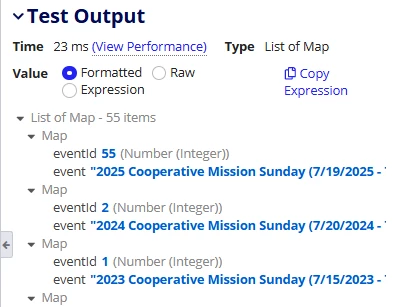
Here is the code for the expression rule. It seems to work just find and outputs both the event and eventID.
a!localVariables(
  local!data: a!queryRecordType(
    recordType: 'recordType!PMSO Event',
    fields: {
      'recordType!PMSO Event.fields.eventId',
      'recordType!PMSO Event.fields.event',
      'recordType!PMSO Event.fields.startDate',
      'recordType!PMSO Event.fields.endDate',

    },
    pagingInfo: a!pagingInfo(
      startIndex: 1,
      batchSize: 100,
      sort: a!sortInfo(
        field: 'recordType!PMSO Event.fields.startDate',
        ascending: false
      )
    )
  ).data,
  a!forEach(
    items: local!data,
    expression: a!map(
      eventId: fv!item['recordType!PMSO Event.fields.eventId'],
      event: concat(
        fv!item['recordType!PMSO Event.fields.event'],
        " (",
        fv!item['recordType!PMSO Event.fields.startDate'],
        " - ",
        fv!item['recordType!PMSO Event.fields.endDate'],
        ")"
      )
    )
  )
)
Here is the output from the expression rule.