
Question
Adding multiple files to an item in an editable grid
Hi,
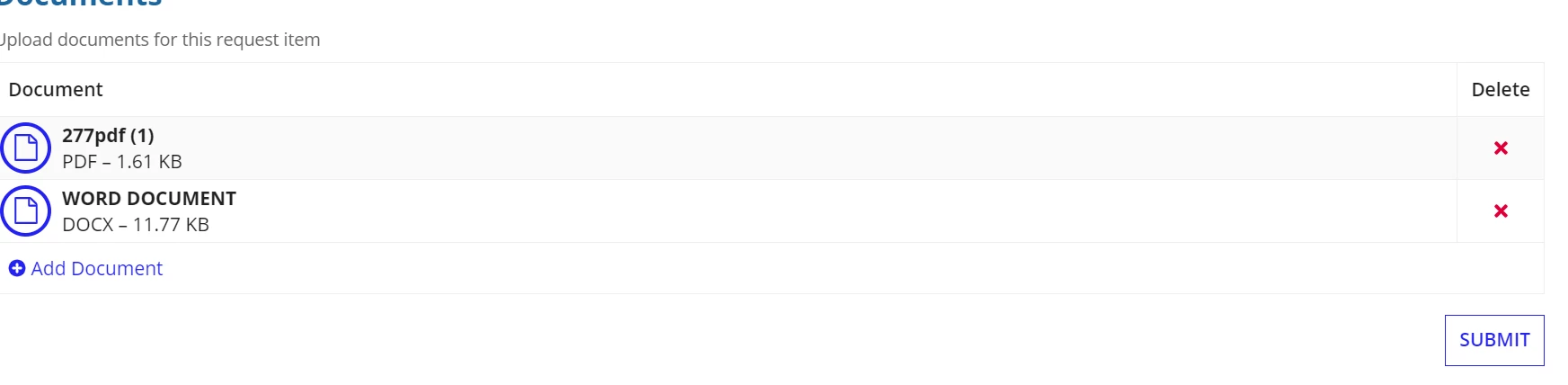
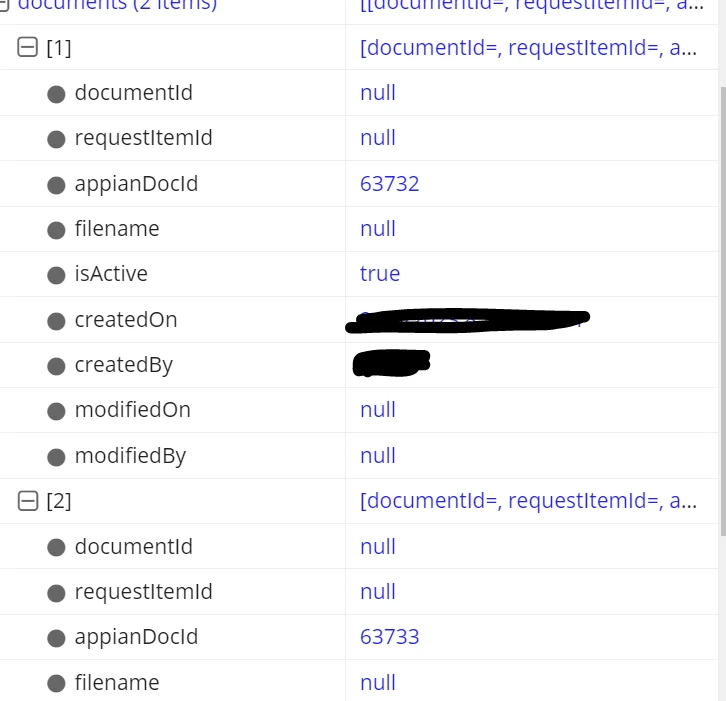
I want to upload multiple files to each item in an editable grid. I am using a link to add documents outside of the grid. When I submit the form for adding documents, I want to associate the documents with relevant item. I am using rule inputs of request _tems and request_item_documents CDTs. Because the requestitemId is null, I am not able to fetch the documents for the relevant request item.

How do I resolve this? Thanks in advance.
a!localVariables(
  local!hardwareClassList: rule!AMF_QR_getHardwareClassifications(),
  local!currentUser: loggedInUser(),

  local!selectedId,
  {
    a!gridLayout(
      label: "",
      labelPosition: "ABOVE",
      headerCells: {
        a!gridLayoutHeaderCell(label: "PDM Number", align: "CENTER"),
        a!gridLayoutHeaderCell(label: "Serial Number", align: "CENTER"),
        a!gridLayoutHeaderCell(
          label: "Part Description",
          align: "CENTER"
        ),
        a!gridLayoutHeaderCell(label: "Revision", align: "CENTER"),

        a!gridLayoutHeaderCell(label: "HW Class", align: "CENTER"),
        a!gridLayoutHeaderCell(label: "Quantity", align: "CENTER"),
        a!gridLayoutHeaderCell(label: "Document(s)", align: "CENTER"),
        a!gridLayoutHeaderCell(label: "")
      },
      columnConfigs: {
        a!gridLayoutColumnConfig(width: "DISTRIBUTE", weight: 2),
        a!gridLayoutColumnConfig(width: "DISTRIBUTE", weight: 2),
        a!gridLayoutColumnConfig(width: "DISTRIBUTE", weight: 3),

        a!gridLayoutColumnConfig(width: "DISTRIBUTE", weight: 2),
        a!gridLayoutColumnConfig(width: "NARROW", weight: null),
        a!gridLayoutColumnConfig(width: "DISTRIBUTE", weight: 1),
        a!gridLayoutColumnConfig(width: "DISTRIBUTE", weight: 1),
        a!gridLayoutColumnConfig(width: "ICON")
      },
      rows: {
        a!forEach(
          items: ri!requestItems,
          expression: a!gridRowLayout(
            contents: {
              a!textField(
                value: fv!item.pdmNumber,
                saveInto: fv!item.pdmNumber,
                characterLimit: 64,
                showCharacterCount: false,

              ),
              a!textField(
                value: fv!item.serialNumber,
                saveInto: fv!item.serialNumber,
                characterLimit: 400,
                showCharacterCount: false,

              ),
              a!textField(
                value: fv!item.partDescription,
                saveInto: fv!item.partDescription,
                characterLimit: 255,
                showCharacterCount: false,

              ),
              a!textField(
                value: fv!item.revision,
                saveInto: fv!item.revision,
                characterLimit: 64,
                showCharacterCount: false,

              ),

              a!dropdownField(
                placeholder: "HW Class",
                choiceLabels: index(
                  local!hardwareClassList,
                  'recordType!{3ec8fedc-5057-4343-8c39-cf34c46901cf}AMF Hardware Class.fields.{bc9287be-dd00-4682-9f35-6a706a8e1c5d}name'
                ),
                choiceValues: index(
                  local!hardwareClassList,
                  'recordType!{3ec8fedc-5057-4343-8c39-cf34c46901cf}AMF Hardware Class.fields.{30f9e578-81cf-4a40-b567-9bf85020c4b9}hardwareClassId'
                ),
                value: fv!item.hardwareClassId,
                saveInto: fv!item.hardwareClassId,

              ),
              a!integerField(
                value: a!defaultValue(value: fv!item.quantity, default: 0),
                saveInto: fv!item.quantity,
                showWhen: if(
                  a!isUserMemberOfGroup(
                    local!currentUser,
                    cons!AMF_GRP_VENDOR_USERS
                  ),
                  false,
                  true
                )
              ),
              a!linkField(
                links: {
                  a!dynamicLink(
                    label: "Upload Documents",
                    value: fv!index,
                    saveInto: local!selectedId
                  )
                }
              ),
              a!richTextDisplayField(
                value: a!richTextIcon(
                  icon: "times",
                  altText: "Remove" & fv!index,
                  caption: "Remove ",
                  link: a!dynamicLink(
                    value: fv!index,
                    saveInto: {
                      a!save(fv!item.isActive, false()),
                      a!save(
                        ri!requestItems,
                        remove(ri!requestItems, save!value)
                      )
                    }
                  ),
                  linkStyle: "STANDALONE",
                  color: "NEGATIVE"
                )
              )
            }
          )
        )
      },
      addRowLink: a!dynamicLink(
        label: " Add Request Item",
        value: 'type!{urn:com:appian:types:AMF}AMF_Request_Item'(
          isActive: true(),
          createdOn: now(),
          createdBy: local!currentUser,

        ),
        saveInto: {
          a!save(
            ri!requestItems,
            append(ri!requestItems, save!value)
          )
        }
      ),
      showWhen: isnull(local!selectedId),
      rowHeader: 1,

    ),
    a!localVariables(
      local!selectedItem: if(
        isnull(local!selectedId),
        {},
        displayvalue(
          local!selectedId,
          ri!requestItems.requestItemId,
          ri!requestItems,
          {}
        )
      ),

      local!documents: {},
      {
        a!sectionLayout(

          label: "Documents for " & local!selectedItem.partDescription,
          contents: {
            rule!AMF_FRM_AddRequestItemDocuments(documents: local!documents),
            a!buttonArrayLayout(
              a!buttonWidget(
                label: "Submit",
                saveInto: {
                  local!selectedId,
                  a!save(
                    ri!documents,
                   append(ri!documents,local!documents)
                  ),
                  a!save(local!documents,{})

                }
              )
            )
          },
          showWhen: not(isnull(local!selectedId))
        ),

      }
    )
  }
)