
March 7, 2023
Question

After editing and submitting the one row the other row is not editing and selecting in interface

  • March 7, 2023
  • 5 replies
  • 1 view

Hi,

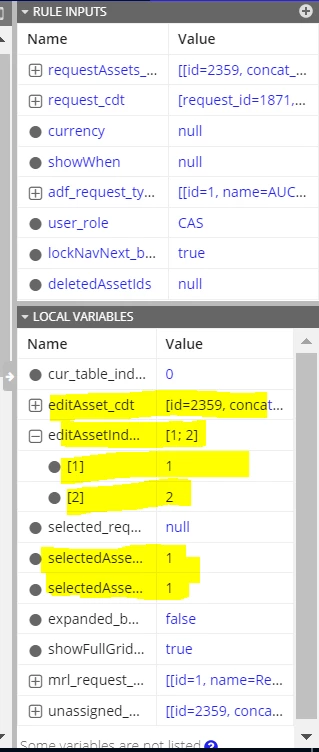
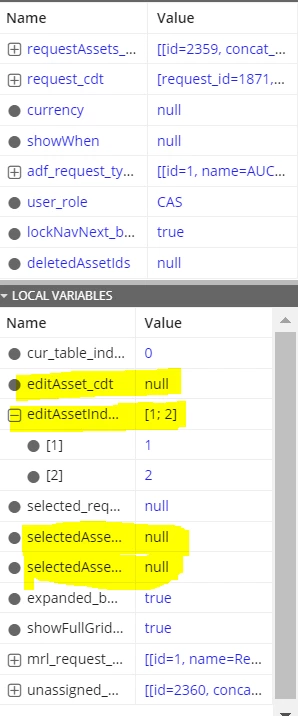
when i edited one row data and submitted after that second row is not getting selected means after selecting first row the local variables selected row and selected row index has the value 1 after submitting it it was nullified when i am selecting the second row the local variables not taking value to edit. please find the below screenshot for the same and suggest on this.

After selecting first row:
After submitting first row and selecting second row:
5 replies

March 7, 2023

Would be more helpful to figure out the issue here, if you can insert your code you are passing in selection

March 7, 2023

Hi 

thank you for update please find the code below

selectionValue: local!selectedAssetindex,
selectionSaveInto: {
a!save(local!selectedAssetindex,save!value),
a!save(local!selectedAssetindex_temp,save!value),
a!save(
local!selectedAssetindex,
index(
save!value,
length(
save!value
),
null
)
),
a!save(
local!selectedAssetindex_temp,
index(
save!value,
length(
save!value
),
null
)
),
a!save(
local!editAsset_cdt,
index(
local!unassigned_final_request_asset_list,
local!selectedAssetindex,
null
)
),
a!save(local!editAssetIndex,wherecontains(local!editAsset_cdt.concat_id,ri!requestAssets_cdt.concat_id)),
a!save(ri!lockNavNext_bool,true)
},
selectable: true,
selectionStyle: "ROW_HIGHLIGHT"
)
)
},
width: if(
local!expanded_bool,
null,
"NARROW_PLUS"
)
),

March 8, 2023

Hi Dharani - If the data is not saving in the editAssetIndex Can you try to append and remove the data that is selected/deselected?

March 8, 2023

Hi Naresh,

Thank you for the links will go through it thank you for the information