

Anyone else having quirky issues with Expression Editor boxes in Chrome for the past version or so?
I began noticing this around 22.2, plus or minus - if you're editing an interface with the expression editor box open, clicks on or near the left edge of the interface (such as checkboxes, etc), actually click inside the expression editor box, leading to some unexpected and fairly frustrating run-arounds. I've verified that this seems to be present in Chrome but not Firefox, and i've verified it on the computer of at least one other designer.
When opening the Inspector and using the "select an element" tool, I can visualize what I can only assume the culprit actually is - there is what seems to be a pretty severe overlap of the expression editor text area, encroaching into the left edge of the preview interface: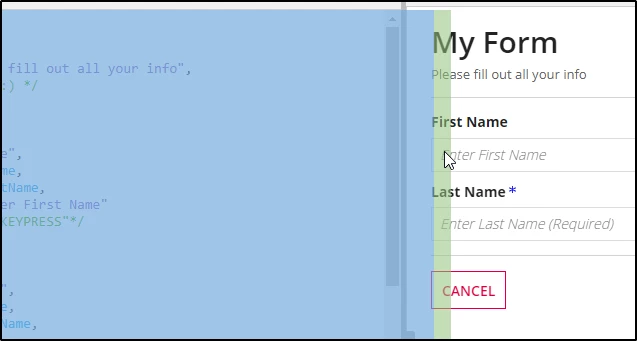
In the above screenshot, if I click my cursor anywhere in that green margin (even when it's clearly over the "First Name" text box), it causes the cursor to land in (and move) the expression edit box. If I have a read-only grid with selection boxes, they're almost impossible to actually select since only the furthest-right maybe 1/5th of the checkbox is actually checkable without accidentally selecting the expression editor's "greedy region".
Just wondering if anyone else has noticed this, or if Appian has any official feedback and/or news on a fix - it's pretty irritating to have to tiptoe around this issue 100% of the time.