
March 5, 2025
Question

Appian Step by Step - Process modelling 101 - Step 10 (part 2, page 4)

  • March 5, 2025
  • 17 replies
  • 0 views

Hi, I am new to Appian and I'm having the following error when building my application.

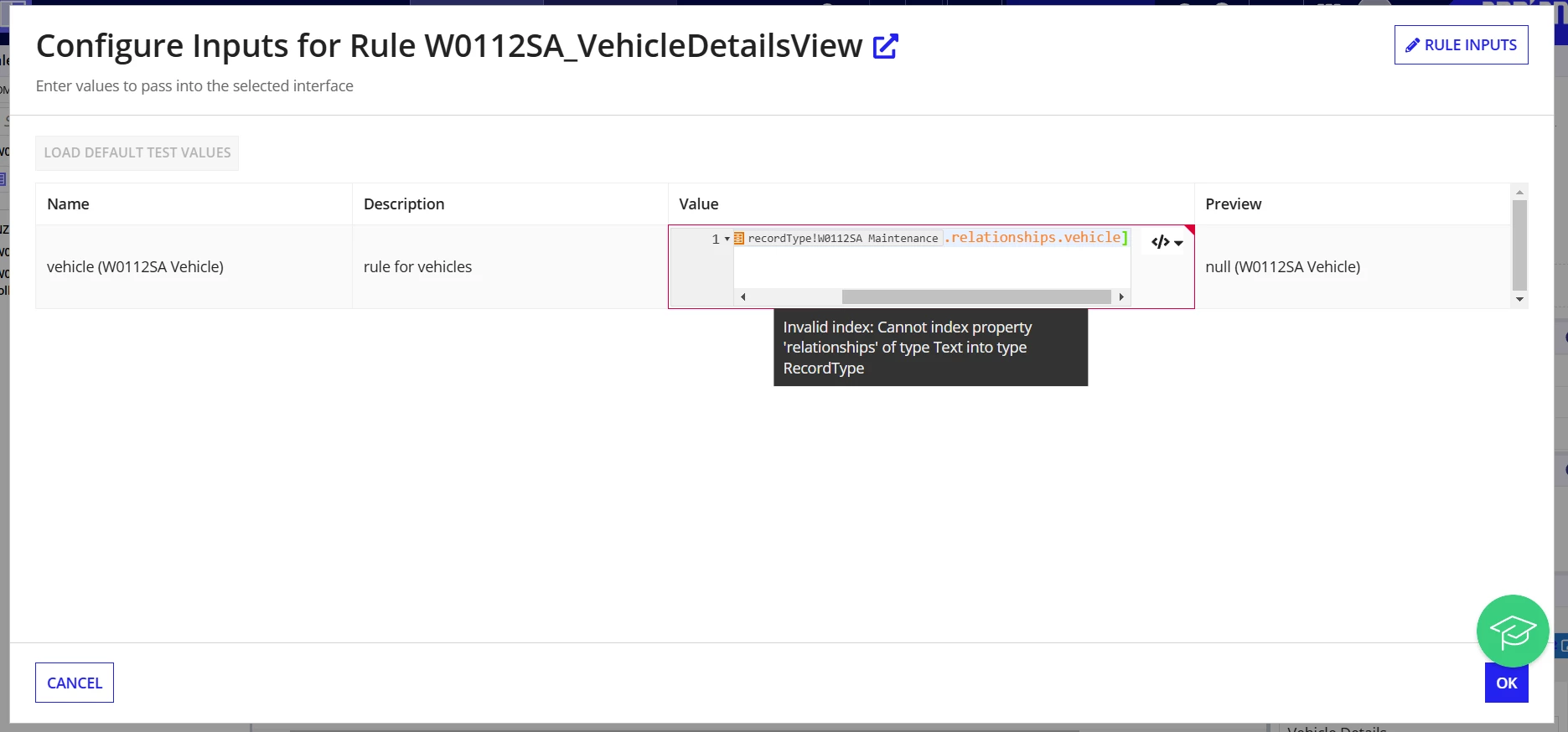
I'm trying to configure the rule inputs but the message "Invalid index: Cannot index property 'relationships' of type Text into Type RecordType.

I'll attach a screencapture.

Thank you in advance for your help.
17 replies

karumurua531442
March 5, 2025

Hi [mention:65254f0b30db47478033d66039f769f1:e9ed411860ed4f2ba0265705b8793d05]   couple of questions from my side

  • Where are you doing this in the interface Rule inputs?
    If yes, then you are mapping it in the wrong way. The field you use to save the value must be configured in its value and saveInto fields with recordType!yourrecord.relationship.relatedrecord.fields.fieldValue.
  • Did you establish mapping between the parent record and the child record?
March 5, 2025

Hi! I'm doing it when I drag and drop the previous interface I previously created (W#SA_VehicleDetailsView) into the Vehicle Details section. That's when the Configure Inputs dialog appears and I'm supposed to write the expression that you see in the screencapture.
Also, when typing 'relationships' the only options I'm given are 'eventHistory' and 'subscriber'

karumurua531442
March 5, 2025

Need see your interface code please 

konduruc733182
March 5, 2025

Hello [mention:65254f0b30db47478033d66039f769f1:e9ed411860ed4f2ba0265705b8793d05] , It looks like you are passing the type instead of the value. Construct the record values. This is a rule input for Interface from what it looks like. You need to either pass a value or leave it blank and not just pass the record type.

March 5, 2025

Thank you. How can I do that? Do I have to go back and modify the record type?

konduruc733182
March 5, 2025

Could you please open the rule W0112SA_VehicleDetailsView and check the rule input type