

Solved
Auto refresh the tasks assigned to the logged in users
Hi All,
Hope everyone is doing well,
I have a requirement, where we are using task reports for assigning tasks in application UI. I need to implement the auto refresh the tasks assigned to the logged in users.
Can you please help me understand what the logic would be I need to use. Please find the attached code snippet I have used currently.
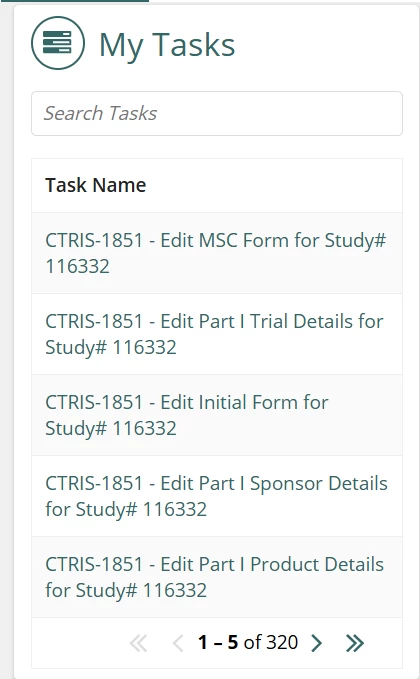
a!gridField_23r3(
                    emptyGridMessage: "No Assigned Tasks",
                    /*label: "Read-only Grid",*/
                    /*labelPosition: "ABOVE",*/
                    data: a!queryProcessAnalytics(
                      report: cons!CTRIS_MY_TASK_REPORT,
                      query: a!query(
                        logicalExpression:{
                          a!queryLogicalExpression(
                            operator: "AND",
                            filters:{
                              a!queryFilter(
                                field: "c12",
                                operator: "in",
                                value: cons!CTRIS_PROCESS_MODEL_IDS_FOR_TASK_FILTER
                              ),
                              a!queryFilter(
                                field: "c0",
                                operator: "includes",
                                value: local!searchTask,
                                applyWhen:a!isNotNullOrEmpty(local!searchTask)
                              )
                            }
                          )
                        },
                        pagingInfo: fv!pagingInfo
                      ),

                    ),
                    columns: {
                      a!gridColumn(
                        label: "Task Name",
                        sortField: "c0",
                        value: a!linkField(
                          links: a!processTaskLink(
                            label: fv!row.c0,
                            task: fv!identifier
                          )
                        )
                      ),
                      a!gridColumn(
                        label: "Created On",
                        sortField: "c2",
                        value: if(
                        isnull(fv!row.c2),
                        fv!row.c2,
                        datetext(fv!row.c2, "default")
                        ),
                        showWhen: false(),
                        align: "END"
                      ),
                      a!gridColumn(
                        label: "Process Name",
                        sortField: "c13",
                        value: fv!row.c13,
                        showWhen: false()
                      ),
                      a!gridColumn(
                        label: "Process Model Id",
                        sortField: "c12",
                        value: fv!row.c12,
                        showWhen: false(),
                        align: "END"
                      ),
                      a!gridColumn(
                        label: "C 3",
                        sortField: "c3",
                        value: fv!row.c3,
                        showWhen: false()
                      ),
                      a!gridColumn(
                        label: "Status",
                        sortField: "c5",
                        value: fv!row.c5,
                        showWhen: false(),
                        align: "END"
                      ),
                      a!gridColumn(
                        label: "C 7",
                        sortField: "c7",
                        value: fv!row.c7,
                        showWhen: false()
                      ),
                      a!gridColumn(
                        label: "C 8",
                        sortField: "c8",
                        value: if(
                        isnull(fv!row.c8),
                        fv!row.c8,
                        datetext(fv!row.c8, "default")
                        ),
                        showWhen: false(),
                        align: "END"
                      ),
                      a!gridColumn(
                        label: "C 9",
                        sortField: "c9",
                        value: fv!row.c9,
                        showWhen: false(),
                        align: "END"
                      )
                    },
                    pageSize: 5,
                    initialSorts: {
                      a!sortInfo(
                        field: "c2"
                      )
                    },
                    validations: {},
                    refreshInterval: 0.5

                  )