
March 28, 2024
Question

Creating a BoxLayout

  • March 28, 2024
  • 15 replies
  • 0 views

Hi Team,

In Excel sheet, as per rows I want separate BoxLayout with the separate entries into it. For Example,

I have a 3 rows with column firstname, lastname and city as per first row of data I want to put in 1st BoxLayout, 2nd row of data in 2nd BoxLayout, 3rd row of data in 3rd BoxLayout without hardcoded.

I am getting 3 seperate BoxLayout with column name firstname, lastname and city that I am satisfied I am getting in UI but result for all the rows of records in excel sheet is showing in all the three BoxLayout not showing in 3 different entries in 3 BoxLayout.

So if you can suggest it how to do it per records will having seperate BoxLayout with rows of records in excel sheet?

I am sharing a screenshots for reference
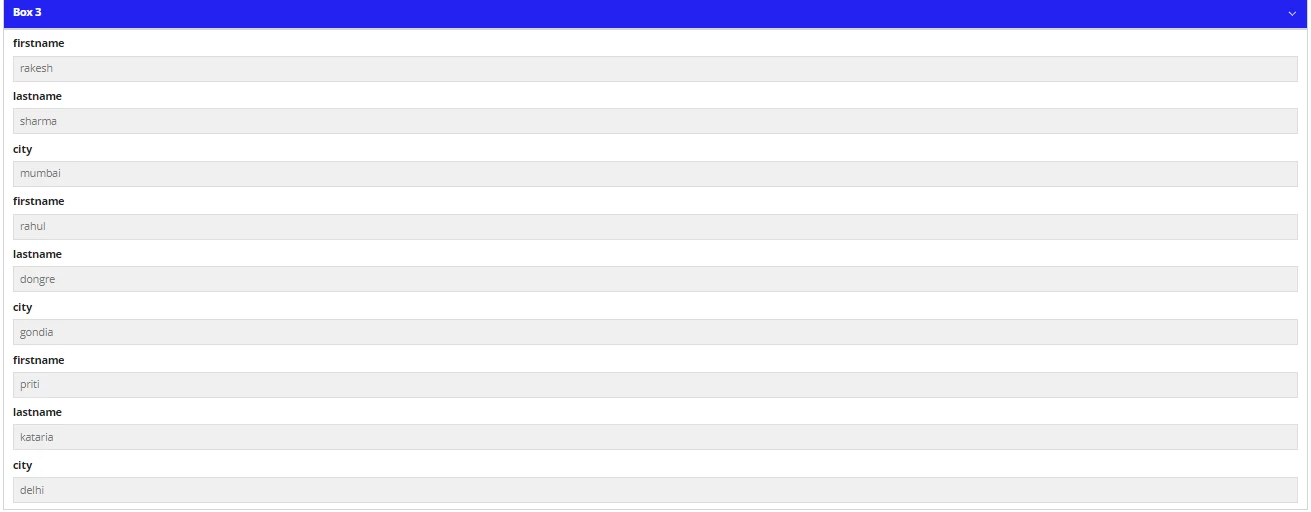
In 1st BoxLayout data would come firstname - rakesh, lastname - sharma, city - mumbai

In 2nd BoxLayput would come firstname - rahul, lastname - dongre, city - gondia

In 3rd BoxLayput would come firstname - priti, lastname - kataria, city - delhi

15 replies

stefanhelzle0001
Brainy
March 28, 2024

Can you share the code of that interface?

I assume you are using a foreach to iterate on the rows. Do you use fv!item to reference the values?

yashg0003Author
March 28, 2024

Sorry Stefan, i cannot share a code it's a organisation policy but for labels i am using fv!item and for values I am using local variables where values of document data is populating with fv! index in textbox

If you can share a code with above scenario what I have written how can be it is shown as sample with for each then i can use it as a reference in UI

stefanhelzle0001
Brainy
March 28, 2024

Sorry, but without seeing your code, I cannot say anything.

March 29, 2024

Hi yashg0003,

Try using grids

a!columnsLayout(
      spacing: "NONE",
      columns: {
        a!columnLayout(
          contents: a!gridField(
            data: local!result,
            columns: a!gridColumn(value: fv!row.values[1])
          )
        ),
        a!columnLayout(
          contents: 
          a!gridField(
            data: local!result,
            columns: a!gridColumn(value: fv!row.values[2])
          )
        ),
        a!columnLayout(
          contents: a!gridField(
            data: local!result,
            columns: a!gridColumn(value: fv!row.values[3])
          )
        ),
      }
    ),

It looks like this

yashg0003Author
March 29, 2024

thank you shyam but i want boxlayout only

April 1, 2024

In Given Manner You Can Achieve the Following Requirements .

a!localVariables(
  local!result: {
    { values: { "firstname", "lastname", "city" } },
    { values: { "rakesh", "sharma", "mumbai" } },
    { values: { "rahul", "dongre", "gondia" } },
    { values: { "priti", "kataria", "delhi" } },

  },
  local!data: a!forEach(
    items: local!result,
    expression: a!map(
      firstname: fv!item.values[1],
      lastname: fv!item.values[2],
      city: fv!item.values[3]
    )
  ),
  local!columnsName: { "firstname", "lastname", "city" },
  a!forEach(
    items: local!data,
    expression: if(
      fv!isFirst,
      {},
      a!localVariables(
        local!indexData: fv!item,
        a!boxLayout(
          contents: {
            a!columnsLayout(
              columns: {
                a!forEach(
                  items: local!columnsName,
                  expression: a!columnLayout(
                    contents: {
                      a!textField(
                        label: fv!item,
                        labelPosition: "ADJACENT",
                        value: index(local!indexData, fv!item, null),
                        readOnly: true()
                      )
                    }
                  )
                )
              }
            )
          },
          isCollapsible: true()
        )
      )
    )
  )
)

yashg0003Author
April 1, 2024

thank you daisymanmohansingh, your code is working