March 11, 2022
Question

Custom dropdown list with multiple groups differntiated by Group name

  • March 11, 2022
  • 3 replies
  • 0 views

Hello all,

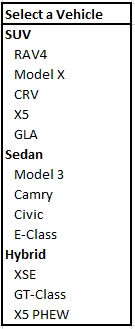
Is it possible to customize a dropdown list of values with Group name as some header values and group members listed seperately withi the dropdwonlist  as shown below? In this eample, user will be selecting only the vehicle model(group member) and not the vehicle type(Group name). Appreciate any help in getting this solved, thank you!      

Select a Vehicle
SUV
   RAV4
   Model X
   CRV
   X5
   GLA
Sedan
   Model 3
   Camry
   Civic
   E-Class
Hybrid
   XSE
   GT-Class
   X5 PHEW

3 replies

stefanhelzle0001
Brainy
March 11, 2022

That is not supported, sorry. I would recommend to create two interconnected drop downs to select the car type first and the model second. This also works better for a larger list of car models.

sunilc407Author
March 11, 2022

Thanks for your response Stefan. In this usecase, user is not going to select the car type - we have to just display it in the list to differentiate the values in the list. I like your idea of putting two intercorrected dropdowns to choose the required value as a workaround - thank you [emoticon:c4563cd7d5574777a71c318021cbbcc8]

harshitb6843
March 12, 2022

Hi there,

Another way can be to just add the group type in the brackets at the end of the group member. That way. you will be able to tell the user about the category of the car. 
Or with the help of some logic and cards, you can build a grid type structure by arranging cards below each other, with no margin, so that they look stacked and then add links only on the cards that have group members, NOT group type.