

krishnakumars5593
October 20, 2022
Solved

Date Field 22.3

  • October 20, 2022
  • 8 replies
  • 0 views

Hello Guys,

I was wondering on the Date Field Validation in Appian.

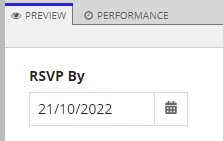
The First screenshot shows that the date is entered in dd/mm/yyyy format and its auto validated. 
The Screenshot shows that the date is entered in mm/dd/yyyy format and its validated to enter the date format in mm/dd/yyyy.
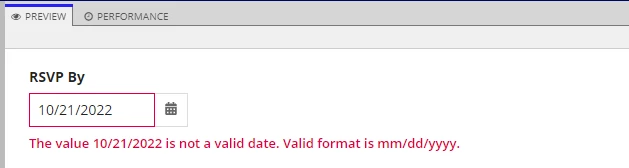
Should it not be case throwing a validation as the valid format is dd/mm/yyyy  since the date field already in mm/dd/yyyy format?

a!localVariables(
  local!storedValue:today()-1,
  a!dateField(
    label:"RSVP By",
    value: local!storedValue,
    saveInto: local!storedValue,
  )
)

Let me know If I am missing something. 

Best answer by harshitb6843

Weird. This looks like a bug! You might want create a support ticket for it so the engineering team can review it. 

8 replies

harshitb6843
October 20, 2022

Weird. This looks like a bug! You might want create a support ticket for it so the engineering team can review it. 

krishnakumars5593
October 20, 2022

Thanks for the confirmation. 

stefanhelzle0001
Brainy
October 20, 2022

I do not see a bug here. My calendar has only 12 months. The expected date format depends on the users locale settings. And Appian does not only validate the format, but also the date value. But maybe the error message is a bit too generic.

krishnakumars5593
October 20, 2022

I feel like the generic error message will misguide the in giving the input. 

For example : If I need to select the 1st Oct '22 as the date.

With respect to the error message I enter as mm/dd/yyyy , i.e 10/01/2022 which will lead me to 10th of Jan

according to user setting it should be 01/01/2022 hence the error message should have been to enter the valid format as dd/mm/yyyy since the format is already available in the interface.

Why not in the auto validation. 

What do you recommend ?  

Thanks in advance. 

stefanhelzle0001
Brainy
October 20, 2022

Please contact Appian.

mikes0011
Brainy
October 20, 2022

This is a Known Issue currently when using the date field with non-US english locales (and possibly other options too).

As others have mentioned, it's probably best to open a Support Case with Appian to check the status of this issue, which I'm hoping was already reported to them due to the prior thread I linked.

The Expression Guru
krishnakumars5593
October 20, 2022

Thanks for the info Mike!