

floriang0001
April 21, 2021
Solved

Determining the different options of a pull-down menu from a database entity?

  • April 21, 2021
  • 6 replies
  • 2 views

I am trying to populate the values of a pull-down menu from a database. For this purpose, I defined cons!GENERIC_TASKS which points to corresponding database entity. I also have the following expression rule which reads all necessary data from the respective entity:

a!queryEntity(
  entity: cons!GENERIC_TASKS,
  query: a!query(
    selection: a!querySelection(
      columns: {
        a!queryColumn(
          field: "genericTaskName"
        )
      }
    ),
    pagingInfo: a!pagingInfo(
      startIndex: 1,
      batchSize: -1
    )
  ),
  fetchTotalCount: false
)

The test result of this rule looks promising since it contains all required data, the labels and the values.
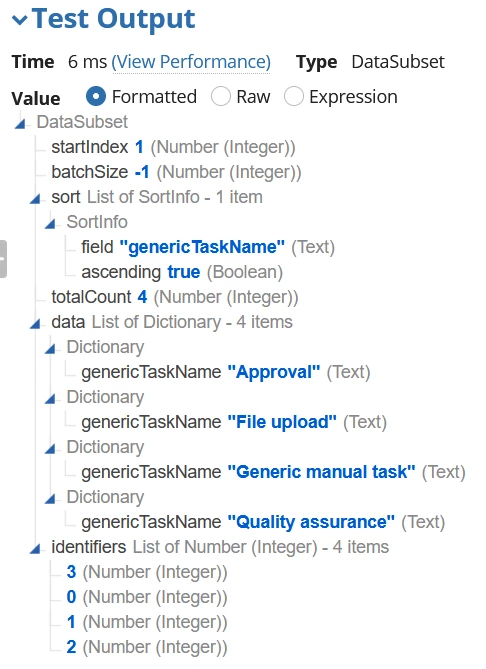
In my user interface, I am now trying the following:

    a!dropdownField(
      label: "Generic step type",
      labelPosition: "ABOVE",
      placeholder: "--- Please choose a step type ---",
      choiceLabels: {rule!APAS_GetAllGenericTaskNames.data.genericTaskName},
      choiceValues: {rule!APAS_GetAllGenericTaskNames.data.identifiers},
      saveInto: {},
      searchDisplay: "AUTO",
      validations: {}
    )

However, this gives me the following error:

Could not display interface. Please check definition and inputs. Interface Definition: Expression evaluation error at function a!dropdownField: Invalid index: Cannot index property 'data' of type Text into type Rule or Function Reference

What do I do wrong?

Best answer by arund0002
choiceValues: {rule!APAS_GetAllGenericTaskNames.data.identifiers}
Why are you using identifiers ?
I don't know your use case but if you are trying to store or display then use same for both
choiceLabels and choiceValues.

choiceLabels: {rule!APAS_GetAllGenericTaskNames().data.genericTaskName},
      choiceValues: {rule!APAS_GetAllGenericTaskNames().data.genericTaskName},
 

6 replies

April 21, 2021

Hi,

I think you are missing () while calling the rules.

choiceLabels: {rule!APAS_GetAllGenericTaskNames().data.genericTaskName},
      choiceValues: {rule!APAS_GetAllGenericTaskNames().data.identifiers},
floriang0001
April 21, 2021

I still receive an error:

Could not display interface. Please check definition and inputs. Interface Definition: Expression evaluation error at function a!dropdownField [line 19]: A dropdown component [label=“Generic step type”] has an invalid value for “choiceValues”. Choice values cannot be null.

This is curious, because I explicitly neither allowed null-values in the column genericTaskName of underlying database table, nor are there any null-values in the table.

The types seem to fit, at least when testing the expression rule.

arund0002Answer
April 21, 2021
choiceValues: {rule!APAS_GetAllGenericTaskNames.data.identifiers}
Why are you using identifiers ?
I don't know your use case but if you are trying to store or display then use same for both
choiceLabels and choiceValues.

choiceLabels: {rule!APAS_GetAllGenericTaskNames().data.genericTaskName},
      choiceValues: {rule!APAS_GetAllGenericTaskNames().data.genericTaskName},
 
mikes0011
Brainy
April 21, 2021

Why are you running the same query twice, once for choiceLabels and once for choiceValues?  That seems pretty inefficient.

Instead you should be doing something like this, querying just once into a local variable and then referring to that subsequently.

a!localVariables(
  local!taskNames: rule!APAS_GetAllGenericTaskNames().data,
  
  a!dropdownField(
    label: "Generic step type",
    labelPosition: "ABOVE",
    placeholder: "--- Please choose a step type ---",
    choiceLabels: local!taskNames.genericTaskName,
    choiceValues: local!taskNames.identifiers,
    saveInto: {},
    searchDisplay: "AUTO",
    validations: {}
  )
)

As an aside: you've posted code a few different ways above, but I universally recommend using the "Code Box" i've used here.  For reference:

The Expression Guru
mikes0011
Brainy
April 21, 2021

Additionally, the way you're trying to refer to "identifiers" won't work.  "Identifiers" is not a sub-property of ".data", but instead a property of the query result (i.e. the data subset returned by a!queryEntity).

I suggest that instead of trying to mess with "identifiers", just include the primary key field in the list of columns you're including in your a!querySelection(); then you can refer directly to the primary key field by its field name instead of trying to use ".identifiers".

The Expression Guru
floriang0001
April 22, 2021

Thanks for all the hints! I will use more local variables now.