January 5, 2024
Question

Drop down Pagination

  • January 5, 2024
  • 4 replies
  • 0 views

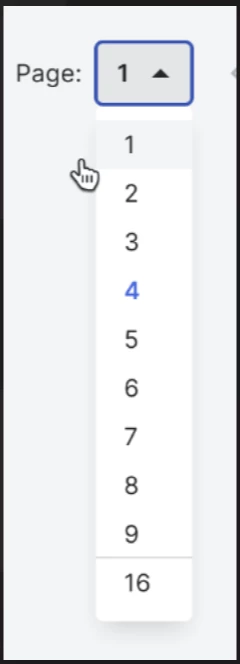
is it possible to used a dropdown pagination in a read-only grid table(recordType)? please see the attached image for the sample output. thank you

4 replies

venkatrea696188
January 5, 2024

No OOTB Function available for this as of now , But you can write your own logic to achieve this. 

https://community.appian.com/discussions/f/user-interface/27665/how-to-implement-page-option-drop-down

refer to this It's already answered recently

amans0009
January 5, 2024

yes it is possible to use a dropdown's value to control grid's paging, for refrence4 -> 

a!localVariables(
  local!defaultPaging: 5,
  local!allowedPaging: { 5, 10, 15, 20 },
  local!data: {
    { id: 1, name: "aman" },
    { id: 2, name: "john" },
    { id: 3, name: "sara" },
    { id: 4, name: "alex" },
    { id: 5, name: "emma" },
    { id: 6, name: "david" },
    { id: 7, name: "lisa" },
    { id: 8, name: "michael" },
    { id: 9, name: "olivia" },
    { id: 10, name: "chris" },
    { id: 11, name: "jessica" },
    { id: 12, name: "ryan" },
    { id: 13, name: "emily" },
    { id: 14, name: "brandon" },
    { id: 15, name: "amy" },
    { id: 16, name: "peter" },
    { id: 17, name: "natalie" },
    { id: 18, name: "kevin" },
    { id: 19, name: "hannah" },
    { id: 20, name: "adam" }
  },
  {
    /*pagsize to be controlled */
    a!dropdownField(
      choiceLabels: local!allowedPaging,
      choiceValues: local!allowedPaging,
      label: "Page Size",
      labelPosition: "ABOVE",
      value: local!defaultPaging,
      saveInto: { local!defaultPaging },
      searchDisplay: "AUTO",
      validations: {}
    ),
    a!gridField(
      label: "Read-only Grid",
      labelPosition: "ABOVE",
      data: local!data,
      columns: {
        a!gridColumn(label: "id", value: fv!row.id),
        a!gridColumn(label: "name", value: fv!row.name)
      },
      /*pagsize to be applied*/
      pageSize: local!defaultPaging,
      validations: {}
    )
  }
)

harshitb6843
January 5, 2024

You can refer this blog of mine to add paging to anything - appianspace.com/.../

rithanir5887
January 5, 2024

Hello,

If you are trying to change the page, then you can refer the below code.

a!localVariables(
 
  local!pagesizeSelected,
  local!data: a!queryRecordType(
    recordType: 'recordType!{4c73e73b-59fc-4fc9-862b-db723c674daa}PA Country',
    pagingInfo: a!pagingInfo(
      startIndex:if(
        a!isNotNullOrEmpty(local!pagesizeSelected),
        ((local!pagesizeSelected-1)*10)+1,
        1),
      batchSize:10
    )
  ).data,
  {
    a!dropdownField(
      placeholder: "select your page size",
      choiceLabels: {1,2,3,4},
      choiceValues:{1,2,3,4},
      value: local!pagesizeSelected,
      saveInto: local!pagesizeSelected
    ),
    a!gridField(
      data: local!data,
      columns: {
        a!gridColumn(
          value: fv!row['recordType!{4c73e73b-59fc-4fc9-862b-db723c674daa}PA Country.fields.{68a8fd97-10c2-4779-9088-c81daec9821d}id']
        ),
        a!gridColumn(
          value: fv!row['recordType!{4c73e73b-59fc-4fc9-862b-db723c674daa}PA Country.fields.{49a5bbd7-cffd-4981-9510-ffb2fb112cf2}name']
        ),
        a!gridColumn(
          value: fv!row['recordType!{4c73e73b-59fc-4fc9-862b-db723c674daa}PA Country.fields.{51134b0c-96aa-434b-8a8d-3d8c683d1ea6}group']
        )
      },
      pageSize:length(local!data)
    )
  }
)