September 27, 2021
Question

dropdown doubt
  • September 27, 2021
  • 9 replies
  • 0 views

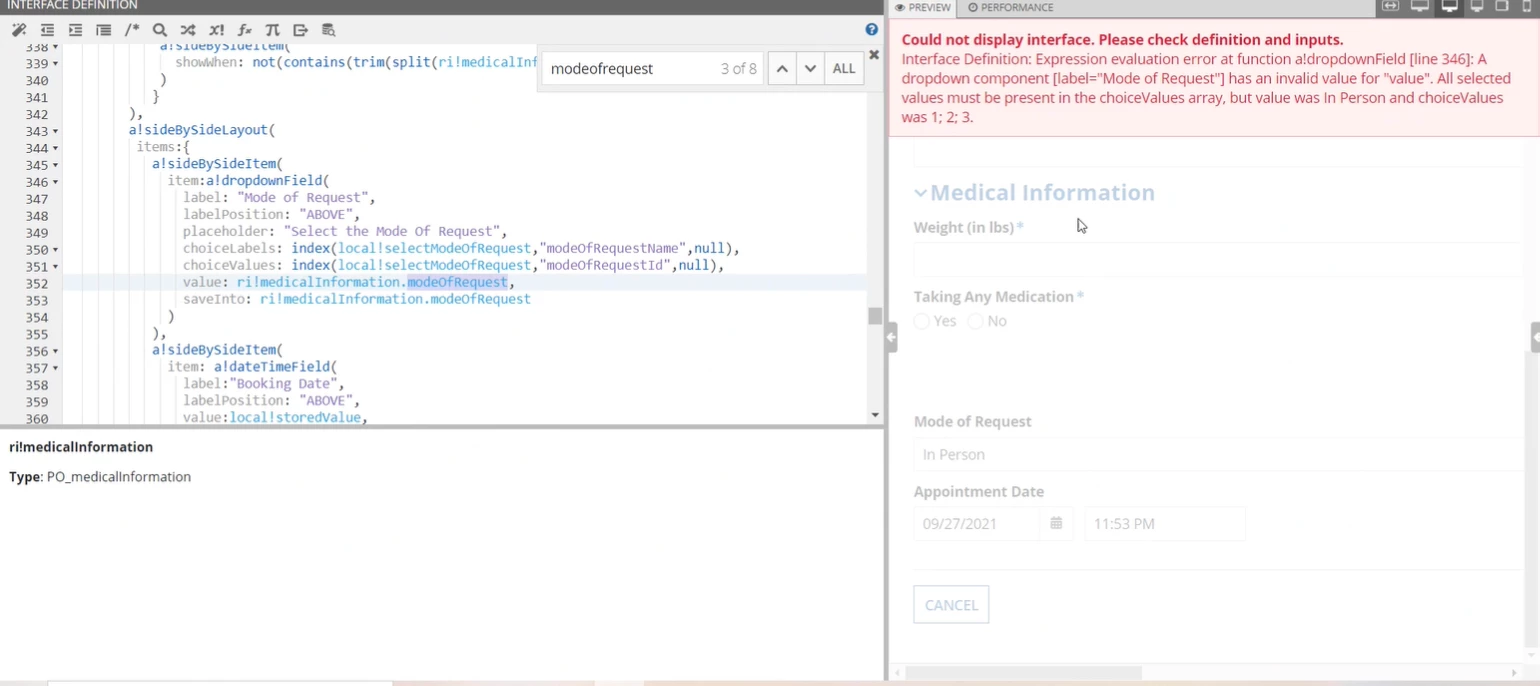
Here in line no 350 for choice labels I need name and for choice values I need ID but in choice values when I am giving here its throwing me the above error.

Can anyone let me know hw to solve it.

    9 replies

    September 27, 2021

    First check what is the value you mentioned in Value field here and then check if that value exist in choice value array or not

    danny.verb
    September 27, 2021

    On line 352 try changing from ri!medicalInformation.modeOfRequest to ri!medicalInformation.modeOfRequestId or another field which has the request ID. If you don't have that, then you should just do index(local!selectModeOfRequest, "modeOfRequestName",{}) in the choiceValues field

    Participating Frequently
    September 27, 2021

    Hi,

    Looks like issue with typecasting as local variable could be of dictionary type.If your choice values are list of text string and you are trying to store them in integer rule input value then you could get such error.

    Try to compare your local values with below and see if it helps:

    a!localVariables(
      local!selectedModeOfRequest: {
        {"name": "In Person", "id": "1"},
        {"name": "Call", "id": "2"},
        {"name": "Mail", "id": "3"}
      },
      {
        a!dropdownField(
          label: "Dropdown",
          labelPosition: "ABOVE",
          placeholder: "--- Select a Value ---",
          choiceLabels: local!selectedModeOfRequest.name,
          choiceValues: tointeger(touniformstring(local!selectedModeOfRequest.id)), 
          value: ri!selected.id, /*id is Number*/
          saveInto: ri!selected.id,
          searchDisplay: "AUTO",
          validations: {}
        )
      }
    )

    September 28, 2021

    Thank you, everyone. I tired these scenarios, 

    danny.verb your scenario works , Thank you.

    September 28, 2021

    And a small doubt not regarding this issue but a general one, In Interface components like section layout or billboard layout we have a parameter called "accessibilityText" .  

    I know we cannot see when we add it like this(accessibilityText: "for readers only") but what 

    "Used only for accessibility; produces no visible change"  means exactly. Could please give an example or a simple explanation, please

    peter.lewis
    Employee
    September 28, 2021

    The accessibility text is only used if you are using a screenreader like JAWS. The accessibility text adds additional information in the HTML that can be read by the screenreader to identify the component.

    September 29, 2021

    Thank you peter.lewis.

    Another small doubt : 

    Can an individual user who does not work in any company, still studying can login into the community? I tried but it was asking for all the company details and it was mandatory, so just had that doubt.