Dropdown Updation
I have a scenario, where there are 2 dropdown fields namely "Region" and "Country"
Choice Labels and Choice Values for "Region" dropdown field is referred to a constant (cons!LCV1_REG) and it has an array of values - Asia, Europe, Australia
Choice Labels and Choice Values for "Country" dropdown field is referred to a constant (cons!LCV!_COUN) and it has an array of values - Japan, India, Sri Lanka, Russia, Germany France, New Zealand, Samoa, Tonga
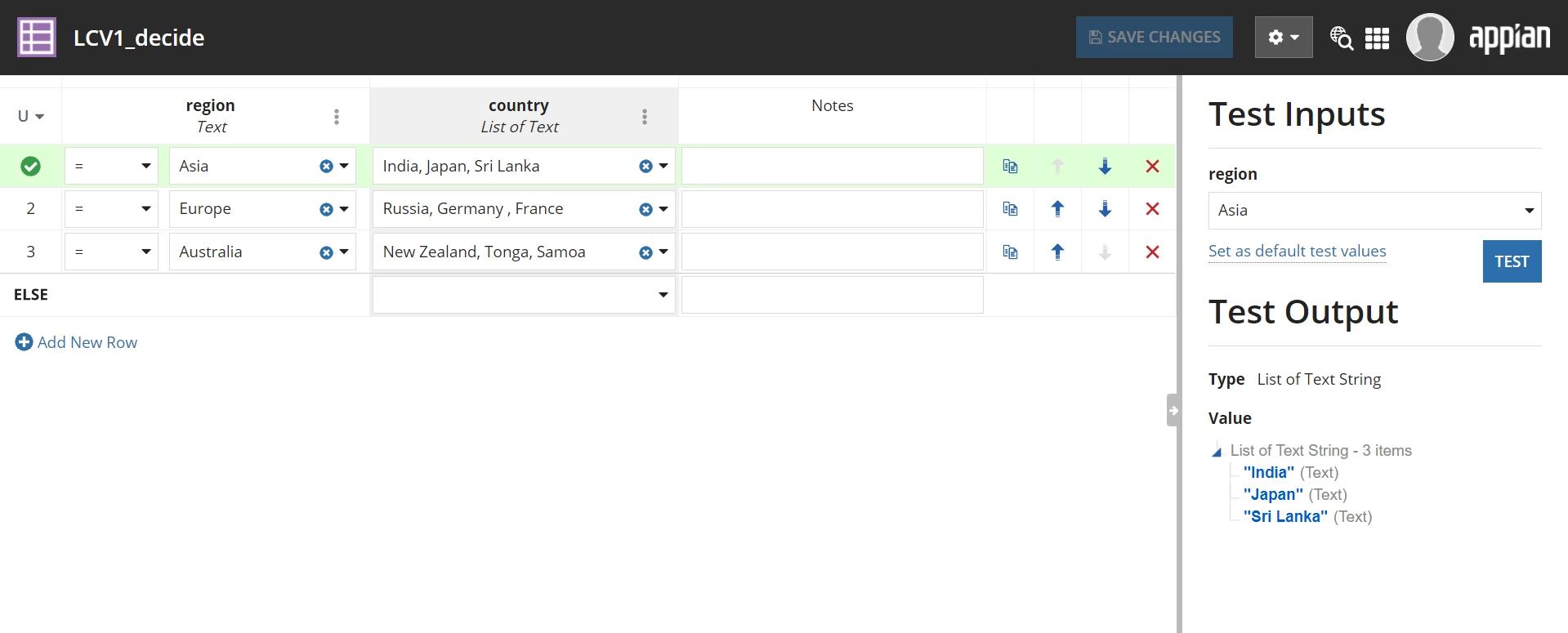
I created a decision rule (rule!LCV1_decidet) where my Region - Asia is equal to Country - Japan, India, Sri Lanka and my Region - Europe is equal to Country - Russia, Germany, France and my Region - Australia is equal to Country - New Zealand, Tonga, Samoa
I created an interface for the same.
So lets say I have selected Region = Asia and I get a list of Countries = Japan, India, Sri Lanka. Now if I suddenly go and select another Region, it gives me an error saying that the Country value was not found.
I want my Country dropdown field to reset every time I select a Region, irrespective of a Country selected before.
I have attached the code below for the interface,
a!localVariables(
  local!region: cons!LCV1_REG,
  local!country: rule!LCV1_decide(region: ri!region),
  {
    a!columnsLayout(
      columns: {
        a!columnLayout(
          contents: {
            a!dropdownField(
              label: "Regions",
              labelPosition: "ABOVE",
              placeholder: "--- Select a Value ---",
              choiceLabels: local!region,
              choiceValues: local!region,
              value: ri!region,
              saveInto: ri!region,
              searchDisplay: "AUTO",
              validations: {}
            )
          }
        ),
        a!columnLayout(
          contents: {
            a!dropdownField(
              label: "Countries",
              labelPosition: "ABOVE",
              placeholder: "--- Select a Value ---",
              choiceLabels: local!country,
              choiceValues: local!country,
              value: ri!country,
              saveInto: ri!country,
              searchDisplay: "AUTO",
              disabled: isnull(ri!region),
              validations: {}
            )
          }
        )
      }
    )
  }
)
The below screenshot is of the decision rule
Can someone help me in this scenario?