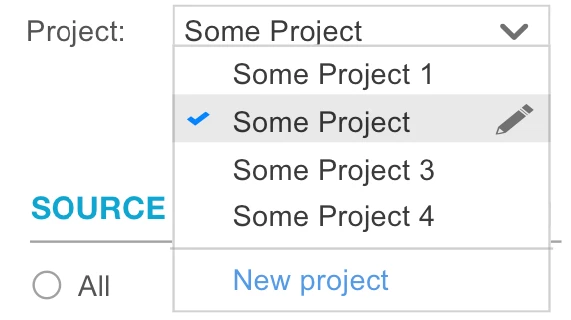
4 replies

andrewh6762
February 19, 2025

No, this isn't possible.

Did you want to further explore what you are trying to do or is it enough just knowing if a dropdown can have a separate button like you've modelled?

stefanhelzle0001
February 19, 2025

I do not see why you would need a button inside a dropdown for this. You could add this as the last option, and then make your UI react on this in a way the user can create a new item. Should not be much of a challenge.

February 19, 2025

I agree with [mention:46771a8e569e4b99ad52e9ba289b3658:e9ed411860ed4f2ba0265705b8793d05]  that a button inside a dropdown isn't possible, but you could always use the last option to mock this behavior.  In my opinion this isn't the best approach, but check the code below for a quick example.

a!localVariables(
  
  local!existingProjects: a!forEach(
    items: enumerate(3)+1,
    expression: {
      id: fv!index,
      projectName: "project " & fv!item,
      description: repeat(fv!index, "words and ")
    }
  ),
  
  local!dropdownOptions: append(
    local!existingProjects.projectName,
    "Create New"
  ),
  local!a: length(local!existingProjects)+1,
  local!selection,
  
  
  {
    a!dropdownField(
      label: "Project: ",
      choiceValues: local!dropdownOptions,
      choiceLabels: local!dropdownOptions,
      value: local!selection,
      saveInto: {
        local!selection,
        a!save(
          local!existingProjects,
          if(
            save!value = "Create New",
            append(
              local!existingProjects,
              {
                id: length(local!existingProjects)+1,
                projectName: "project " & length(local!existingProjects)+1
              }
            ),
            local!existingProjects
          )
        )
      },
      placeholder: "select project"
    ),
    
    a!gridField(
      label: "Current Projects",
      data: local!existingProjects,
      columns: {
        a!gridColumn(
          label: "ID",
          sortField: "id",
          value: fv!row.id
        ),
        a!gridColumn(
          label: "Project Name",
          sortField: "projectName",
          value: fv!row.projectName
        ),
        a!gridColumn(
          label: "Description",
          sortField: "description",
          value: fv!row.description
        ),
      }
    )
  }
)

You may want to check out Editable Grid Component as an alternate approach.  Appian even has a recipe showing how to configure adding new rows/records to the gridLayout.

Hope this helps

February 20, 2025

I agree .
Their is always a way around which we customize in Appian.
if you could specify your use case it would help more in better solution.