
Dynamic Group Visualization in Grid
Member Inclusion with Tick Marks and Non-member Exclusion with Crosses
Facing issue in accurately displaying membership status within groups
Difficulties in correctly identifying group membership.
Seeking assistance.
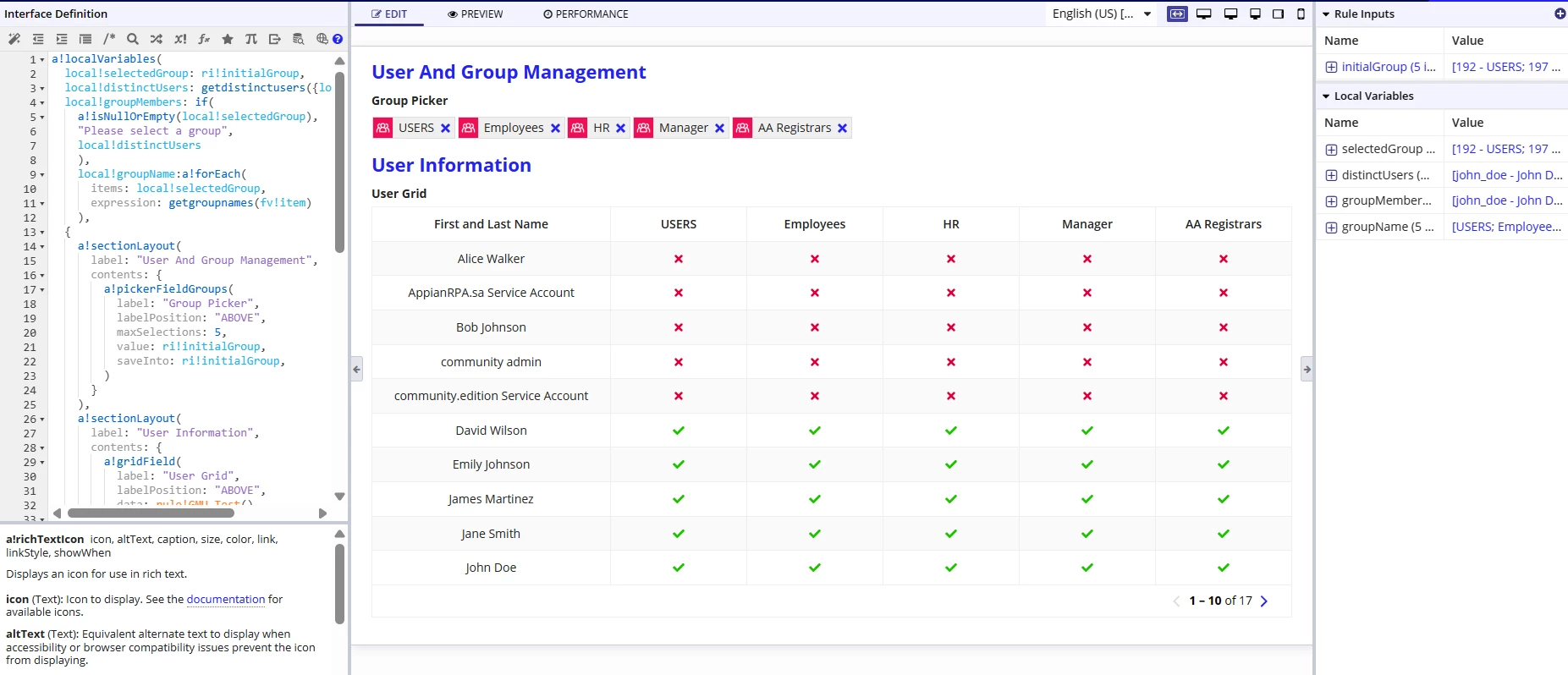
a!localVariables(
  local!selectedGroup: ri!initialGroup,
  local!distinctUsers: getdistinctusers({local!selectedGroup}),
  local!groupMembers: if(
    a!isNullOrEmpty(local!selectedGroup),
    "Please select a group",
    local!distinctUsers
    ),
    local!groupName:a!forEach(
      items: local!selectedGroup,
      expression: getgroupnames(fv!item)
    ),
  {
    a!sectionLayout(
      label: "User And Group Management",
      contents: {
        a!pickerFieldGroups(
          label: "Group Picker",
          labelPosition: "ABOVE",
          maxSelections: 5,
          value: ri!initialGroup,
          saveInto: ri!initialGroup,
        )
      }
    ),
    a!sectionLayout(
      label: "User Information",
      contents: {
        a!gridField(
          label: "User Grid",
          labelPosition: "ABOVE",
          data: rule!GMU_Test(),
          columns: {
            a!gridColumn(
              label: "First and Last Name",
              value: fv!row['recordType!{SYSTEM_RECORD_TYPE_USER}User.fields.{SYSTEM_RECORD_TYPE_USER_FIELD_firstAndLastName}firstAndLastName'],
              backgroundColor: "NONE",
              align: "CENTER",
              width: "NARROW"
            ),
            a!forEach(
              items: local!groupName,
              expression: a!gridColumn(
                label: fv!item,
                value: if(
                  contains(
                    local!groupMembers,
                    fv!row['recordType!{SYSTEM_RECORD_TYPE_USER}User.fields.{SYSTEM_RECORD_TYPE_USER_FIELD_username}username']
                  ),
                  a!richTextDisplayField(
                    value: a!richTextIcon(
                      icon: "check",
                      color: "POSITIVE"
                    )
                  ),
                  a!richTextDisplayField(
                    value: a!richTextIcon(
                      icon: "times",
                      color: "NEGATIVE"
                    )
                  )
                ),
                align: "CENTER",
                width: "NARROW"
              )
            )
          }
        )
      }
    )
  }
)
