
August 23, 2022
Question

Editable Grid - Dynamic rows
  • August 23, 2022
  • 5 replies
  • 1 view

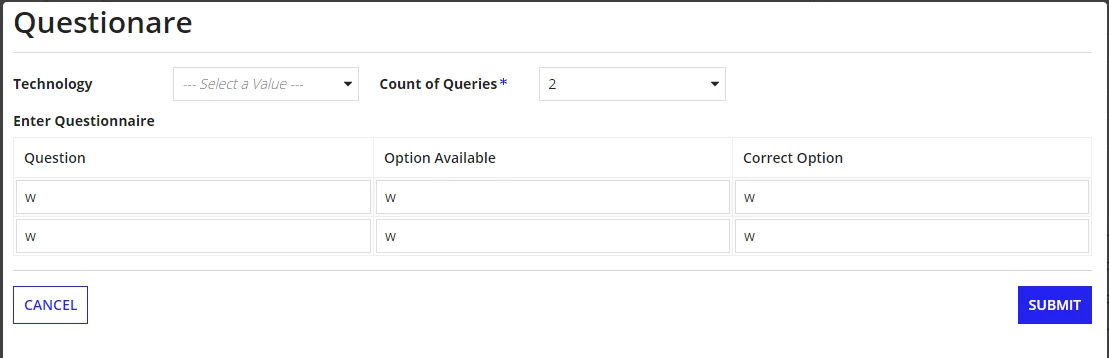
I want to fill separate values in these fields, How can I resolve it

rows: {
a!forEach(
items: local!counts,
expression: a!gridRowLayout(
contents: {
a!textField(
label: "Text",
labelPosition: "ABOVE",
value: ri!Queries.question,
saveInto: { ri!Queries.question },
refreshAfter: "UNFOCUS",
validations: {}
),
a!textField(
label: "Text",
labelPosition: "ABOVE",
value: ri!answers.option1,
saveInto: { ri!answers.option1 },
refreshAfter: "UNFOCUS",
validations: {}
),
a!textField(
label: "Text",
labelPosition: "ABOVE",
value: ri!answers.option1,
saveInto: { ri!answers.option1 },
refreshAfter: "UNFOCUS",
validations: {}
)
}
)
)
}

5 replies

harshitb6843
August 23, 2022

Let's understand it first. For storing separate values, you need separate variables and a separate index of a variable. 
So you need to make a 2D array here that you can achieve by adding 3 fields in a CDT and using that CDT as the datatype of an array type variable

August 23, 2022

a!localVariables(
local!tech,
local!count,
local!counts: if(
a!isNullOrEmpty(local!count),
null,
a!forEach(
items: enumerate(local!count) + 1,
expression: {
a!textField(
label: "Text",
labelPosition: "ABOVE",
value: ri!Queries.question,
saveInto: { ri!Queries.question },
refreshAfter: "UNFOCUS",
validations: {}
),
a!textField(
label: "Text",
labelPosition: "ABOVE",
value: ri!answers.option1,
saveInto: { ri!answers.option1 },
refreshAfter: "UNFOCUS",
validations: {}
),
a!dropdownField(
label: "Text",
labelPosition: "ABOVE",
placeholder: "--- Select a Value ---",
choiceLabels: cons!MCS_ANSWERS,
choiceValues: cons!MCS_ANSWERS,
value: ri!answers.correctans,
saveInto: { ri!answers.correctans },
validations: {}
)
}
)
),


a!formLayout(
label: "Questionare",
contents: {
a!columnsLayout(
columns: {
a!columnLayout(
contents: {
a!dropdownField(
label: "Technology",
labelPosition: "JUSTIFIED",
placeholder: "--- Select a Value ---",
choiceLabels: rule!MCS_GetTechnologyName().subname,
choiceValues: rule!MCS_GetTechnologyName().subid,
value: local!tech,
saveInto: {
a!save(local!tech, save!value),
a!save(ri!Queries.subid, local!tech)
},
searchDisplay: "AUTO",
validations: {}
)
}
),
a!columnLayout(
contents: {
a!dropdownField(
label: "Count of Queries",
labelPosition: "JUSTIFIED",
placeholder: "--- Select a Value ---",
choiceLabels: cons!MCS_COUNTOFQUESTIONS,
choiceValues: cons!MCS_COUNTOFQUESTIONS,
value: local!count,
saveInto: local!count,
searchDisplay: "AUTO",
required: true,
validations: {}
)
}
),
a!columnLayout(contents: {})
}
),
a!gridLayout(
label: "Enter Questionnaire ",
labelPosition: "ABOVE",
headerCells: {
a!gridLayoutHeaderCell(label: "Question"),
a!gridLayoutHeaderCell(label: "Option Available"),
a!gridLayoutHeaderCell(label: "Correct Option")
},
columnConfigs: {},
rows: {
a!forEach(
items: local!counts,
expression: a!gridRowLayout(
contents: {
a!textField(
label: "Text",
labelPosition: "ABOVE",
value: fv!item.question,
saveInto: fv!item.question,
refreshAfter: "UNFOCUS",
validations: {}
),
a!textField(
label: "Text",
labelPosition: "ABOVE",
value: fv!item.option1,
saveInto: fv!item.option1,
refreshAfter: "UNFOCUS",
validations: {}
),
a!dropdownField(
label: "Text",
labelPosition: "ABOVE",
placeholder: "--- Select a Value ---",
choiceLabels: cons!MCS_ANSWERS,
choiceValues: cons!MCS_ANSWERS,
value: fv!item.correctans,
saveInto: fv!item.correctans,
validations: {}
)
}
)
)
},
selectionSaveInto: {},
validations: {},
shadeAlternateRows: true
)
},
buttons: a!buttonLayout(
primaryButtons: {
a!buttonWidget(
label: "Submit",
submit: true,
style: "PRIMARY",
loadingIndicator: true
)
},
secondaryButtons: {
a!buttonWidget(
label: "Cancel",
value: true,
saveInto: {},
submit: true,
style: "NORMAL",
validate: false
)
}
)
)
)

stefanhelzle0001
Brainy
August 23, 2022

Use this feature to make your code more readable.