
October 24, 2023
Question

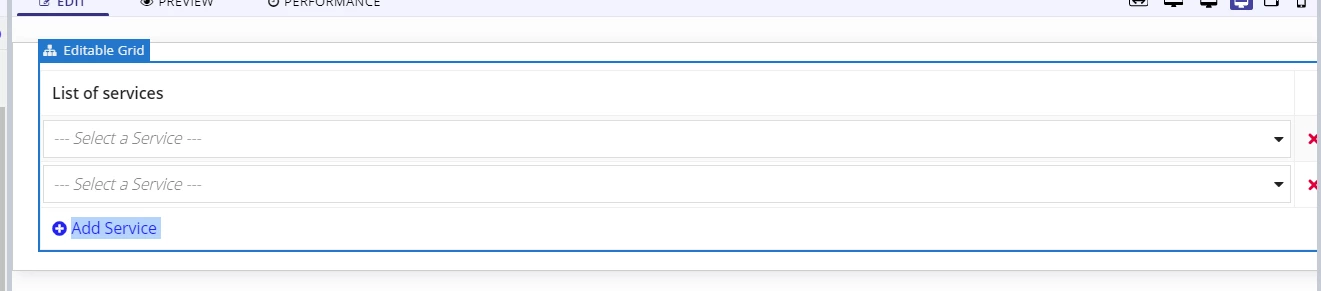
Editable grid view with dropdown

  • October 24, 2023
  • 4 replies
  • 0 views

I have a grid layout consist of dropdown,  If I select a value on the first drop down then if I add new row it will show new drop down on the second drop down I need to hide the value that is selected on the first drop down. Here is my initial code. I just  created it but the problem is in choiceLabel it's showing id. The requirements is to show the column "name". I try indexing it but it show an error. 

a!localVariables(
local!service: rule!IBM_GetServiceByFilter(
extractData: true,
fetchAll: true,
status: {cons!IBM_SERVICE_STATUS_PENDING_APPROVAL,cons!IBM_SERVICE_STATUS_ACTIVE}
),
local!user: user(loggedInUser(), "firstName") & " " & user(loggedInUser(), "lastName"),
local!now: now(),
{
a!gridLayout(
labelPosition: "ABOVE",
headerCells: {
a!gridLayoutHeaderCell(label: "List of services"),
a!gridLayoutHeaderCell(label: "" )
},
columnConfigs: {
a!gridLayoutColumnConfig(width: "DISTRIBUTE", weight:3 ),
a!gridLayoutColumnConfig(width: "ICON")
},
rows: a!forEach(
items: ri!channelService,
expression: a!gridRowLayout(
id: fv!index,
contents: {
a!dropdownField(
label: "Dropdown",
labelPosition: "ABOVE",
placeholder: "--- Select a Service ---",
choiceLabels:
difference(
tointeger(local!service.id),
tointeger(
difference(
ri!channelService.serviceId,
fv!item.serviceId
)
)
),
choiceValues: difference(
tointeger(local!service.id),
tointeger(
difference(
ri!channelService.serviceId,
fv!item.serviceId
)
)
),
value: fv!item.serviceId,
saveInto: fv!item.serviceId,
searchDisplay: "ON",
required: true,
requiredMessage: "Service is required"
),
/*Remove row*/
a!richTextDisplayField(
value: a!richTextIcon(
icon: "close",
altText: "delete " & fv!index,
caption: "Remove",
link: a!dynamicLink(
value: fv!index,
saveInto: {
if(
a!isNotNullOrEmpty(fv!item.id),
a!save(
ri!deletedChannelService,
append(
ri!deletedChannelService,
a!update(
data: fv!item,
index: "status",
value: cons!IBM_SERVICE_STATUS_FOR_DELETION)
)
),
null
),
a!save(ri!channelService, remove(ri!channelService, save!value))
}
),
linkStyle: "STANDALONE",
showWhen: length(ri!channelService) > 1,
color: "NEGATIVE"
)
)
}
)
),
selectionSaveInto: {},
addRowlink: a!dynamicLink(
label: "Add Service",
value: {
frontChannelId: if(
ri!action = "Update",
ri!frontChannelId,
null
),
serviceId: null,
status: "DRAFT",
createdBy: local!user,
createdDate: local!now,
updatedBy: local!user,
updatedDate: local!now
},
saveInto: {
a!save(
ri!channelService,
append(ri!channelService,save!value)
)
},
showWhen: true
),
validations: {},
shadeAlternateRows: true
)
}
)
4 replies

stefanhelzle0001
Brainy
October 24, 2023

Next time please 

This code snippet returns the not selected items:

a!localVariables(
  local!services: {
    a!map(id: 1, name: "A"),
    a!map(id: 2, name: "B"),
    a!map(id: 3, name: "C"),
    a!map(id: 4, name: "D"),
    a!map(id: 5, name: "E"),
  },
  local!selectedServices: {2,4},
  index(
    local!services,
    wherecontains(difference(local!services.id, local!selectedServices), local!services.id),
    null
  )
)

When you wrap your dropdown into a separate a!localVariables, you can do that evaluation separately for each dropdown.

October 25, 2023

hello sir, this is what you mean to wrap down my drop down into a separate a!localvarariables? I'm encountering an error. I just need some recommendation. thank you

rows: a!forEach(
        items: ri!channelService,
        expression: a!gridRowLayout(
          id: fv!index,
          contents: {
            a!localVariables(
              local!choices: index(
                local!service,
                wherecontains(
                    difference(
                      tointeger(local!service.id),
                      tointeger(fv!item.serviceId)
                    ),
                  local!service.id
                ),
                null
              ),
              a!dropdownField(
                label: "Dropdown",
                labelPosition: "ABOVE",
                placeholder: "--- Select a Service ---",
                choiceLabels: local!choices.name,
                choiceValues: local!choices.id,
                value: fv!item.serviceId,
                saveInto: fv!item.serviceId,
                searchDisplay: "ON",
                required: true,
                requiredMessage: "Service is required"
              )
            ),
            /*Remove row*/
            a!richTextDisplayField(
              value: a!richTextIcon(
                icon: "close",
                altText: "delete " & fv!index,
                caption: "Remove",
                link: a!dynamicLink(
                  value: fv!index,
                  saveInto: {
                    if(
                      a!isNotNullOrEmpty(fv!item.id),
                      a!save(
                        ri!deletedChannelService,
                        append(
                          ri!deletedChannelService, 
                          a!update(
                            data: fv!item,
                            index: "status", 
                            value: cons!IBM_SERVICE_STATUS_FOR_DELETION)
                        )
                      ),
                      null
                    ),
                    a!save(ri!channelService, remove(ri!channelService, save!value))
                  }
                ),
                linkStyle: "STANDALONE",
                showWhen: length(ri!channelService) > 1,
                color: "NEGATIVE"
              )
            )
          }
        )
      ),

stefanhelzle0001
Brainy
October 25, 2023

Yeah, I expected this to happen. I think the error message is pretty clear. You have to make sure that a drop down still shows the selected choice. You could add the id of the locally selected choice like this:

wherecontains(
  {
    difference(
      tointeger(local!service.id),
      tointeger(fv!item.serviceId)
    ),
    tointeger(fv!item.serviceId) /* This keeps the locally selected item in the list */
  },
  local!service.id
),

BTW, your code only removes the locally selected choice from all choices. I think you should remove the selections from all drop downs. I did not change this.