
natashan0002
February 8, 2023
Solved

Empty value Check not validating on button click

  • February 8, 2023
  • 12 replies
  • 0 views

Hello,

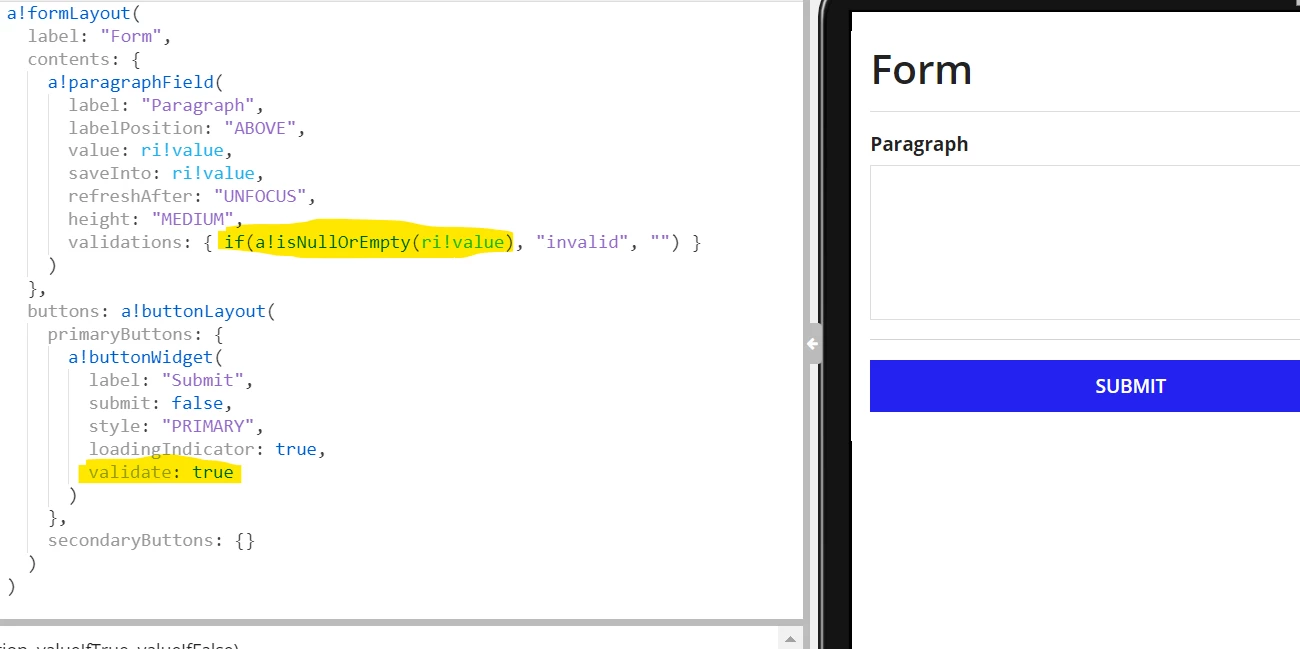
I am trying to do a simple check on a paragraphField or any field(integer, text, decimal field).

The validation is not working for empty or null. I tried giving a!isNullOrEmpty(ri!value), Null(ri!value), ri!value=null. The validation message is not shown. 

If i give any other logic, it works. 
Best answer by jonesprakashs0001

Using a!validationMessage function will help to achieve this.

a!formLayout(
  label: "New Application",
  contents: {
    a!paragraphField(
      label: "Paragraph",
      labelPosition: "ABOVE",
      value: ri!text,
      saveInto: { ri!text },
      refreshAfter: "UNFOCUS",
      height: "MEDIUM",
      validations: {}
    )
  },
  validations: a!validationMessage(
    message: "Invalid",
    showWhen: a!isNullOrEmpty(ri!text),
    validateAfter: "SUBMIT"
  ),
  buttons: a!buttonLayout(
    primaryButtons: {
      a!buttonWidget(
        label: "Submit",
        submit: true(),
        style: "PRIMARY"
      )
    }
  )
)

12 replies

stefanhelzle0001
Brainy
February 8, 2023

A field based validation is only evaluated when the value is not null. Set "required" to true to catch this.

natashan0002
February 8, 2023

Hi Stefan, 

i dont want the asterix.

stefanhelzle0001
Brainy
February 8, 2023

Why? It is a good UI design style to indicate to the user that a field is required.

But, feel free to add a form based validation, or wrap the text field into a section layout and add your validation to it.